
• This forum is the machine-generated translation of www.cad3d.it/forum1 - the Italian design community. Several terms are not translated correctly.

isometric asymmetric quotas

  • Thread starter Thread starter gigy
  • Start date Start date

gigy

Guest
Bye to all,
I can't put in some odds in the isometric assonometry.
In particular, I cannot insert horizontal or vertical quotas in oblique traits.
How can I solve this?
Thank you in advance

p.s. why the diameter ø14 comes out of blue color and the other quotas in gray?
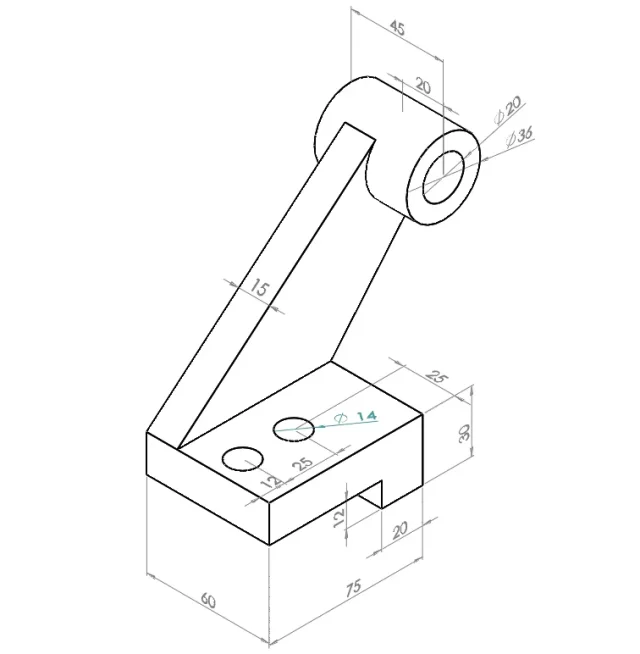
 

Attachments

  • esercizio.webp
    esercizio.webp
    21.4 KB · Views: 45
starting from the fact that listing an object in assonometry for me is a barbaric thing, if you specify what altitude you would like to insert, making a sketch with paint, so to say, maybe you can give sensible solutions. in the three-dimensional views you can get different results to sepond that you select: point-point, point-line and change the orientation of the share with the tab. you tell us what you want to get and tell you what to do
p.s. why the diameter ø14 comes out of blue color and the other quotas in gray?
according to your settings what are the blue odds?
 
good morning massivon,
Thank you for this first answer.
I'm actually not an expert on solidworks and I try to learn from self-taught by reproducing designs that I find on the net, that's why I tried to insert the odds into an object in assonometry (I agree with her that is a somewhat barbaric way:)).

As for sectage, in fact personally I have not set anything and to be honest I do not even know how to do it :s .
I try to attach the photo again with the changes made with paint.
Thank you again.
 

Attachments

  • esercizio.webp
    esercizio.webp
    49.5 KB · Views: 28
first of all do the tutorials if you didn't.
under menu tools>options>colors find the color setting of the various entities; you have to check between quota headings which of them has blue color and consequently understand what kind of quota it is.
for the management of the projection of quotas I had answered a similar question in recent months, do a search in the forum. later if I have time I do a research myself and see if I find it
 
I've done some evidence because I never quote in three-dimensional views I don't remember things.
in these types of views you can select in addition to points and edges also faces; then for that quota 58 you can select one of the edges of the round and then the face on which the base of the rib rests.
I was confused with the 3d sketch in the environment where the tab goes from one orientation to another.
In the design environment I do not remember if you can change orientation and how to do it; in the two-dimensional views you can right-click on the quota and select the edge, but in the three-dimensional ones this option is not always present.

personally I would say that instead of trastullarsi with absurd quotations that you will never use it is better to practice to use the commands to make classical views and insert all those things that comlete a design like: axes, roughness, welding, tolerances... .
 
I had to create views so for a catalog and the escamotage I followed is:
do a sketch line (not 3d) in the environment part that follows the orientation you want and, after listing it in the design, hide it, so that only the quota in the design field after making a "restore the visibility of the sketch"
 

Forum statistics

Threads
44,997
Messages
339,767
Members
4
Latest member
ibt

Members online

No members online now.
Back
Top