
• This forum is the machine-generated translation of www.cad3d.it/forum1 - the Italian design community. Several terms are not translated correctly.

java problems with batch translators

  • Thread starter Thread starter Lorenzo77
  • Start date Start date

Lorenzo77

Guest
Hello everyone, since yesterday I have a problem with nx batch translators updated at 8.5.1, java is 7u13.
practically with any batch I make, whether iges, step or whatever else I always have the same result:
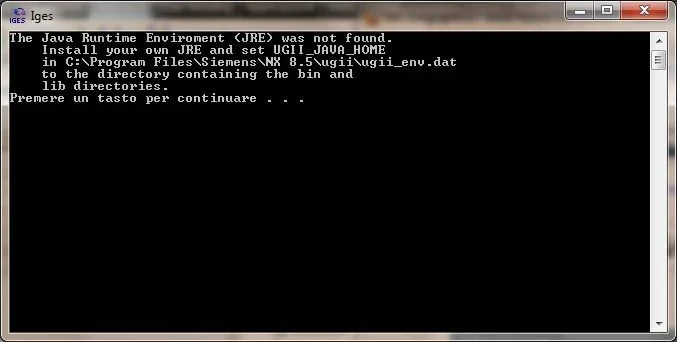
errore nel batch.webpthe ugii_env.dat file reports:
#
# copyright 1991 - 2009 siemens product lifecycle management software inc.
# all rights reserved.
#
###############################################################################
#
#
# this file should be used to override any standard nx environment variables.
# the values defined here will take precedence over the nx values, as long as
# they are defined before the #include of ugii_env_ug.dat. this file will not
# be overwritten by an mr installation.
#
# override any variables here.

#
# do not define any variables after the #include below. they must be defined
# before the #include in order to override the nx defaults.
#
#if file ${ugii_base_dir}\ugii\ugii_env_ug.dat
#include ${ugii_base_dir}\ugii\ugii_env_ug.dat
#endif
while the ugii_env_ug.dat file in the section concerned shows:
#########################################################################
# java nxopen environment variables
#########################################################################
#
# as of nx 8.5, nx no longer provides a jre in the installation.
# ugii_java_home should point to the base directory of the jre installation.
# the value below is just an example that will be different on your system.
# changing this variable will cause all nx java based applications to use the specified jre.
# this is an example of how this value can be set.
#if x64wnt
#if file c:\apps\java\jre7x64
ugii_java_home=c:\apps\java\jre7x64
#endif
#else
#if file c:\apps\javasoft\jre7
ugii_java_home=c:\apps\javasoft\jre7
#endif
#endif
#
# this is the jvm that will be used for nxopen java applications.
# ugii_jvm_library_dir is set to the directory specified in ugii_java_home.
# note: changing this value only changes the jre used by nx open applications.
#
# on windows 64 only the server jvm library is in the jre
#
#if x64wnt
ugii_jvm_library_dir=${ugii_java_home}\bin\server
#else
ugii_jvm_library_dir=${ugii_java_home}\bin\client
#endif
I tried without positive result to change in:
#if x64wnt
#if file c:\programmi\java\jre7x64
ugii_java_home=c:\programmi\java\jre7x64
#endif
#else
#if file c:\program files (x86)\javasoft\jre7
ugii_java_home=c:\program files (x86)\javasoft\jre7
#endif
#endif
I don't know why this error started, it's a bit that I don't use the batch and meanwhile I updated java and nx from 8.5 to 8.5.1, do you have any solutions?
 
Hello, Lorenzo.
you must put the path of the required directories in the file ugii_evn.dat under the line overryde any variables here.
nx goes to read the ugii_env.dat and if he finds new variables he overwrites them in ugii_env_ug.dat.
I hope I was clear and tell me if it worked.
Hi.
 
thanks for the tip baskets, however it did not work, with the dat files of nx I lost. On the other hand I corrected batch cmd files and now it works everything, I added the famous set strings in cmd and everything started to work:
:java_gui
set path=%base_dir%\ugii;%path%set path=c:\program files\java\jre7;%path%
set ugii_java_home=c:\program files\java\jre7
set ugii_jvm_library_dir=c:\program files\java\jre7\bin\server


rem allow the user to use their own jre or jar
if "%ugii_dex_jar%" == "" set ugii_dex_jar=%step203ug_dir%
if "%ugii_dex_jre%" == "" goto checkhome

rem check if the jave.exe exist at location defined by ugii_dex_jre
@if not exist "%ugii_dex_jre%\bin\java.exe" goto checkhome
@goto checkjre

rem ugii_dex_jre is not defined, check for ugii_java_home
:checkhome
@if "%ugii_java_home%" == "" goto setjre
@if not exist "%ugii_java_home%\bin\java.exe" goto setjre
@set ugii_dex_jre=%ugii_java_home%
@goto checkjre

rem ugii_java_home is not defined, check if it is set by ugii env.
:setjre
@for /f "tokens=*" %%i in (' "%base_dir%\ugii\env_print" ugii_java_home') do set ugii_java_home=%%i

rem check the jre version
:checkjre
if defined ugii_java_home (
@if not exist "%ugii_java_home%\bin\java.exe" goto jreerror
"%ugii_java_home%\bin\java" -jar "%base_dir%\ugii\verifyjava.jar" external "%ugii_java_home%"
) else (
echo ugii_java_home must be defined
goto jreerror
)
if errorlevel 1 (
goto ok
) else (
set ugii_dex_jre=%ugii_java_home%
)
@goto startui


:jreerror
@echo the java runtime enviroment (jre) was not found.
@echo install your own jre and set ugii_java_home
@echo in %ugii_base_dir%\ugii\ugii_env.dat
@echo to the directory containing the bin and
@echo lib directories.
@pause
@goto ok


:startui
@call "%ugii_dex_jre%\bin\java" -classpath "%ugii_dex_jar%\dex.jar" -dugii_base_dir="%base_dir% " -dstep203ug_dir="%step203ug_dir% " com.dex.splash.step203splashscreen
@if not %errorlevel% == 0 pause
goto ok
However I would like to know why I don't work correctly variables in ugii_env_ug.dat.. .
 
Hello, Lorenzo.
I think I figured out why the mistake was wrong. I had not read your initial post carefully in which you said about the batch translator. It doesn't work because it's as if you 'high' the nx configuration that is activated when you start it but not when you start a batch command. to have the test confirmation to put the variables in the nozzle_env.dat (and not in the nozzle_env_ug.dat) in the location I suggested, launch nx and then go to see the log file (in help) and you will see that the variables are correctly set.
I recommend, at this point, to put these variables directly as system variables.
Bye-bye soon
 
I tried to put them in the ugii_env.dat as you suggested, but the variables in the log file in the section ugii_env.dat have turned out with the blank field. then I put them in the system as you suggested, in this way the batches work correctly and the variables appear correctly assigned in the system variable log section and appear double in the section ugii_env.dat.
Thank you. :biggrin:
 
if in the path there are spaces, then when you put the variable in the env.dat you have to enclose it between the double apici : ugii_java_home="c:\program files\java\jre7"
 
thanks ciciu, this was precisely the problem, in the _env.dat the path with spaces edited in the variables should be enclosed between the double apici. now I have removed the variables from the system, I have inserted them with double apex in the ugii_env.dat and I have cleaned from the previous changes the batch *.cmd. everything neat and working. thank you all and we hope you no longer understand anything for at least another year. :biggrin:
 

Forum statistics

Threads
44,997
Messages
339,767
Members
4
Latest member
ibt

Members online

No members online now.
Back
Top