• This forum is the machine-generated translation of www.cad3d.it/forum1 - the Italian design community. Several terms are not translated correctly.

joint section

  • Thread starter Thread starter andrea9875
  • Start date Start date

andrea9875

Guest
hi to all, I need to dissect a single part in a set; using the "setium" I see that the function goes to act also on the other parts that pass through the section plan of the main object....how can you solve?
Thank you.
 
hi to all, I need to dissect a single part in a set;using the "setium" I see that the function goes to act also on the other parts that pass through the section plan of the main object. ...How can you solve it?
Thank you.
as it is right that it is.
to do what you ask:
in idw:
in the browser expand the view node in section.
find us the symbol of the set that you dissected
expand that too.
right click on every part you don't want to dissect.
choose: participate in section=no
 
I didn't understand well: should I design the axieme and do what you say this will then be changed automatically?
 
I didn't understand well: should I design the axieme and do what you say this will then be changed automatically?
I didn't mention any automatism.:cool:
I said you have to repeat the operation for each component of the view on table.:mixed:
unless I misunderstand:
if what you ask is to view directly together through the commands Semisection view, then you just have to right-click the component you want to dissect, choose "island" and sit down the view with the plan you need... .
in this case, however, the command is not called, as you wrote in the first post "seziona" but "look/view in semisection" or section of a quarter,
or 3 quarters...:cool::smile:
 
I'm sorry, but maybe what you say works in the right design?
I meant to dissect a part in the "assieme" environment and do not see in the browser the possibility to enable or not the section. . .
 
I'm sorry, but maybe what you say works in the right design?
I meant to dissect a part in the "assieme" environment and do not see in the browser the possibility to enable or not the section. . .
or you can't read or I can't write.:
I repeat what I wrote in my last post:

"if what you ask is to view directly togetherthrough the semisection view commands, then you just have to right-click the component you want to dissect, choose "island" and then dissect the view with the plan you need... "
 
to me it seems that in your first answer you wrote: "in idw" right?
I'm working in imp.
I go in the curtain in the top "view", I go on the symbol of the section, I choose the one with two blue and two white squares, select the section plan and cut everything, all the details.
If I do as you say "click with the right on the component you want to dissect, choose "island" I find myself isolated a component. . .
 
to me it seems that in your first answer you wrote: "in idw" right?
I'm working in imp.
I go in the curtain in the top "view", I go on the symbol of the section, I choose the one with two blue and two white squares, select the section plan and cut everything, all the details.
If I do as you say "click with the right on the component you want to dissect, choose "island" I find myself isolated a component. . .
then, let's try to make some clarity::mixed:
you're asking "setting a single part in a set"
but do not specify whether that "part in a set" is in a table or not.
However, since you are talking about "section" and not "view in semisection" or similar:
In the first post I tell you how to do if you work in idw.
in the second post I repeat how much to the first post, and I add that, in case I understood badly and you are working in iam (i.e. in the environment together) you have to click dx on the piece that interests you, isolate it and then dissect it with the command "view in semisection" using a plan that crosses the piece.
so you see that only piece, which seems to me is what you asked.
If I still misunderstood, try to explain what you want.
p.s.
what is the environment:confused:
 
I didn't actually make the table.
I meant iam, what is escaping me too....:smile:
So: I did as you say but once it gives back visibility to other components, they are also cut from the plan used to dissect previously.
thanks for the patience:redface:
 
I didn't actually make the table.
I meant iam, what is escaping me too....:smile:
So: I did as you say but once it gives back visibility to other components, they are also cut from the plan used to dissect previously.
thanks for the patience:redface:
Let me understand, you would like to in the environment together, to put in sight only one component of the axieme, leaving not dissected others?
I don't know how to do it, but I think it's not possible.:frown:
 
enter the parts to exclude
> tool> document setting>modeling> participation in assembly and drawing sections
 
exact!and even on the cover of inventor 2011 you see a motor dissected with the internal components whole...I the only way I found and that to dissect the detail in ipt environment but it's a bit 'an annoyance and I find it strange that there is no other possibility. ...
 
enter the parts to exclude
> tool> document setting>modeling> participation in assembly and drawing sections
I'm sorry, do you better explain what you mean by "going into the parts to be excluded"?
Can you give me directions in Italian?
 
I'm sorry, do you better explain what you mean by "going into the parts to be excluded"?
Can you give me directions in Italian?
means that this setting must be done within the document setting of the part.

even if the indications are in English you will see that you will have no problem trying on that in Italian.
 
I tried guys manon works...I also tried to open the single component and make the above-mentioned check...and I tried to dissect the axieme from a plan created in the single component and a plan created in the axieme...:confused:
 
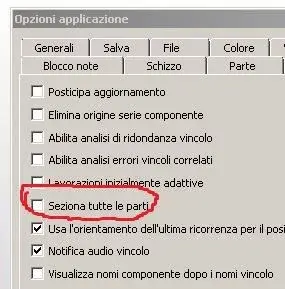
now go to options->axieme-> remove flags from seziona all parts.
 

Attachments

  • Cattura.webp
    Cattura.webp
    16.3 KB · Views: 6

Forum statistics

Threads
44,997
Messages
339,767
Members
4
Latest member
ibt

Members online

No members online now.
Back
Top