
• This forum is the machine-generated translation of www.cad3d.it/forum1 - the Italian design community. Several terms are not translated correctly.

Lamiera

  • Thread starter Thread starter PiegatoreSolidworks
  • Start date Start date

PiegatoreSolidworks

Guest
when I export dxf of my folded sheet I can export many things including geometry and fold lines...
is it possible that the fold lines automatically go under a layer different from the default 0? I do because otherwise I have to move them "handed" on a different layer. . .
Thank you.
 
when I export dxf of my folded sheet I can export many things including geometry and fold lines...
is it possible that the fold lines automatically go under a layer different from the default 0? I do because otherwise I have to move them "handed" on a different layer. . .
Thank you.
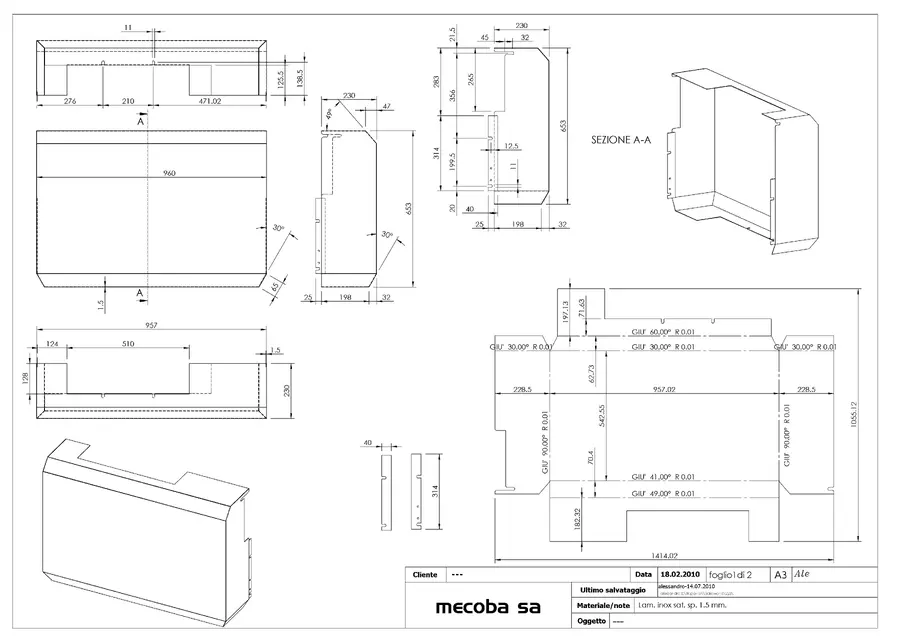
the fastest method is to hide the sketches, see attached. :wink:

I, personally, prefer to click with ts dx and hide the lines of pawn
and notes of bending.
take into account, however, that I glue in an ad hoc sheet all the forms to be cut, in fact my cam is screwed if inside the dxf there are also only annotations.
 

Attachments

  • schizzo.webp
    schizzo.webp
    87.9 KB · Views: 39
the fastest method is to hide the sketches, see attached. :wink:

I, personally, prefer to click with ts dx and hide the lines of pawn
and notes of bending.
take into account, however, that I glue in an ad hoc sheet all the forms to be cut, in fact my cam is screwed if inside the dxf there are also only annotations.
My cam instead asks me to specify the layer to work the piece, is for what I asked if you could automatically move the fold lines on a layer different from the zero that is default.
Tonight I try to watch all the settings.. .
Thanks mike you are always a valuable help!
 
Hi.
If you attach a dxf I see you with a hammer to start in autocad, I cadcam I am building it from me according to my real needs.

bb
 
Hi.
If you attach a dxf I see you with a hammer to start in autocad, I cadcam I am building it from me according to my real needs.

bb
My "problem" is that solidworks creates the fold lines that are those outlined but the cam does not want them. How can I handle this? simple, as long as the fold lines are on a layer different from that of the design for the cam that I have asked me what plan it has to work. sw creates a single floor that includes external geometry and dotted fold lines. solution: I open the cad supplied with laser cutting and move the fold lines on a new layer created by me, then work with the cam and select only the layer of external geometries and not that of the folds. I asked, if it was possible, a solidworks configuration that automatically created 2 separate floors. apparently it is not possible, at least in the 2010 version.

If you know more than me, gladly!!!! :finger:
 

Attachments

My "problem" is that solidworks creates the fold lines that are those outlined but the cam does not want them. How can I handle this? simple, as long as the fold lines are on a layer different from that of the design for the cam that I have asked me what plan it has to work. sw creates a single floor that includes external geometry and dotted fold lines. solution: I open the cad supplied with laser cutting and move the fold lines on a new layer created by me, then work with the cam and select only the layer of external geometries and not that of the folds. I asked, if it was possible, a solidworks configuration that automatically created 2 separate floors. apparently it is not possible, at least in the 2010 version.

If you know more than me, gladly!!!! :finger:
I continue to suggest the system that has already led for more than 10 years with this sw:

in addition to the possible table of the object/axieme, I add
another sheet where I put only the items to export for the various
processing (water/cleaner cutting...) and for each object
I click with the right button on the fold lines and hide them.
a much faster method, but not always applicable ("nota1"vuoi
because maybe you have some reference sketches that you have to put on the table)
I delete the display of sketches (as from previous post).
So I wouldn't compose my life to configure layers that
can be imprecise (see "Note1").
I speak from experienced experience, 90 % of my work concerns sheeting with
bends and I assure you that it is the most reliable method, then, do you.

I attach a small example
bye:
 

Attachments

I continue to suggest the system that has already led for more than 10 years with this sw:

in addition to the possible table of the object/axieme, I add
another sheet where I put only the items to export for the various
processing (water/cleaner cutting...) and for each object
I click with the right button on the fold lines and hide them.
a much faster method, but not always applicable ("nota1"vuoi
because maybe you have some reference sketches that you have to put on the table)
I delete the display of sketches (as from previous post).
So I wouldn't compose my life to configure layers that
can be imprecise (see "Note1").
I speak from experienced experience, 90 % of my work concerns sheeting with
bends and I assure you that it is the most reliable method, then, do you.

I attach a small example
bye:
I understand, but how do you make signs or markings for bending? What are you going to "eye"? I needed the fold lines to make something visible for the folder that I would then be!!!!:biggrin::biggrin:
 
I understand, but how do you make signs or markings for bending? What are you going to "eye"? I needed the fold lines to make something visible for the folder that I would then be!!!!:biggrin::biggrin:
..mha.? I don't understand the problem:biggrin:
I make two different files (just as type/extension); one in dwg/dxf "clean" (only contours, using the available options in the export dxf/dwg directly from the 3d) that I send to the cut.
and a "native" slddrw for the construction table that serves in the workshop; this obviously will have everything, orthogonal projections, fold lines, quotas, notes, maybe an assonometric view etc. etc. in short all that can serve to the construction/assembly.

It happens that for "strange" silhouettes and with many non-normal pieghi neither parallel leaves the fold lines even in the dwg for cutting, so that I "draw" them with laser. I put a note with "only tracking".

greetings
Mar
 
..mha.? I don't understand the problem:biggrin:
I make two different files (just as type/extension); one in dwg/dxf "clean" (only contours, using the available options in the export dxf/dwg directly from the 3d) that I send to the cut.
and a "native" slddrw for the construction table that serves in the workshop; this obviously will have everything, orthogonal projections, fold lines, quotas, notes, maybe an assonometric view etc. etc. in short all that can serve to the construction/assembly.

It happens that for "strange" silhouettes and with many non-normal pieghi neither parallel leaves the fold lines even in the dwg for cutting, so that I "draw" them with laser. I put a note with "only tracking".

greetings
Mar
idem......@piegatoresolidworks... Do you think my bender bends to the eye? ?

ps: for the record... for a couple of years... I bent too....
 

Attachments

It happens that for "strange" silhouettes and with many non-normal pieghi neither parallel leaves the fold lines even in the dwg for cutting, so that I "draw" them with laser. I put a note with "only tracking".

greetings
Mar
exact and we suggest that these lines cannot be traced perhaps because you use 6mm aluminum? That's the problem.
then I leave the fold lines and then with the "metal design" supplied with laser cutting the shifts in a layer "piegature" and also use them to create small indentations to the sheet as reference to the fold. I just wanted to avoid this passage in manual and make the bending lines always active but on different layers just like name...

(in the file you see the contours in blue and the orange fold lines divided on layers 0 and layers folds)

clearly the "v" I made them as reference to the fold with the program in use to laser!
 

Attachments

exact and we suggest that these lines cannot be traced perhaps because you use 6mm aluminum? That's the problem.
then I leave the fold lines and then with the "metal design" supplied with laser cutting the shifts in a layer "piegature" and also use them to create small indentations to the sheet as reference to the fold. I just wanted to avoid this passage in manual and make the bending lines always active but on different layers just like name...

(in the file you see the contours in blue and the orange fold lines divided on layers 0 and layers folds)

clearly the "v" I made them as reference to the fold with the program in use to laser!
I said I didn't understand the problem and that you solve everything by saving it by name in dwg/dxf from the 3d (but also from the table if you prefer) with the dedicated options. do everything from solidworks without having to edit in the machine/cut program (which at the given limit before sending it to the car, opening the file with acad or similar).
you can make a file News for export, where you check for each entity the layers the styles and colors you want. or, if from the table, you create new levels where you will put the fold lines (or whatever you want). when saving/exporting in the dwg create all new levels.

He talked about it several times, not many days ago.
for example here:http://www.cad3d.it/forum1/showthread.php?t=22391&highlight=mappaturahttp://www.cad3d.it/forum1/showthread.php?t=20176&highlight=mappaturahttp://www.cad3d.it/forum1/showthread.php?t=8041&highlight=mappaturaThere is also some example, try to do a search.

greetings
Marco:smile:
 
I said I didn't understand the problem and that you solve everything by saving it by name in dwg/dxf from the 3d (but also from the table if you prefer) with the dedicated options. do everything from solidworks without having to edit in the machine/cut program (which at the given limit before sending it to the car, opening the file with acad or similar).
you can make a file News for export, where you check for each entity the layers the styles and colors you want. or, if from the table, you create new levels where you will put the fold lines (or whatever you want). when saving/exporting in the dwg create all new levels.

He talked about it several times, not many days ago.
for example here:http://www.cad3d.it/forum1/showthread.php?t=22391&highlight=mappaturahttp://www.cad3d.it/forum1/showthread.php?t=20176&highlight=mappaturahttp://www.cad3d.it/forum1/showthread.php?t=8041&highlight=mappaturaThere is also some example, try to do a search.

greetings
Marco:smile:
Thanks marco I finally figured out how to do it! It's very simple and I left the function activated for every rescue so I eased the task on the laser...

this forum is the bible for me, you never get to learn!!! :finger:
 
here I have just finished, upload the attached file to autocad and type cl_piega

hi and good work
bb
My "problem" is that solidworks creates the fold lines that are those outlined but the cam does not want them. How can I handle this? simple, as long as the fold lines are on a layer different from that of the design for the cam that I have asked me what plan it has to work. sw creates a single floor that includes external geometry and dotted fold lines. solution: I open the cad supplied with laser cutting and move the fold lines on a new layer created by me, then work with the cam and select only the layer of external geometries and not that of the folds. I asked, if it was possible, a solidworks configuration that automatically created 2 separate floors. apparently it is not possible, at least in the 2010 version.

If you know more than me, gladly!!!! :finger:
 

Attachments

Forum statistics

Threads
44,997
Messages
339,767
Members
4
Latest member
ibt

Members online

No members online now.
Back
Top