• This forum is the machine-generated translation of www.cad3d.it/forum1 - the Italian design community. Several terms are not translated correctly.

layout sheet limits

  • Thread starter Thread starter Alfred_V
  • Start date Start date

Alfred_V

Guest
Good morning to all, I tried to search in the forum before creating the post but I did not find something similar to the problem I found.
I have to create a layout to stack a table of a profile (length of the section of 6km) to print in scale 1:1000 (I cannot change it), which presupposes a layout of size 6000x594 mm. autocad however limits me in length to a maximum of 5000mm (5085 for precision).
So I wanted to ask if there is a way to extend this value.
as a printer use "dwg to pdf" which is among the default settings of autocad.
in the photo the error message.
Thank you all.
errore cad.webp
 
dwg to pdf manages pages not longer than 5085.
the nitropdf printer (you must have the nitro pro program) pushes further.
 
dwg to pdf manages pages not longer than 5085.
the nitropdf printer (you must have the nitro pro program) pushes further.
thanks rpor66, I thought the autocad internal printing engine managed to manage these dimensions. ..however then I will try with the nitropdf printer.
 
dwg to pdf manages pages not longer than 5085.
the nitropdf printer (you must have the nitro pro program) pushes further.
I tried but did not recognize this printer, it does not give me the possibility to add the sheet, no custom sheet. Am I wrong?
 
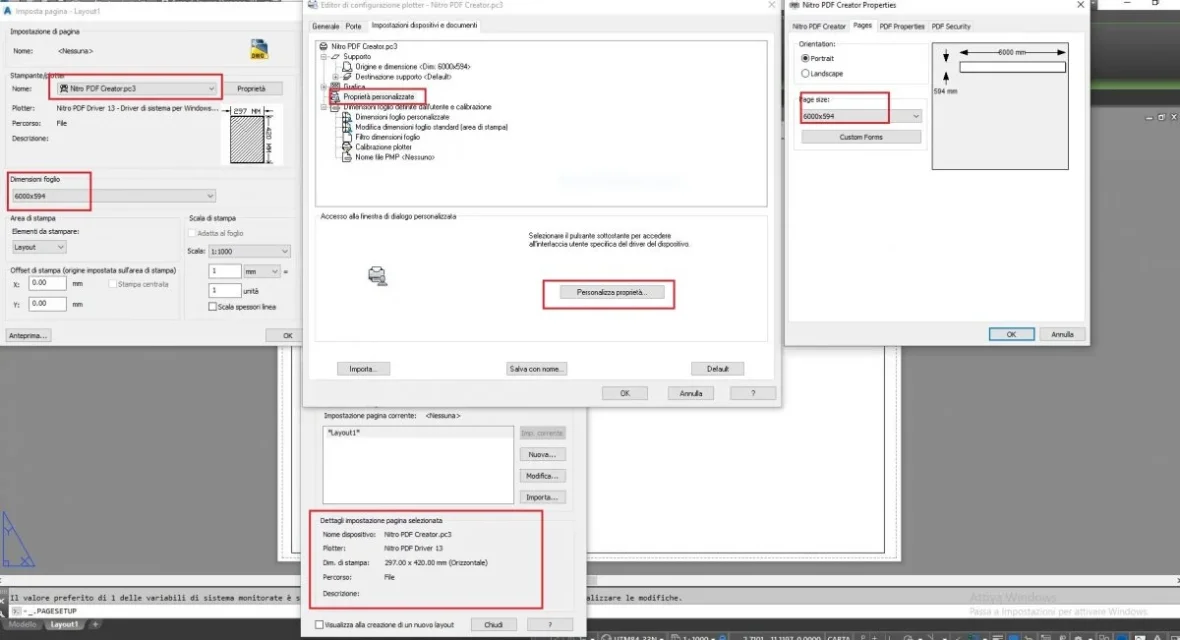
Immagine 2022-03-31 190637.webpto add a new format you have to select custom properties, page, custom modules, add it, confirm everything and find it inside autocad.
 
View attachment 65055to add a new format you have to select custom properties, page, custom modules, add it, confirm everything and find it inside autocad.
hi rpor66, I followed your directions but once confirmed with "ok", the layout always remains an a4 or an a3, I will show you the screen with the steps:2.webpin the last window below you can see that once confirmed, the size is not respected...and I don't understand why...I've never had any kind of problem with any type of formats, but now that I need a sheet over 5000mm is becoming a problem with these virtual printers.
 
You were almost there.
in the current page setting, select layout1, edit, you appear the plot window, select the format 6500x594 and from the ok.
 
You were almost there.
in the current page setting, select layout1, edit, you appear the plot window, select the format 6500x594 and from the ok.
Hello rpor66
I tried to select it but it does not seem to work, it always remains in a4 or other formats already prepared:2.webp
3.webpI can't understand where I'm wrong.
 
copy the .pc3 file in
c:\users\profile\appdata\roaming\autodesk\autocad......
hi rpor66, thank you for the file I tried to copy in the indicated folder but nothing, the size always stays those standard...I also noticed that in the "pages" tab of the "custom settings" of the nitro printer, there is no possibility to insert the margins, maybe that's why you don't recognize the sheet since they are not set? I don't know what to think
 
I tried to print the layout but nitro cannot manage the format.
with pdffactorypro yes.
it's about finding the right printer.

p.s.: but instead of printing it as the only pdf, why not try to create a series of a3, pdf multipage, more manageable.
 
I tried to print the layout but nitro cannot manage the format.
with pdffactorypro yes.
it's about finding the right printer.

p.s.: but instead of printing it as the only pdf, why not try to create a series of a3, pdf multipage, more manageable.
with pdffactory I partially solved, that is I tried with a sheet of 594x6500 and made me create and print. If I open the pdf with "pdffactory", I can see it in the real size, if I open it with acrobat adobe stops at 5080mm and does not show me the design, then white sheet.
I then noticed that if I want to add a new layout, i.e. change size and make it bigger, type 8000mm, create the profile but then puts me a sheet from 1946mm long, so to pleasure, as in photo:
4.webpWith regard to the solution in multiple sheets in a3 I can not, it is a profile of a conduct from 6km in scale 1:1000, then 6 meters of table, to the maximum if I do not find a satisfactory solution, I break the table in two from 3mt... I wanted to avoid to do not remake the fakings of the legend/values. . .
 
I saw after you were rusted to produce pdf but not to display it with adobe, bullzip does not solve you that last problem (in fact I deleted my message)
quiet, thank you anyway for the advice on bullzip that I will try anyway
 

Forum statistics

Threads
44,997
Messages
339,767
Members
4
Latest member
ibt

Members online

No members online now.
Back
Top