• This forum is the machine-generated translation of www.cad3d.it/forum1 - the Italian design community. Several terms are not translated correctly.

length

  • Thread starter Thread starter marco.mestriner
  • Start date Start date

marco.mestriner

Guest
Hello, everyone.
I have a problem with the cutting distinct in solidworks.
I created a simple set with two l steel of different lengths. However, I can't make the cutting lengths appear in Tables 2d in any way.
I press that before I ask this question I have looked everywhere for an answer, but I have not been able to understand how the thing works.
I come from inventor, where it was enough to identify the parameter of extrusion, rename it for example "length" and export it to tables in 2d.
in solidworks I cannot find the same procedure.
Thank you if you can help me.

Hi.

Mar
 
in the part in the cutting distinct is the length parameter?
in the part you updated the distinct?
did you enter the correct table? distinct cutting instead of materials (can happen)?
in the table cutting distinct is the item corresponding to the length parameter of the part?
 
in the part in the cutting distinct is the length parameter?
in the part you updated the distinct?
did you enter the correct table? distinct cutting instead of materials (can happen)?
in the table cutting distinct is the item corresponding to the length parameter of the part?
Hello Massivonweizen,
I'll try to get back to you.

- Did you update the difference?
in the part I tried to create a parameter named "length" connected to the extrusion quota through the table "equations" but I can't
use. I don't know what you mean to update the difference.

- Did you put in the table the correct table? distinct cutting instead of materials (can happen)?
in the table I entered the table from separate materials --> bom-weldment cut list

-Is there the item corresponding to the length parameter of the part in the table?
in the separate cutting table there is an automatic column "length" but the values are empty.

I hope I've been quite clear in the answers.
I add that I also tried to create a custom property in the model part with "file ownership" but I did not succeed. . .

Thanks again.
Mar
 
in the part I tried to create a parameter named "length" connected to the extrusion quota through the table "equations" but I can't
to connect a property to a vaore it is sufficient to write = in the value/expression box, double click on the function and select the quota. if you use the structural elements some parameters, including the length, are inserted automatically
in the table I entered the table from separate materials --> bom-weldment cut list
You're wrong. insert>tabelle>cutting
 
to connect a property to a vaore it is sufficient to write = in the value/expression box, double click on the function and select the quota. if you use the structural elements some parameters, including the length, are inserted automatically

You're wrong. insert>tabelle>cutting
So... .
I admit I'm lost. .
because in the value/expression drop-down menu I don't see the global variable I created in equations?
Why can't I select the "cutting table for soldering"? (which is the one that comes closer to what you wrote to me? I don't have a separate cut table)

Thank you.
Mar
 
Why can't I select the "cutting table for soldering"?
almost certainly (you have to guess as always) because you do not have a soldering list like that of the image
I miss you a little bit of base.
Come here http://help.solidworks.com/2012/ita...lists.htm?id=670f6f7bb1d147889d6beca6c6a42b12
View attachment 47501
Eureka!
Thank you Massivonweizen!
I'm suing here what I did in case someone ran into this situation.
created the part, in functions I created welding.
in the modeling tree is created the knot "different cutting". inside there is a "elements list" folder that contains the solid bodies that will be considered in the cutting table.
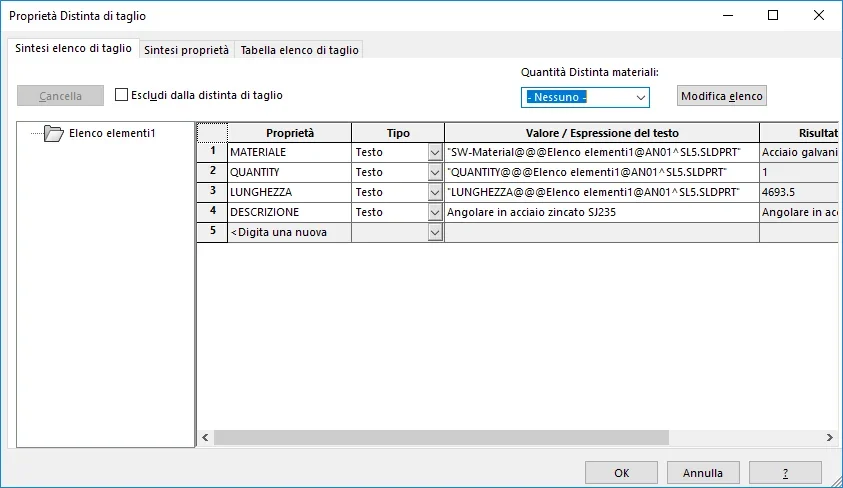
clicking the dx button and selecting properties opens the separate cutting property table.
in my case lacked the property length, which I added in the property column by selecting it from the drop down menu.
for the expression I did not only copy that of the row quantity and replace to quantity, length.
Everything comes back.
as an inventor user I would never have arrived, however the importance is understood.
thanks again massivonweizen for the help!

Hi.
MarImmagine.webp
 
Forget the movies, there are internal tutorials that explain well and also that of welded
 

Forum statistics

Threads
44,997
Messages
339,767
Members
4
Latest member
ibt

Members online

No members online now.
Back
Top