• This forum is the machine-generated translation of www.cad3d.it/forum1 - the Italian design community. Several terms are not translated correctly.

lights on tree together

  • Thread starter Thread starter PiegatoreSolidworks
  • Start date Start date

PiegatoreSolidworks

Guest
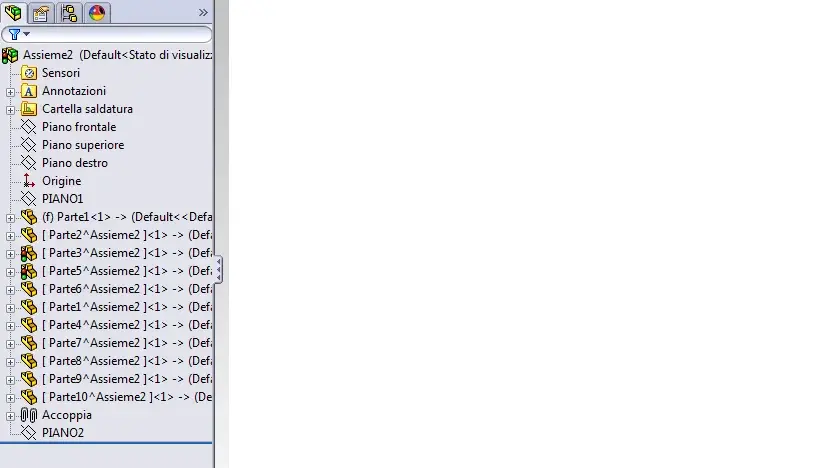
hello to all, I wanted to ask you a question about something that I don't remember well and that I haven't happened long ago: How come the symbol of the traffic light appears to me in front of the components of a set? I press that this together is built in top-down in part. the symbol of the traffic light remains despite I repeated several times the ctrl+q to resurrect and, clearly, even when I save I ask myself to update the 2 details in question.
Thank you.
 

Attachments

  • albero.webp
    albero.webp
    29.5 KB · Views: 31
the semaphore idicates the request for updating ctrl+q (which regenerates everything) and/or click on the top light in icons that is not a regenerate everything. It is likely that you should click more than once and it is normal with reference geometries. sometimes it becomes a rupture of boxes because all the times that it opens is so, to be updated.
 
the semaphore idicates the request for updating ctrl+q (which regenerates everything) and/or click on the top light in icons that is not a regenerate everything. It is likely that you should click more than once and it is normal with reference geometries. sometimes it becomes a rupture of boxes because all the times that it opens is so, to be updated.
In fact, the problem is solved only if I open it in two details individually. I do ctrl+q and the traffic light disappears but then when I go out and go back to the whole the symbol reappear. If you tell me it's a normal thing, I'm just making a point.
Thank you.
 
normal is normal... But when I open and dismiss until I close and reopen the axieme no longer gives me the traffic light if I do not make changes. it would be to try to make configurations, so maybe swx remembers how the objects were put and maybe not from more boredom.
 
normal is normal... But when I open and dismiss until I close and reopen the axieme no longer gives me the traffic light if I do not make changes. it would be to try to make configurations, so maybe swx remembers how the objects were put and maybe not from more boredom.
I have not understood the speech of the confgurations even because I do not use them almost ever (I do not understand much). .
the only changes I made regarding some sketch not totally defined, but the result does not change.

Thank you.
 
In fact, the problem is solved only if I open it in two details individually. I do ctrl+q and the traffic light disappears but then when I go out and go back to the whole the symbol reappear. If you tell me it's a normal thing, I'm just making a point.
Thank you.
Is it not that you made any circular references?
 
In fact, I think it is. It is normal that it appears and is normal that it appears to the maximum to the second ctrl+q without reappearing later.
there is definitely a circular reference referring to the basic compomente, but it does not even take away to the 200th ctrl+q. I don't know why. I'm sure I've made some mistakes.
 
there is definitely a circular reference referring to the basic compomente, but it does not even take away to the 200th ctrl+q. I don't know why. I'm sure I've made some mistakes.
if you have a circular reference made "good" the traffic light does not turn out even after a consecutive year of crtl+q.
You know the dog biting the tail? He stops turning when he snaps! :-)
in one of the two parts suspend the features and reactivate them once at a time until you reach the one that in the axieme leaves the lights on.
after he tries to understand if he creates the circular reference the final conditions of the feature or something in the sketch.
 
They're rotten and king...
there is a circular reference that brings in loop the request for update.
try using the assemblyxpert command.
by circular reference is an example of this type:
1) part y has a feature driven by the x part
2) part x has a feature driven by part y

since the features are sequential and chronological, every time you start a change or update affecting those two parts, enter this round of which function is updated compared to the other.

as suggested, being you the designer, check where circular and delete references are.
They must not exist.
 
identified and correct problem... .
was the extrusion of a "tube" in relation to the face of the base piece using "surface offset" corrected with "up to the edge".

In fact, I had never been able to use the above-mentioned vent in sheet metal but everything seemed to work regularly. . . .

thanks to all for the answers. :finger:
 

Forum statistics

Threads
44,997
Messages
339,767
Members
4
Latest member
ibt

Members online

No members online now.
Back
Top