• This forum is the machine-generated translation of www.cad3d.it/forum1 - the Italian design community. Several terms are not translated correctly.

linear series: strange behavior in autocad 2013

  • Thread starter Thread starter graziano-g
  • Start date Start date

graziano-g

Guest
Hi.

I'm trying to set a block by assigning a linear series parameter. autocad 2013

design the shape
I create the block
Published the block
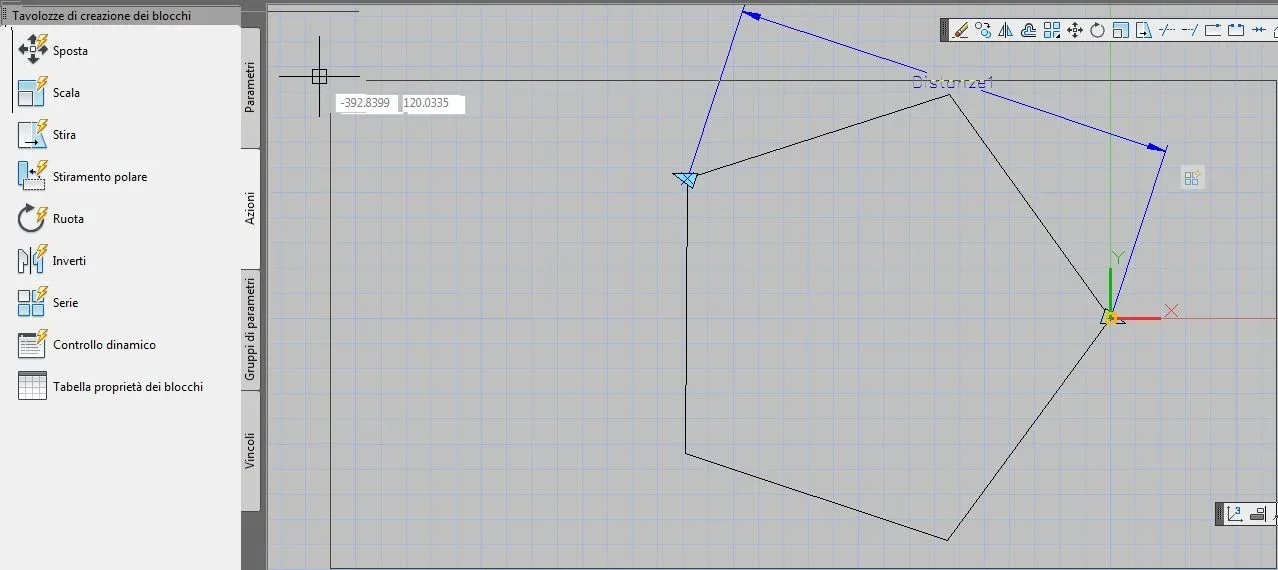
block creation palette - parameter group - linear series
specific initial point - final point
right clik on icon series ( 3 squares / triangle yellow exclamation point )
Action selection group - new selection group
select object + sending
save block
close editor blocks

I get this:

penta 0.webppenta 1.webppenta 2.webpif I perform the same operation but inserting the parameters first - linear
Then
actions - series
so I follow the previous steps

the result is the exact one, this:

penta3.webppenta4.webppenta5.webpCan anyone explain to me?

Hi.
 
Bye.

surely somehow the shift that produces the echo that you see in the first images is related to the distance set in the first procedure: group parameters - linear series
while it is not in the second procedure: actions / parameters.

I don't understand why.

here you see a nice descriptive tutorial of the procedure where everything rows for the right direction, the procedure starts at about 4:30 minutes.
[video=youtube;DnnudHdZDHI]https://www.youtube.com/watch?v=dnnudhdzdhi[/video]Where am I wrong?

Hello, thank you.
 
the "linear series" you used in the first case, by default, set the 'offset column' property of the action series to 1.
In the second case, you are explicitly asked: "Digit the distance between columns (|||||):"

If you regain the crate block in the first case, select the icon of the series and then edit the properties (owners panel) change the value 'offset columns' from 1 to the right distance and you will see that it will go ok.
 
domenic save, thanks for the quick and precise indication.

Unfortunately I did not manage to implement the indicated solution....

selecting the icon of the series the only properties (model property) to which I have access are: type - linear / number of grip - 1 / actions - series

if instead I make right clik on the 4 square icon with lightning the property voice is not there.

probably do not select the right icon.....

any other indication?

Thank you.

Hi.
 
first of all type on the command line. should appear the panel of the offspring.
then click on the icon of the series...proprieta.webp
 
Bye.

Thank you for your patience!! it was hard but the result arrived, very slender but arrived.

only one doubt now: how can you automatically set the column offset so that it takes the value -- distance 1 -- referred to the first two points taken to define the series ?

I think there's a macro or other set by the user, or is it?

Thank you.

Hi.
 

Forum statistics

Threads
44,997
Messages
339,767
Members
4
Latest member
ibt

Members online

No members online now.
Back
Top