
• This forum is the machine-generated translation of www.cad3d.it/forum1 - the Italian design community. Several terms are not translated correctly.

lisp per subdivision areas according to surface values

  • Thread starter Thread starter micheledag
  • Start date Start date

micheledag

Guest
I hope you can help me.
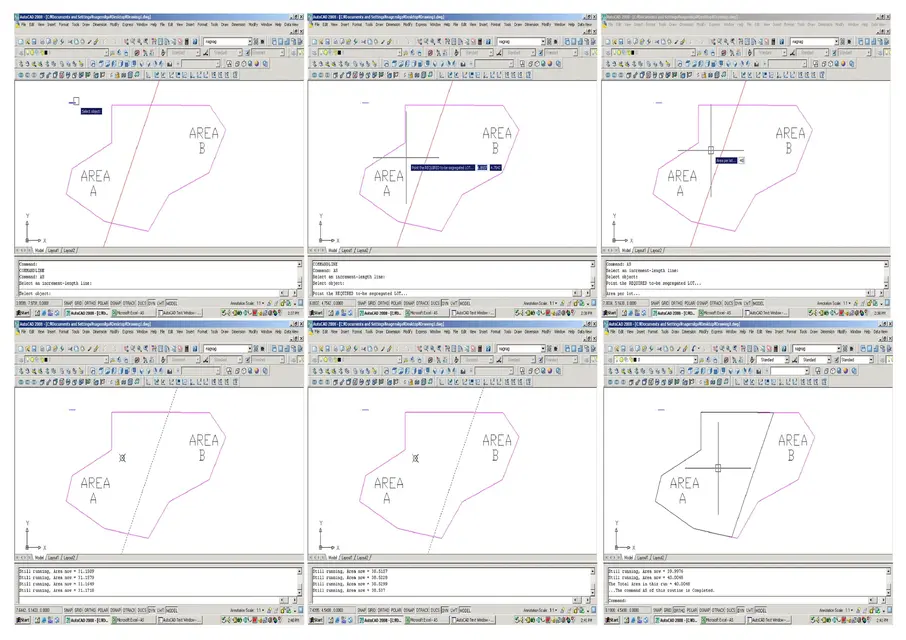
I do not remember from where, I arrived this lisp, very nice as it allows, once inserted a line of direction on an area composed of closed lines, to choose the value of the area of a part of the surface and to get this value automatically moving the line of direction.
Since it is easier to see than to say, I place the image with the explanation.
Unfortunately in my 2010 64-bit autocad the lisp stops, we say so, to the third image, and gives me a series of errors.
Would someone you'd like to take a look at the list and see where the trouble is?
or could you direct me to another lisp that does the same thing? online there are different, but... or not well (they give mistakes or do wrong operations) or, like the famous splitarea.vlx, they work in trial version.
Thank you. .
 

Attachments

Bye! the version is in Italian and the errors, after entering the value in "area per lot", are:

command unknown "point". press f1 for the guide.
unknown command "-boundary". press f1 for the guide.
unknown command "or". press f1 for the guide.
unknown command "p". press f1 for the guide.
unknown command "as". press f1 for the guide.
the selected object does not have an area
unknown command "erase". press f1 for the guide.
unknown command "as". press f1 for the guide.
unknown command "move". press f1 for the guide.
<gruppo 251="" :="" di="" selezione="">*nothing*


Yet I do everything that requires the lisp, I do not use polylinee closed, I use an xline as direction, etc.
uff!</gruppo>
 
the problem is the language. the lisp was conceived exclusively for commands in English.
see now if it works. just put the underscore in the lisp.
If I didn't miss anything, it should work.
 

Attachments

Thank you. But he keeps giving me a mistake.
does not create the area that I would like but creates two separate areas where there is xline.
these messages:

unknown command "as". press f1 for the guide.
; error: an error occurred within the function
* error* setting of the autocad variable rejected: "cmdecho" nil
 
I don't know if micheledag will be interested anymore since it's been a long time, however it works now!
the underscore was just before it, but not in front of the cons and the getvars whose syntax remains the English one, like: (cons 0 "lwpolyline")

the command, interesting, lends itself to changes, if nothing else to avoid clicking on the line that constitutes the increment. a second thing could be the calculation of the area not with the constant increase, but exploiting the method of bisection. Thirdly, the possibility to decrease an area, not only to increase it.
 

Attachments

That's it, that's better.
click on the xline and the area to expand, tolerance to 0.001 graphics units. contours can be lines, polylines, arches and circles.
 

Attachments

Forum statistics

Threads
44,997
Messages
339,767
Members
4
Latest member
ibt

Members online

No members online now.
Back
Top