Tony88
Guest
good evening to all;
First of all, I want to thank anyone who wants to lose a couple of minutes simply to read this post,
if you can give me your opinion would be super!
I am new to this forum and will try as much as possible to make me as useful/active as possible.
I write to you because I have a problem. . .
after the update to inventor 2018,
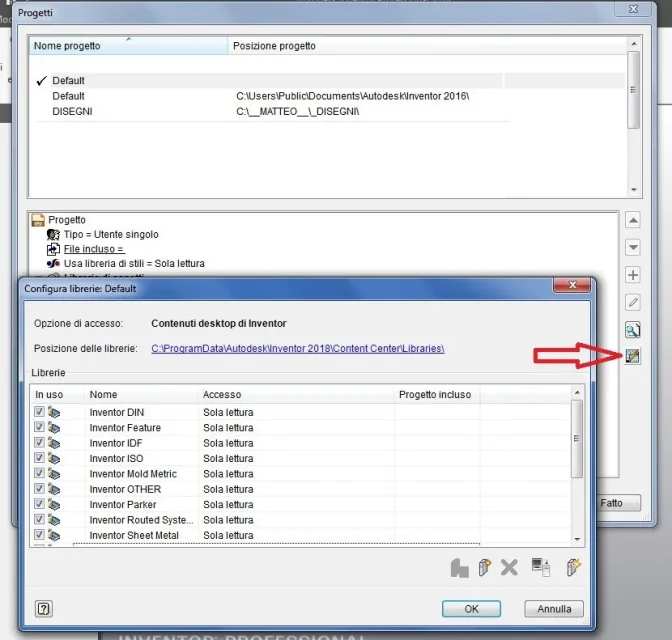
I completely lost all the elements of the contained center and the window turns out completely empty.
I assume that the program points to a folder or incorrect file, but strange that default does so,
both in the 2016 update and 2017 did not give me this problem;
Moreover, the strangest thing about all is that my colleague works perfectly.
Has anyone happened?
I messed up with project management, or is it better if I compare with assistance?
First of all, I want to thank anyone who wants to lose a couple of minutes simply to read this post,
if you can give me your opinion would be super!
I am new to this forum and will try as much as possible to make me as useful/active as possible.
I write to you because I have a problem. . .
after the update to inventor 2018,
I completely lost all the elements of the contained center and the window turns out completely empty.
I assume that the program points to a folder or incorrect file, but strange that default does so,
both in the 2016 update and 2017 did not give me this problem;
Moreover, the strangest thing about all is that my colleague works perfectly.
Has anyone happened?
I messed up with project management, or is it better if I compare with assistance?