• This forum is the machine-generated translation of www.cad3d.it/forum1 - the Italian design community. Several terms are not translated correctly.

macro for normal view to selection

  • Thread starter Thread starter marcof
  • Start date Start date

marcof

Guest
I did some research on the net, and maybe I looked bad, but I didn't find that anything.
I would like to associate a keyboard shortcut with a macro that allows you to put in normal view to a selected face. Now I do it with two keyboard shortcuts for "normal" and "zoom optimized" commands, but I would like a unique command.
I tried to make a macro to associate then to a keyboard shortcut but it doesn't work. in reality macro & c. I don't understand a real bat so I ask if kindly someone is able to give me a hand, which in practice means to make me the macro because I'm not really able to put on my :redface:. . .

Thank you.

p.s. ohhh, as I was tempted to put a title to the message of the type "help! I am desperate!!!" :smile:
 
I'm sorry, but I don't understand. does the "normal" view command not already have an optimized zoom? (at least on my swx 2012)
in theory should do so, also because in the description of the "normal a" command is indicated "wheel and creates the zoom of the model..." but in practice does not.
as says marcof you have to use the two commands in sequence
 
I'm sorry, but I don't understand. does the "normal" view command not already have an optimized zoom? (at least on my swx 2012)
It does so by way of saying, in the sense that it puts normal to the face but optimizes the view on the whole model and not on the selected face. therefore with axiemi gandi and small details on which to work normal is a continuous forward and backward. I always have my two simple ta keyboard commands but doing it all at once would not be bad. I could accelerate this by eliminating all the animation of the changes of view but it would dry me because, while having set them rather fast, they help so much to memorize how the model reorients itself.
 
I may not have guessed the question well, but I to put myself normal at a click view:

ctrl.

is the shortcut for "normal to"
if you want to optimize, wheel and go..
I do this and I find it convenient
 
if you read what marcof says
It does so by way of saying, in the sense that it puts normal to the face but optimizes the view on the whole model and not on the selected face. therefore with axiemi gandi and small details on which to work normal is a continuous forward and backward.
if you work on an industrial project of 50x50 meters (50000x50000 mm) and you have to work on a surface of 100x100 mm you want to wheel. . .

read threads well (especially if they are short)
 
I may not have guessed the question well, but I to put myself normal at a click view:
ctrl+8 is the shortcut for "normal to"
I press n and do earlier, but that's not the point...
if you want to optimize, wheel and go..
I do this and I find it convenient
I find all that advanced and back very uncomfortable (from which, incidentally, this thread is born...) because if I have to put myself normal to a 20 diameter washer on which I am working and which is part of a 18 meters long machine with that swx command it puts me in normal view though taking in all the machine for which I have to press again s (in my customizoni of the keyboard commands is the zoom on the selection)
if you have read well what I wrote :rolleyes: I would like a macro, to associate then to a button, which simultaneously puts in normal view to the selection and optimize the zoom to That's the one selection.

So please don't propose me to "give" the rotellina that otherwise turn me :smile:

[EDIT] while writing this above I also did other so I had not seen the answer of massivonweizen coming. I leave everything, just to reiterate the concept. if it is frustrating enough to try to answer and help those who ask questions unclear as they do unfortunately all the time, it is really to cut off their veins having to explain their questions (once every death of pope that happens to me to ponder them) when they are exposed in a rather clear way. Ecchecaxxo!
 
It does so by way of saying, in the sense that it puts normal to the face but optimizes the view on the whole model and not on the selected face. therefore with axiemi gandi and small details on which to work normal is a continuous forward and backward. I always have my two simple ta keyboard commands but doing it all at once would not be bad. I could accelerate this by eliminating all the animation of the changes of view but it would dry me because, while having set them rather fast, they help so much to memorize how the model reorients itself.
Okay.
But it seems to me that the commands in question are: "normal view to" and "zoom selection" (not zoom optimized).


If that's how I attach the simple macro I have recorded. (from the .zip extension from the file)
if it is what you wanted then you can create its icon and possible keyboard connection.


Hi.
Gabriele
 

Attachments

Okay.
But it seems to me that the commands in question are: "normal view to" and "zoom selection" (not zoom optimized).


If that's how I attach the simple macro I have recorded. (from the .zip extension from the file)
if it is what you wanted then you can create its icon and possible keyboard connection.


Hi.
Gabriele
no is zoom optimized.
Zoom selection is used to zoom in selected details. you understand that if I have to optimize the zoom for a whole selection zoom system is not suitable.
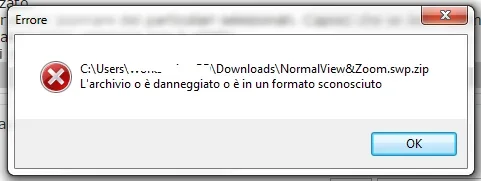
to me the .zip does not open
error.webp
 
Okay.
But it seems to me that the commands in question are: "normal view to" and "zoom selection" (not zoom optimized).
If that's how I attach the simple macro I have recorded. (from the .zip extension from the file)
if it is what you wanted then you can create its icon and possible keyboard connection.
Hi.
Gabriele
Great!
Thank you so much, it works perfectly! to make (hopefully) :smile:
 
Okay.
But it seems to me that the commands in question are: "normal view to" and "zoom selection" (not zoom optimized).
no is zoom optimized.
No, he's right, gabrin, I need the zoom selection. optimized zoom already does it by itself when you give the command "normal view a"

I made some confusion with theology, using "optimized" in the context of the explanation of what I wanted to get without remembering that it is also the name of one of the commands that I do not need.
my keyboard shortcuts were "n" for normal view and "s" for selection zoom and were those commands I wanted to gather as did gabrin with its macro
 
No, he's right, gabrin, I need the zoom selection. optimized zoom already does it by itself when you give the command "normal view a"

I made some confusion with theology, using "optimized" in the context of the explanation of what I wanted to get without remembering that it is also the name of one of the commands that I do not need.
my keyboard shortcuts were "n" for normal view and "s" for selection zoom and were those commands I wanted to gather as did gabrin with its macro
then I will have touched something in the settings myself. I'm going to see:
 
Try to see if this macro works for you. I've been practicing it if you have sw in Italian and English.
 

Attachments

Try to see if this macro works for you. I've been practicing it if you have sw in Italian and English.
Yes, yours also works perfectly like that of gabrin. macro associated with the "s" button and I go to god. thanks also to you
 
to me the .zip does not open
you need to remove the .zip extension (for example by requiring 7 to view known file extensions and remove it by renameing the file)

General question: how can you add a macro button or a macro keyboard link?
 
Hi.

macro mouse... .

left + right button -> normal + zoom to selection

right + left button -> normal + zoom fit
BRADIPO.webpyou can create a macro button to launch it almost automatically

senno, create a solidworks boot icon: ...\sldworks.exe /m ...\mouse.swp
 

Attachments

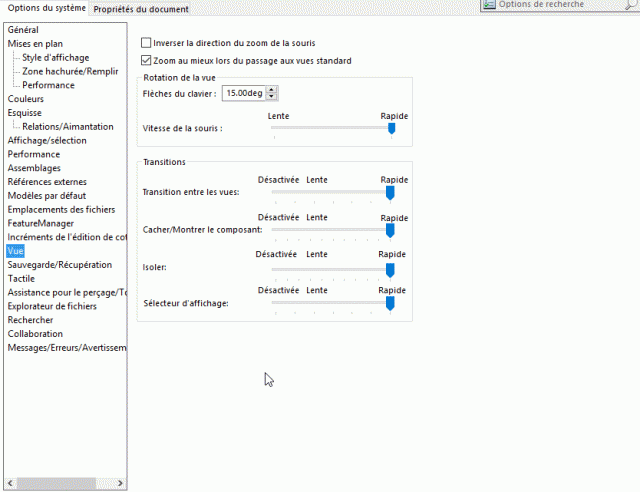
known that the rotation speed of the piece after launching the macro is low. Is there a way to speed up?
 
rotation with the wheel?, with my pc is a splinter hp8540w, bofh, I don’t know, it is true that a macro with a class inside, does not speed,... as the French Swiss say, on ne peut pas avoir le beurre et l’argent du beurre, and I add, je me contentrai de laitière. . .
modified the parameters (options) to rotate the view?Nouvelle image bitmap.gif
 

Forum statistics

Threads
44,997
Messages
339,767
Members
4
Latest member
ibt

Members online

No members online now.
Back
Top