Andrea Amedei
Guest
Good morning.
It's a few days that I'm banging my head without coming to the head. Since I often need to perform the solid feature that you see in the image below on various holes, I was thinking of creating a macro that automated this process.
the solid feature to build is a "prism" that has as a basic sketch the projection of a hole and a larger circle that has a diameter n times greater than that projected (n parameter to set). extrusion height is also a parameter.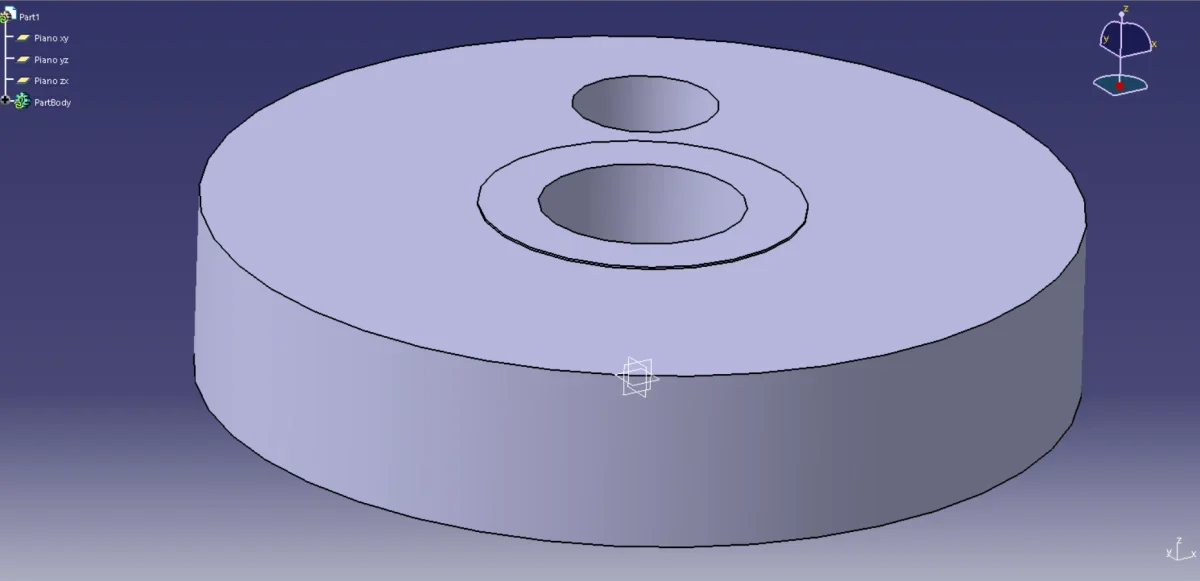 to do this, I created a userform that you can see in the figure below. the user must use the 3 buttons in sequence (ground selection, select hole edge, create solid) and the two text boxes of the d/d ratio and the profile extrusion height.
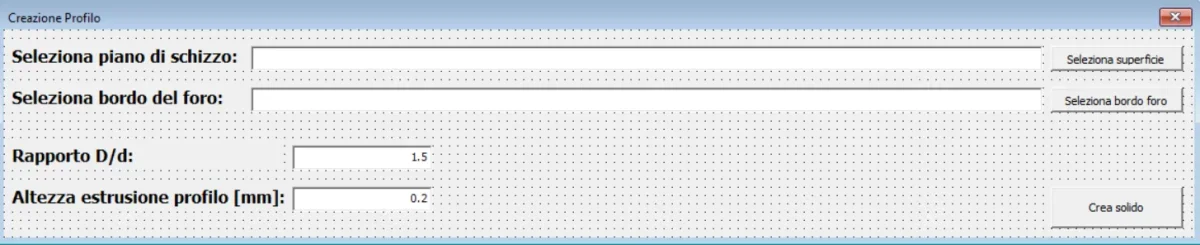 I admit I know quite well the vba programming on excel, but they are really at first with catia. at the moment what I did is the following:
"select surface" buttonprivate sub select_surface_button_click_click()
dim myselection
dim myarray(0) as face
dim strreturn as string
dim part1 as part
dim partdocument1 as partdocument
dim myhybridbodies as hybridbodies
set myselection = catia.activedocument.selection
myselection.clear
me.hide
strreturn = myselection.selectelement2(array("face"), "select a face:", false)
if strreturn = "normal" then
'redim preserve myarray(ubound(myarray) + 1)
set myarray(ubound(myarray)) = myselection.item2(1).value
end if
textbox1.text = myarray(0).name
me.show
end sub
button "select edge hole"private sub select_edge_button_click_click()
dim myselection
dim myarray(0) as edge
dim strreturn as string
dim part1 as part
dim partdocument1 as partdocument
set myselection = catia.activedocument.selection
myselection.clear
me.hide
strreturn = myselection.selectelement2(array("edge"), "select a edge:", false)
if strreturn = "normal" then
'redim preserve myarray(ubound(myarray) + 1)
set myarray(ubound(myarray)) = myselection.item2(1).value
end if
textbox2.text = myarray(0).name
me.show
end subat this point, in the longer text boxes the name(?) of the selected surface and edge appears. pressing "crea solid" I would like the software to build:
1. a sketch plan on the selected surface (using the name in the userform? )
2. from the edge of the selected hole derives the diameter and its center
3. takes the edge of the hole and projects it on that floor
4. creates a new circle with the same center of the projected edge and diameter d=n*d
5. comes out of the sketch
6. extrude height set in userform
7. uncheck everything and cleans all userform for a new operation
I hope someone can help me, even with the macro record I can't understand how the program works.
greetings,
Andrea
It's a few days that I'm banging my head without coming to the head. Since I often need to perform the solid feature that you see in the image below on various holes, I was thinking of creating a macro that automated this process.
the solid feature to build is a "prism" that has as a basic sketch the projection of a hole and a larger circle that has a diameter n times greater than that projected (n parameter to set). extrusion height is also a parameter.
to do this, I created a userform that you can see in the figure below. the user must use the 3 buttons in sequence (ground selection, select hole edge, create solid) and the two text boxes of the d/d ratio and the profile extrusion height.I admit I know quite well the vba programming on excel, but they are really at first with catia. at the moment what I did is the following:"select surface" buttonprivate sub select_surface_button_click_click()
dim myselection
dim myarray(0) as face
dim strreturn as string
dim part1 as part
dim partdocument1 as partdocument
dim myhybridbodies as hybridbodies
set myselection = catia.activedocument.selection
myselection.clear
me.hide
strreturn = myselection.selectelement2(array("face"), "select a face:", false)
if strreturn = "normal" then
'redim preserve myarray(ubound(myarray) + 1)
set myarray(ubound(myarray)) = myselection.item2(1).value
end if
textbox1.text = myarray(0).name
me.show
end sub
button "select edge hole"private sub select_edge_button_click_click()
dim myselection
dim myarray(0) as edge
dim strreturn as string
dim part1 as part
dim partdocument1 as partdocument
set myselection = catia.activedocument.selection
myselection.clear
me.hide
strreturn = myselection.selectelement2(array("edge"), "select a edge:", false)
if strreturn = "normal" then
'redim preserve myarray(ubound(myarray) + 1)
set myarray(ubound(myarray)) = myselection.item2(1).value
end if
textbox2.text = myarray(0).name
me.show
end subat this point, in the longer text boxes the name(?) of the selected surface and edge appears. pressing "crea solid" I would like the software to build:
1. a sketch plan on the selected surface (using the name in the userform? )
2. from the edge of the selected hole derives the diameter and its center
3. takes the edge of the hole and projects it on that floor
4. creates a new circle with the same center of the projected edge and diameter d=n*d
5. comes out of the sketch
6. extrude height set in userform
7. uncheck everything and cleans all userform for a new operation
I hope someone can help me, even with the macro record I can't understand how the program works.
greetings,
Andrea