
• This forum is the machine-generated translation of www.cad3d.it/forum1 - the Italian design community. Several terms are not translated correctly.

macro x pdf

  • Thread starter Thread starter BOSCO '71
  • Start date Start date
Good boy!
keep the code sorted and write the comments.
the pdf3d does not seem to be very used, the customer must enable the function in acrobat, the navigation requires a little hand...
on the internet there are new standards, but I am not informed.
 
hi wasp, I noticed a problem
export 3 works perfectly in part scheetmetal environment and assembly as long as the parts are sorted but crashes if the environment is active... Do you have any idea how it could work out?

Also I am trying to customize the composition of the name using what you said some message ago...
dim propion
propname = objdoc.properties.item("custom").item("material").value
for fishing between custom properties
the thing works properly and is certainly very useful for my purposes I had talked about long ago in this post.

but if you want to take for example use the properties of the file present in the project tab type the revision number

or from the summary tab you want to extract the title field or the field object

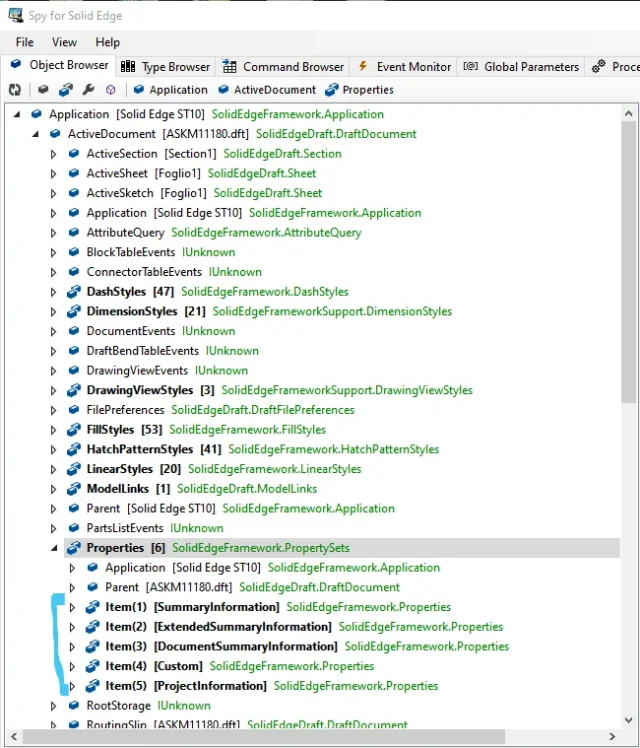
I guess the red part of the line is changed. objdoc.properties.item("Custom").item("material'(Value of V)but how are these data sources in programming language?
How do I avoid the error if the field recalled was empty? for new files can I edit templates but for archive files?

then wanting to complicate the thing again, if I run the macro from environment 2d and wanted these properties to be read by the connected 3d and not by the .dft how would the references change?
 
but crashes if the environment is active... Do you have any idea how it could work out?
manually by solidedge the save by name works? I noticed that if the file options (e.g. if... .ini) is not found also solidedge is not right.
I guess the red part of the line is changed. objdoc.properties.item("Custom").item("material'(Value of V)but how are these data sources in programming language?
installato spy for solid edge? (towards)SESPY DOC PROP.webp
then wanting to complicate the thing again, if I run the macro from environment 2d and wanted these properties to be read by the connected 3d and not by the .dft how would the references change?
You're a little vague. I need a little more concrete example, because I have the impression that to solve a file management problem you want to complicate with an eye: is it worth it?
but how much do you want to write in the description of the exported file? :
 
hi to everyone, I came across this conversation looking on the forum and wondering how to add the revision number to the file name.
for those like me to read in the future, this is the solution I found: just add the following two rows
Code:
dim revision 'as string
revision = objdoc.properties.item(5).item(2).value
and, instead of the pdf rescue line, use
Code:
call objdoc.saveas(path + "\" + name + " rev " + revision + ". " + "pdf") ' save by name
here the complete code: https://pastebin.com/cgqkelhq
 
Good boy!
keep the code sorted and write the comments.
the pdf3d does not seem to be very used, the customer must enable the function in acrobat, the navigation requires a little hand...
on the internet there are new standards, but I am not informed.
Good morning Mr. Vespignani,

I ran into this macro, downloaded version 1.4 but I can't make it work.

I use the solidedge version 2023, I have to create the dwg of the open design in the x folder.

taking the macro I practically put everything on false, except for export 2d that was set on dxf (here they want the dwg)

so I set dwg instead of dxf

I entered my quoted path and imported the macro.

I don't understand why it doesn't work
 
Good morning Mr. Vespignani,

I ran into this macro, downloaded version 1.4 but I can't make it work.

I use the solidedge version 2023, I have to create the dwg of the open design in the x folder.

taking the macro I practically put everything on false, except for export 2d that was set on dxf (here they want the dwg)

so I set dwg instead of dxf

I entered my quoted path and imported the macro.

I don't understand why it doesn't work
the error code is this, I also tried to enable the function creates path, pdf, and tried with the dxf version... Nothing to do.. .

0x800704
 

Forum statistics

Threads
44,997
Messages
339,767
Members
4
Latest member
ibt

Members online

No members online now.
Back
Top