• This forum is the machine-generated translation of www.cad3d.it/forum1 - the Italian design community. Several terms are not translated correctly.

make 3d collar

  • Thread starter Thread starter jim78b
  • Start date Start date

jim78b

Guest
because I can't ask more experts.
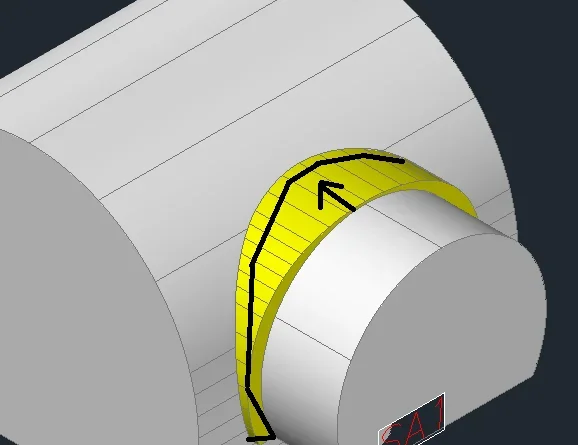
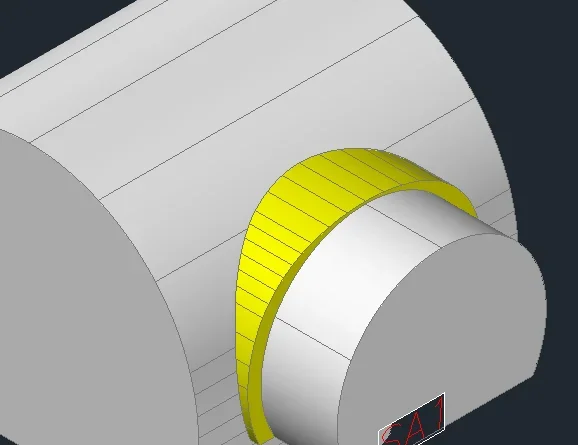
I should do as in the flooded file :gluing, is highlighted by arrows.
I tried them all but I don't understand cm and make sure that it follows the 2 galleries then the section varies continuously.

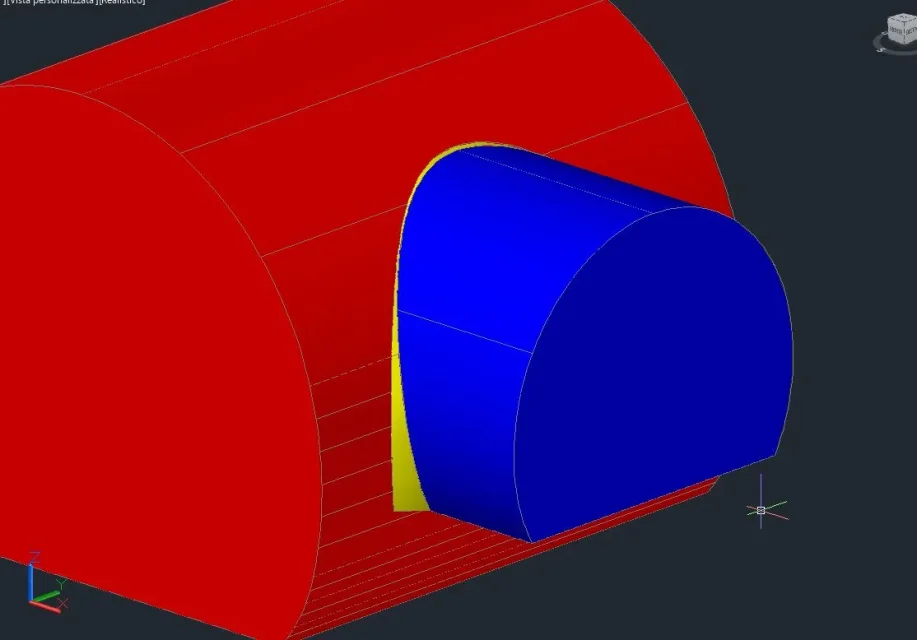
I also attached the dwg file with what I did but I just can't straighten it to make it look like that of the image
 

Attachments

  • collare mio.webp
    collare mio.webp
    14.9 KB · Views: 45
  • STUB 1 SA1-SC7 90°.dwg
    STUB 1 SA1-SC7 90°.dwg
    664.1 KB · Views: 5
  • collare.webp
    collare.webp
    17.9 KB · Views: 15
with what logic the collar combines the two surfaces?
why in the first image above is zero and in half gallery picoola is wide? What happens under the gallery? I think it disappears. .
with which angle attack the two surfaces?
is a geometric fact, first obtained plants and sections, then we talk about model 3d
 
with what logic the collar combines the two surfaces?

I should do it as from the first image.

why in the first image above is zero and in half gallery picoola is wide? What happens under the gallery? I think it disappears. .
with which angle attack the two surfaces?
is a geometric fact, first obtained plants and sections, then we talk about model 3d
the dwg file with the model is attached.The yellow tunnel intersects at 90° in the gray .in fact I made a subrait to the yellow one to give it the form it has now but I do not understand how to get a "glue" as in the first image.
under the gallery ends is that disappears is a kind of collar that fits above.
 
that there is the file attached with the wrong sulotion I understood.
What I don't understand is what the correct solution is. a collar has the same thickness everywhere, and it is not a simple small gallery r wholesale.
I repeat the questions: with which corner attack the two surfaces?
Why on top is zero and on the side is maximum?

and I repeat the request, obtained plants and sections of what you want to do, then steps to the 3d (or, as I imagine, you want a 3d because you are not able to get the 2d...)
 
that there is the file attached with the wrong sulotion I understood.
What I don't understand is what the correct solution is. a collar has the same thickness everywhere, and it is not a simple small gallery r wholesale.
I repeat the questions: with which corner attack the two surfaces?
Why on top is zero and on the side is maximum?

and I repeat the request, obtained plants and sections of what you want to do, then steps to the 3d (or, as I imagine, you want a 3d because you are not able to get the 2d...)
the correct solution from which I would like to copy is the first image.I indicated it with an arrow.
I don't care about the angle they attack, but better to start with 90° is easier I think.
I want the 3d because I would be interested in the procedure
 
I didn't mean the angle of attack between the two galleries. I meant the attack angle between the collar and the tunnel.
I'll stop taking it anyway. You saw one thing and you want to copy it, but without understanding what rules substantiate.
If you don't understand how it is done, you can't even adapt it to a condition other than what you saw made by another.
Bye. good continuation.
 
the angle does not exist, in the sense that the yellow collar I want to rake it until touching the gallery on which it interfaces from the first figure is clear.
as if I make a projection of the yellow part until you get to the gray tunnel. Maybe if you want it will be 45°.collare mio2.webpI have brutally sketched what I meanthe collar must cover the tunnel with sa1 and the one on which it intersects (see example first figure)
 
because I started making these simple models with autocads to do before, I thought it was immediately like work. Anyway I don't even know how to do solidworks.
 
then nothing simpler.
1) draws (solids) the large gallery of its diameter + thickness collar;
2) draws (solid) the smaller tunnel of its diameter + thickness collar;
from the command _interfere, select the great, send, select the small, send
in the dialogue that will come out you remove the "solid helimin of interference at the exit.

see if that's the result you're looking for.
 
then nothing simpler.
1) draws (solids) the large gallery of its diameter + thickness collar;
2) draws (solid) the smaller tunnel of its diameter + thickness collar;
from the command _interfere, select the great, send, select the small, send
in the dialogue that will come out you remove the "solid helimin of interference at the exit.

see if that's the result you're looking for.
The yellow collar is fine as I did, but so they don't select the collar when I make interference?
 
View attachment 49456hang out the 2 galleries (empty inside) and then interfer
thank you now it is clear.a thing that makes it difficult is that my yellow collar does not have a thickness always equal from how you see .cmq on your model x give the form that I mean I should then smooth the edges and the game would be done.

One thing... the yellow collar after the gate?
 
You mean something like that?
has been done to the eye in 10 minutes, with the right measures should take on a more proportionate aspect
 

Attachments

  • raccordo.webp
    raccordo.webp
    36 KB · Views: 10

Forum statistics

Threads
44,997
Messages
339,767
Members
4
Latest member
ibt

Members online

No members online now.
Back
Top