miccel82
Guest
Hello everyone
I'm putting you on the problem that got me stuck at work.
I have to map drawings (components of furniture walls or furnishings) which then thanks to the autocad explanatory that we use in the company are rendered.
for this design in 3d faces.
My problem is in the map:
I created a texture of a wood (so with vein). as long as the horizontal surfaces (the same towards the texture vein) are mapping nothing strange. the problem is when I have to map the vertical surfaces.
the procedure that had explained to me is the following:
- open the drawing made
- open the palette of materials and the library
- insert a design with faces I need as a model
- apply the material to the model face that has similarity to the design (then vertical face if the design is prevalent vertically)
- mapping my design with parallelepiped mapping
- apply the material on the drawing
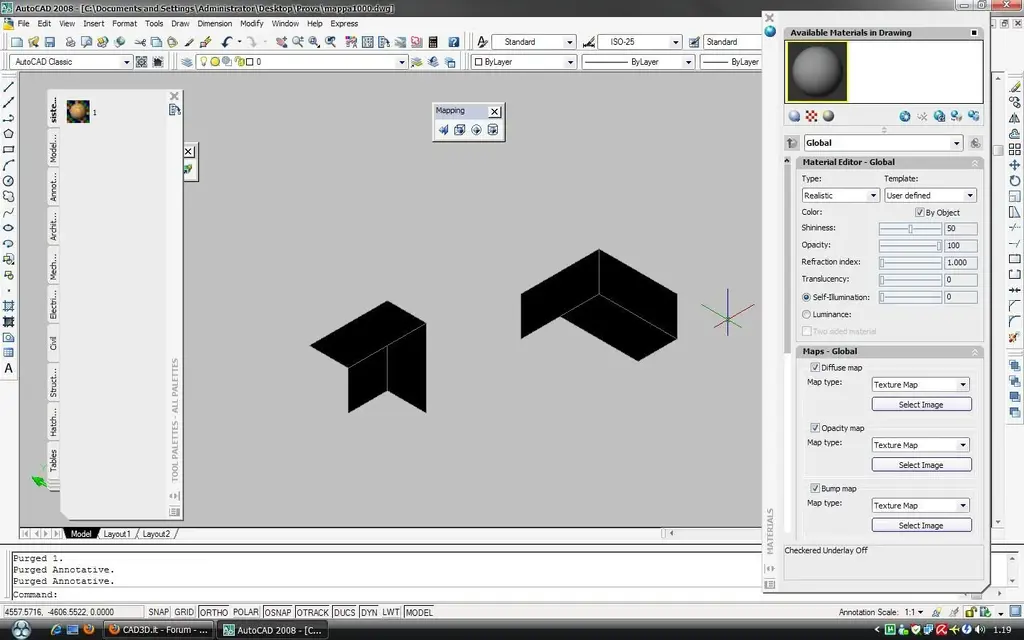
My problem is that when I stick the mat on a vertical surface it does not show me the veins of the wood but gives me it as a solid color
they told me to go to remove the mapping with the gizmo when I apply it but nothing changes (maybe also because I did not understand how to do it).
other thing: how does the copy mapping command work?
Sorry for the length and thank you in advance.
p.s. hope to have attached well the image of the file I use as a model
I'm putting you on the problem that got me stuck at work.
I have to map drawings (components of furniture walls or furnishings) which then thanks to the autocad explanatory that we use in the company are rendered.
for this design in 3d faces.
My problem is in the map:
I created a texture of a wood (so with vein). as long as the horizontal surfaces (the same towards the texture vein) are mapping nothing strange. the problem is when I have to map the vertical surfaces.
the procedure that had explained to me is the following:
- open the drawing made
- open the palette of materials and the library
- insert a design with faces I need as a model
- apply the material to the model face that has similarity to the design (then vertical face if the design is prevalent vertically)
- mapping my design with parallelepiped mapping
- apply the material on the drawing
My problem is that when I stick the mat on a vertical surface it does not show me the veins of the wood but gives me it as a solid color
they told me to go to remove the mapping with the gizmo when I apply it but nothing changes (maybe also because I did not understand how to do it).
other thing: how does the copy mapping command work?
Sorry for the length and thank you in advance.
p.s. hope to have attached well the image of the file I use as a model