duedan
Guest
Hello, everyone.
I searched in the forum but did not find the answer for the problem. Surely because it's a trivial thing... but I don't get there.
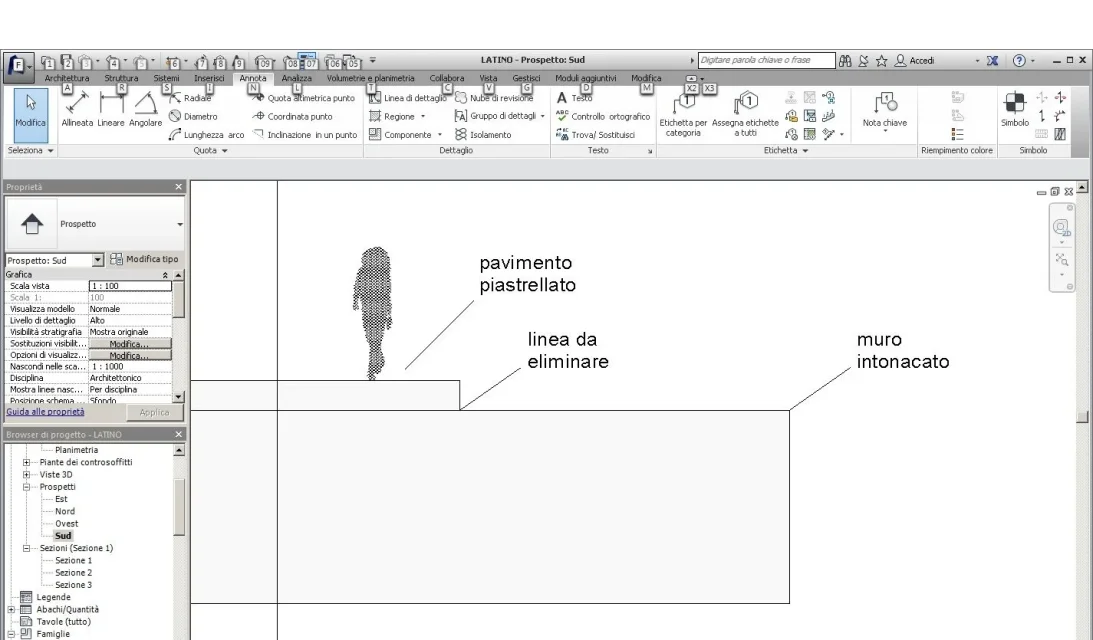
1)I had to make sure that my wall covers the "thickness" of the loft (teracce). I tried with the priorities of the materials but, having as a surface finish of the floor a tile and the surface of the plastered wall... they can not join... therefore leaving also in the prospectus the line that highlights where the wall ends and begins the floor.
I attach an image trying to be clearer
2) to make the walls I generally proceed like this: I put on level 1 and draw the walls then on level 2 and in the same way I design the walls. the thing I can't understand is that even if the overlapping walls have the same stratigraphy, in section I don't see the contiguous walls and materials but separated from a line. possible that revit does not combine them automatically but must be used for force, wall by wall, the tool joins?
thanks to those who have the patience to answer me
I searched in the forum but did not find the answer for the problem. Surely because it's a trivial thing... but I don't get there.
1)I had to make sure that my wall covers the "thickness" of the loft (teracce). I tried with the priorities of the materials but, having as a surface finish of the floor a tile and the surface of the plastered wall... they can not join... therefore leaving also in the prospectus the line that highlights where the wall ends and begins the floor.
I attach an image trying to be clearer
2) to make the walls I generally proceed like this: I put on level 1 and draw the walls then on level 2 and in the same way I design the walls. the thing I can't understand is that even if the overlapping walls have the same stratigraphy, in section I don't see the contiguous walls and materials but separated from a line. possible that revit does not combine them automatically but must be used for force, wall by wall, the tool joins?
thanks to those who have the patience to answer me