
• This forum is the machine-generated translation of www.cad3d.it/forum1 - the Italian design community. Several terms are not translated correctly.

material

  • Thread starter Thread starter EDU
  • Start date Start date

EDU

Guest
Good morning, everyone.
I installed version 18.1 on another pc, and I find myself without the "material" button (the one in four colored spheres). on the other pc before, fixed the materials a person I can't contact.
Please, someone can tell me what and where I should copy from the first pc to have the "materials" on the second.
 
Good morning, everyone.
I installed version 18.1 on another pc, and I find myself without the "material" button (the one in four colored spheres). on the other pc before, fixed the materials a person I can't contact.
Please, someone can tell me what and where I should copy from the first pc to have the "materials" on the second.
If I don't remember that key is part of the eit pdm. The installation is not trivial at all, you should track that technician.
 
hunter thanks for the answer.
If I turn to your help, it means that I can no longer have the help of the person who has set me up the matter on the other pc, so I stay at the expense of other suggestions. Thanks again.
 
If I don't remember that key is part of the eit pdm. The installation is not trivial at all, you should track that technician.
Can you see if on the other pc you have a folder called "ecs pdm client" or something?

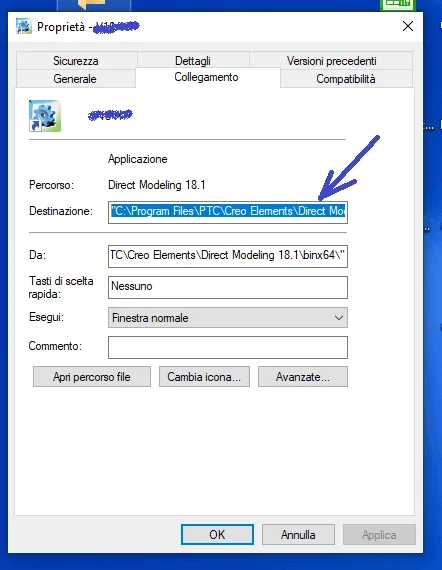
p.s. would also be useful to know the complete path of the launch string, always talking about the pc on which everything works:
1598714245729.png
 
what is sincerely not very clear is whether the technician who made you the installation is an autonomous who knows the cad well and made you customizations or is part of a software house that sold you additional packages including materials, libraries etc.
because in the latter case you may also have problems managing additional package licenses; Moreover very often the additional packages have "centralized" customizations that are going to read text files that are on the server and not local, and this is meant to make sure that all business users have the same materials, with the same characteristics that always remain aligned even if a user should add a material and make other changes.

if instead your installation took place independently without servers etc, then it could be enough to search in the customizations of the computer correctly configured folder 18.1
and overwrite it to that of the new pc.

just write in the internal search bar %appdata% and
find all your personalizations, that of your interest should be in

c:\users\pc\appdata\roaming\cocreate\cocreate modeling 18.1
 
after installation, if I start the model manager, asks me the host and the door. having installed it on laptop PC, what should I indicate (from what you are telling me, I realize I should first fix pdm)
 
after installation, if I start the model manager, asks me the host and the door. having installed it on laptop PC, what should I indicate (from what you are telling me, I realize I should first fix pdm)
to understand this, you should first answer questions @kaji Then from there, we can help you.
 
after installation, if I start the model manager, asks me the host and the door. having installed it on laptop PC, what should I indicate (from what you are telling me, I realize I should first fix pdm)
but excuse, that pdm uses, that is the old pdm of the cocreate workmanager, if it still exists, is totally abandoned by the ptc that bets a lot on windchill, but it is so complicated that it seems to me difficult to imagine a non-technical that configures it.
the other pdm coupled with modeling I thought they were managed directly by the software houses that sell them to you and therefore should also configure them.
 

Forum statistics

Threads
44,997
Messages
339,767
Members
4
Latest member
ibt

Members online

No members online now.
Back
Top