• This forum is the machine-generated translation of www.cad3d.it/forum1 - the Italian design community. Several terms are not translated correctly.

measure

  • Thread starter Thread starter doriano
  • Start date Start date

doriano

Guest
Good evening to all
I need simple information (unfortunately I don't remember how to do it) I have to measure the area of a sketch.
Thank you.
 
I think you should at least create a filling surface of the curves built in the sketch, otherwise by selecting a edge, only measure that entity. . .

menu/visualize/barra of instruments/measure and then customize by clicking "area", then with the gauge measures the surface created
 
thanks gianni55
sometimes it is necessary to measure the area of a sketch before making solid, but apparently there is no such opportunity.
Dominican
 
gianni does not speak of solid extrusion, but of flat surface, base, which fills the sketch.
 
the area is by definition the measure of the extension of a surface or in the case of a solid the sum of the surfaces that compose it, instead the curves, are on the plane of the sketch or three-dimensional, are one-dimensional entities not measurable as surface.

It is true that there are software more related to architectural use than in drawing a plant automatically generates the surface, giving you the corresponding square meters at the same time, but I don't think caia... If you have this need, obviously the sketch you do is still a study, which is not closed until you find a congruous value with your needs. . .

Perhaps if you place an example we can help you better, maybe you can develop a macro (I am not able).

Hi.
 
I would like to ask the Commission to give its opinion on this matter.
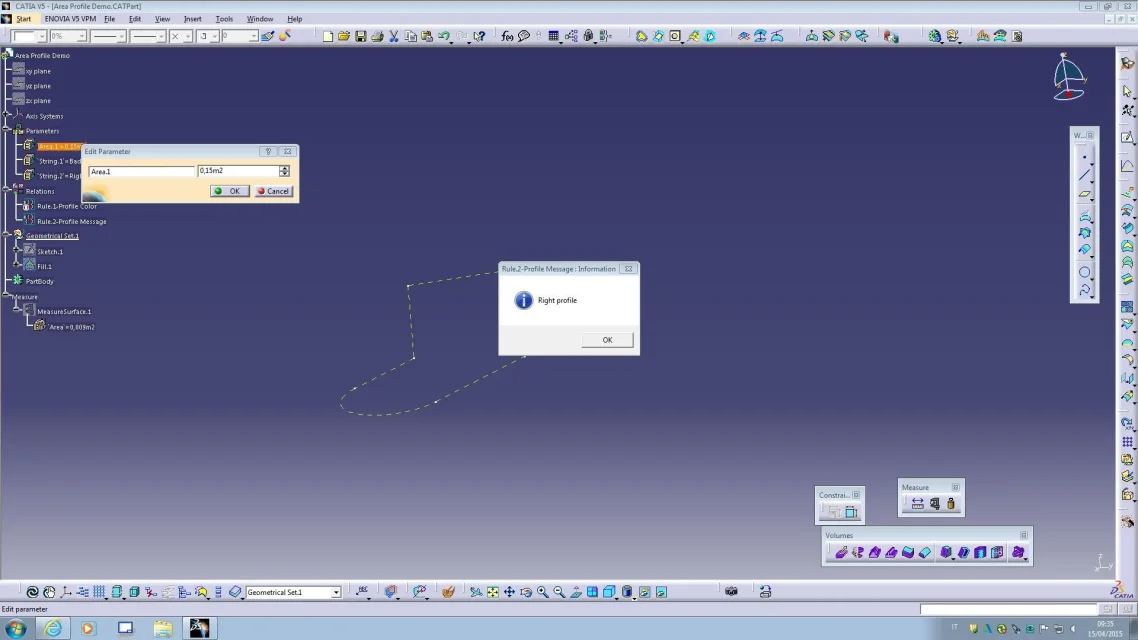
I send a demo that I believe can help
in cases similar to this ...

in the attached file I created a parameter
that fixes a limit area... (changeable to pleasure)
it is clear the sketch I will perform could exceed or not this limit.. .

comfort is that through rules
I can:

1-change color to the sketch output in case the limit is exceeded (then receive a visual signal)Rule Color.webp2-receiving a video message that signals me if the profile is "good" or "bad"Rule Message.webpthe whole is done by inserting, as you will see some parameters; a measure that detects the area
of the sketch, a limit parameter, and two rules, one for the change of color
and one for the message-
as you will see in the file are inserted both.. .
just click on rule and check (disable) to use only one ,
what you believe most useful to report to you the achievement and
overcoming your limit, preceding fixed-
to the
 

Attachments

Forum statistics

Threads
44,997
Messages
339,767
Members
4
Latest member
ibt

Members online

No members online now.
ciao
Back
Top