
• This forum is the machine-generated translation of www.cad3d.it/forum1 - the Italian design community. Several terms are not translated correctly.

[mechanical 2014] cartiglio: how to edit and/or add items.

  • Thread starter Thread starter Vit1
  • Start date Start date

Vit1

Guest
Good morning, I have difficulty in creating a cartouche that contains the voices I need. before proceeding to the realization of a table to be filled with values and figures by hand I would like to understand how it is possible to automate this process.

This is what I see when I try to change the cartilage:
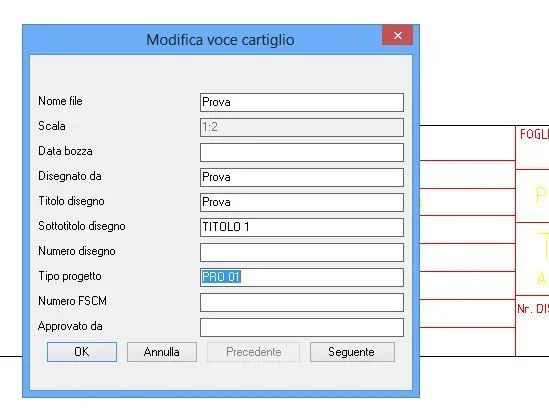
Cartiglio.webpI explain: I would like to add to the cartiglio some voices (for example "group list") to which to associate more values (for example four names with related freshmen).

I would also like to add the symbol corresponding to the chosen view (iso 5456-2:1996), which I cannot do if I do not draw it by hand.

Thank you!
 
I go to the eye, and logical, because I don't have the program.
those voices that appear to you correspond to the attributes contained in the cartiglio (which is nothing but a dwg inserted as a block). open the card design and add all the attributes you need.
for the second problem just create two identical cards apart from the representation of the projection method
 
for the symbol you have to draw it, but not every time, enter the block (edit block) and:
1) drawings
2) exit the block saving
3) You always have it, when you put that cartilage on another design there will be the symbol.

for synchronization and modification of attributes, if I remember well command _battman

Hi.
 
Hi.
I don't know if you have already solved, I also use mech 14 and I usually use the cartilage with attributes (you can play with the fields, for example to automatically insert the date of creation or saving the file) and various symbols (wrinkles etc) that, sometimes serve, others do not; I use a visibility parameter to hide the symbols I don't need.
If you explain to me in detail or send me an example of what you need, I think I can help you.
I try to allegar you my cartilage as an example View attachment 378 do not look after the symbol type and description I put a couple of random symbols only x let you understand the operation, just click on the blue arrow that appears when you select the block and opens a curtain where you choose what to show

Hi.
 
Hello, everyone.
I sneak in here to avoid opening a new discussion like that.
the last time I created a set of custom sheet and paper formats, I used autocad 2006.. So there were still dinosaurs.. :
I am now with mechanical 2014 and I have created a new cartilage (with attributes) and a custom board a4.
All of this is smooth.
But... I don't remember how to insert my custom carts and edges so that they appear in the selection list of them, that is here:
2014-02-21_084714.webpgrazie.
 
instruments>options> am-standard card
double click on the voice sheet and access them directly to the folder where the files are contained
 
Sorry you know how to set the field designed so you don't have to change it every time.
 
inside the block select the attribute that interests you and through the properties imposed the voice constant come si.
 

Forum statistics

Threads
44,997
Messages
339,767
Members
4
Latest member
ibt

Members online

No members online now.
Back
Top