
• This forum is the machine-generated translation of www.cad3d.it/forum1 - the Italian design community. Several terms are not translated correctly.

mechanical properties product

  • Thread starter Thread starter marcofa
  • Start date Start date

marcofa

Guest
I have a set z consisting of many subaximes b c d
making the inertia measure (mass) of the total z I found a weight enormously higher than expected.
by clicking property/mechanical I checked the masses of each subassieme and found a b (670 kg) .
opening b alone the mass is correct (72 kg)
in the axieme z I tried to replace b with the original b, but at the verification the mass is always 670
closing and reopening everything does not change: b in z weighs 670 and b alone weighs 72
mystery magic or spirits?
Thank you.
Mar
 
1. I hope you have attributed the material in catpart b correctly. if you have only one material in question this must be inserted directly into the logical tree at 1.level

2. you tried to insert b into a new catproduct. do you have the same result?

Maybe I'll take a look at the catpart.
 
I have a set z consisting of many subaximes b c d
making the inertia measure (mass) of the total z I found a weight enormously higher than expected.
by clicking property/mechanical I checked the masses of each subassieme and found a b (670 kg) .
opening b alone the mass is correct (72 kg)
in the axieme z I tried to replace b with the original b, but at the verification the mass is always 670
closing and reopening everything does not change: b in z weighs 670 and b alone weighs 72
mystery magic or spirits?
Thank you.
Mar
Maybe you left leotards inside the other parts, if there are solid geometries, they become part of the sum.

Hi.
 
I would like to join in this debate to ask you a question.
is it possible to exclude some body within a catpart before a global count of the "inertia measures" of a catproduct?
 
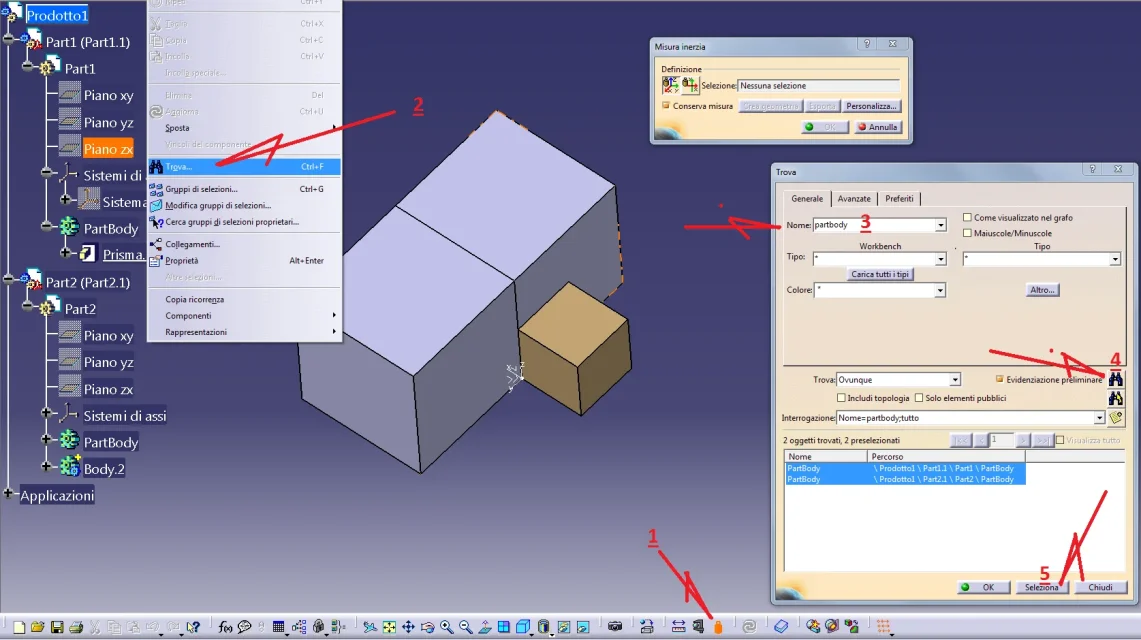
calcolo masse.webpIf you have given significant names you can use the find commando to filter the body.

1 calls the mass calculation commando
2 ctrl+f (or change menu + find)
3 type the name of body or partbody
4 clicks on serch
5 clicks on select or ok
calcolo masse II.webpHowever, I notice that with some catia licenses it may not work.

Hi.
 
All right, we're clearing up, like always.

so, to exclude bodywork it is enough to enter the command finds, do an advanced search of the type "body" and then uncheck the unwanted ones (at the end of the project I am faster this method than rename all the body concerned).

ps: if someone wants to use this method, but after all the procedure, when clicking the "select" button (or ok) nothing happens, the reason is that in your selection there is an empty body.
There will be no specific error, but it will simply not start the calculation of inertia measures.
 

Forum statistics

Threads
44,997
Messages
339,767
Members
4
Latest member
ibt

Members online

No members online now.
ciao
Back
Top