
• This forum is the machine-generated translation of www.cad3d.it/forum1 - the Italian design community. Several terms are not translated correctly.

messa and tavola problems

  • Thread starter Thread starter diegox160
  • Start date Start date

diegox160

Guest
Bye to all,
I have a problemone at work are making me learn creo direct modeling, from a 3d design I made the table putting, which I saved but unfortunately by mistake I did not save the 3d design attached to it there is way to connect the table to the 3d design without having to remake the table?

Thank you very much

disability
 
If there is a procedure you can tell me step by step.

Thank you very much

disability
 
you need to use the "league view" or "link view" command that I don't remember now precise under which drop-down menu is in version 19, but I remember that it is in a menu other than that containing allega design copy, allega design variant etc.

the procedure is as follows:
- load the 3d and regenerate the views if it is possible with the same orientation you used the first time
- if there was any section between the views, obviously you need to remake more or less the same section line you had previously done.

in this in the 3d structure tree will appear at the top a kind of sheet with pink paper, that sheet contains your ties with 2d views, in fact if you also explore the pink symbol will appear to you the names of the newly created views.

now load the file.mi that obviously you appear red, but with the command "link view" you can connect to one of the views 2d views with quotas etc that will appear in the tree structure of the menu design of annotation, to the 3d views found in the tree structure of the menu structure always in annotation.

I'm sorry if I wasn't clear, but I'm going back to the office on Monday.
 
I have the same problem (with 18.0). the command "link view" would not seem to exist.
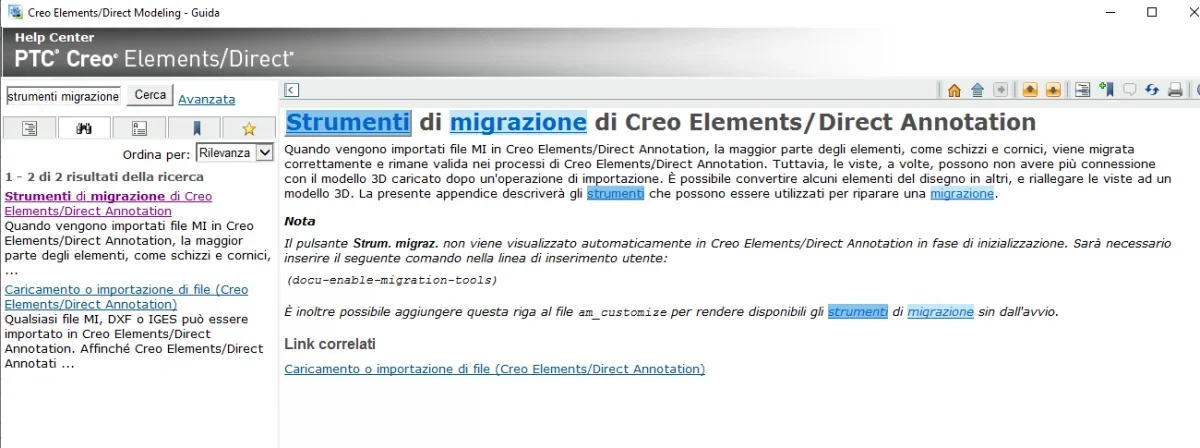
you have to activate the " migration tools". that will appear to you the relative commands between the toolbars of annotation.
1669828663266.webp
 
when I execute the command "allega vista" I can select the view 2d but I cannot associate it with the reference 3d. the following:wetevrt.webpAnd yet that's it.
 
when I execute the command "allega vista" I can select the view 2d but I cannot associate it with the reference 3d. the following:View attachment 67015And yet that's it.
The most common mistake is that the 3d was not saved after making the table. the thing is necessary as when the views are generated, the cad writes in the part the orientation of the drawing views. if the rescue is not done, it is impossible for module 2d to go back to the association of views with the corresponding model 3d (in the design tree you will see the "red" views).

if your problem is this you have to resort to a trick, i.e. generate new views in annotation in the existing design, disconnect them from the 3d, and then associate the old views disconnected to the new definitions just created in the 3d model.

then:

1) I have red views
(2) I create provisional views in annotation with the same orientation as those disconnected
3) I collect the newly created views, command "separa vista"
4) gate newly disconnected views from 2d
5) I associate the old views in 2d to the new definitions in 3d, command "allega vista"
 
Last edited:
The most common mistake is that the 3d was not saved after making the table. the thing is necessary as when the views are generated, the cad writes in the part the orientation of the drawing views. if the rescue is not done, it is impossible for module 2d to go back to the association of views with the corresponding model 3d (in the design tree you will see the "red" views).

if your problem is this you have to resort to a trick, i.e. generate new views in annotation in the existing design, disconnect them from the 3d, and then associate the old views disconnected to the new definitions just created in the 3d model.

then:

1) I have red views
(2) I create provisional views in annotation with the same orientation as those disconnected
3) I collect the newly created views, command "separa vista"
4) gate newly disconnected views from 2d
5) I associate the old views in 2d to the new definitions in 3d, command "allega vista"
I'll try.
I'll sign this right away.
Thank you for sharing this trick.
 

Forum statistics

Threads
44,997
Messages
339,767
Members
4
Latest member
ibt

Members online

No members online now.
Back
Top