• This forum is the machine-generated translation of www.cad3d.it/forum1 - the Italian design community. Several terms are not translated correctly.

Modeling problem (part2)

  • Thread starter Thread starter Biggmetals
  • Start date Start date

Biggmetals

Guest
Aloha!
sorry if my questions may be trivial but by self-taught I am trying to learn as much as possible;
I find myself in front of a problem that I can't solve in any way, I also searched on the forum but I found nothing about it.

I think only from the screens is my problem.
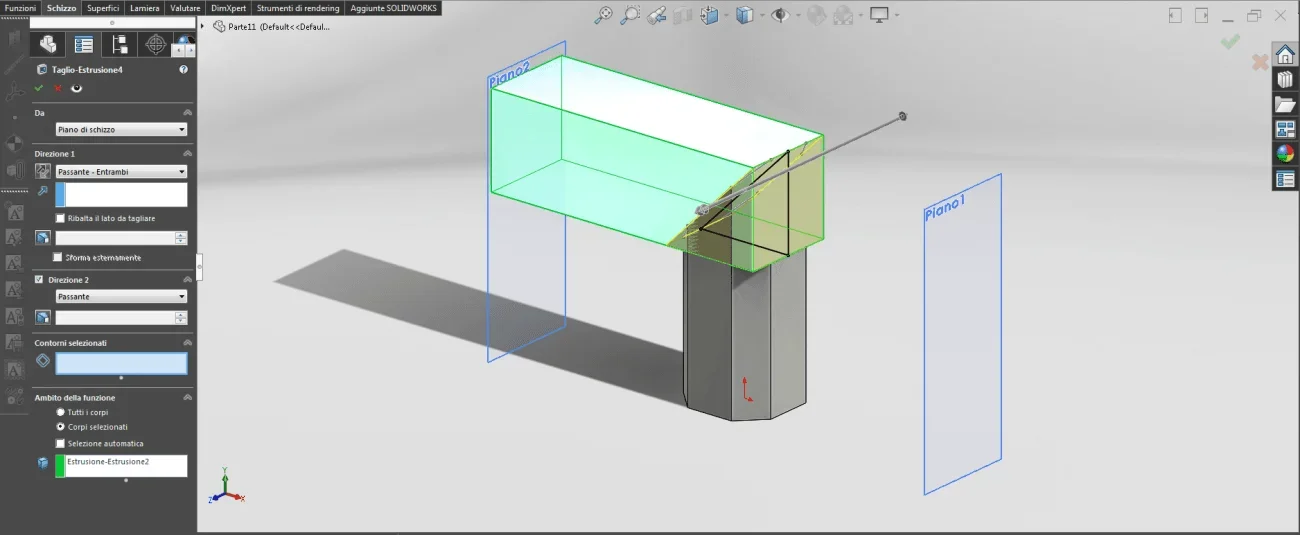
the left piece has already been modeled on solid while the right one is what I am playing but with different measures. (both for work needs and for teaching)

Now: how do I make the option that does not appear to me appear, i.e. "the scope of the function"?Immagine.webpImmagine2.webpI apologize if it's a question of m, but I don't know what else it is....
 
with the file you could do some analysis to figure out how you did the model, and we're not talking about the model of a shuttle drive... because this reticence to attach a file since they attach the images.
At first I would say that you don't get that voice because you're making a cut that intersects one body.
in the figure on the left it seems that the hexagon comes wine to the green body while in the one on the right not.
then because with a simple triangle you should use the contours select I do not understand it; if you are activated automatically means that the sketch has open or intersecting contours.
I would take with the springs also the model to the right that to make two bodies united to corner ah made 4 functions, 3 floors and an external sketch
 
At first I would say that you don't get that voice because you're making a cut that intersects one body.
I correct the above. even if the sketch intersects only one body is equally proposed the choice of the body.
The only way not to make it appear without your file to be analyzed is to have a unique body. this would also explain the final result that you see right in the second 'image.
 
with the file you could do some analysis to figure out how you did the model, and we're not talking about the model of a shuttle drive... because this reticence to attach a file since they attach the images.
I attach my (dx file) and apologize if I didn't do it before, but I didn't get permission for the sx file, currently in production from us.
edit: since I found the solution I removed the file in the attachment, to avoid dicks at work (as well as the dick from mass). I think screens are more than enough to understand the problem and its solution :rolleyes::cautious:
At first I would say that you don't get that voice because you're making a cut that intersects one body. in the figure on the left it seems that the hexagon comes wine to the green body while in the one on the right not. then because with a simple triangle you should use the contours select I do not understand it; if you are activated automatically means that the sketch has open or intersecting contours.
I understand that without file it may seem but how you can see from the attached file the bodies meet exactly as in the left file.
regarding the selection of contours I selected it during my tests to activate that "area of function" option and left it selected.
I would take with the springs also the model to the right that to make two bodies united to corner ah made 4 functions, 3 floors and an external sketch
the sketch serves for the creation of plans (some already present) that follow it for later functions;
They were active because I was moving forward with modeling.
I correct the above. even if the sketch intersects only one body is equally proposed the choice of the body.
The only way not to make it appear without your file to be analyzed is to have a unique body. this would also explain the final result that you see right in the second 'image.
I may have understood what you mean, now I see if I can solve, in case I place immediately :unsure:
 
Last edited:
even under big dicks always has the solution! Thank you very much!
Immagine.webpImmagine.webpin the extrusion function 2 (that parallel to the upper floor to understand us, the rectangle) it was enough to remove the tick to "unisci result" and voilà!

I'm sorry if it was a cabbage... :rolleyes:(
 
I attach my (dx file) and apologize if I didn't do it before, but I didn't get permission for the sx file, currently in production from us.

edit: since I found the solution I removed the file in the attachment, to avoid dicks at work (as well as the dick from mass). I think screens are more than enough to understand the problem and its solution
in fact it was enough your file with the only two bodies.
in fact screens were not enough, unless you have the feature manager flanked so you see that there was only one body. precisely because it was a cabbage is not the first thing that you go to think also because certain options to set you give for granted (unless the moment of blackout happens to everyone).
Unfortunately the dicks are my way of interacting; I'm sorry if I'm heavy and brusque, but at my side there is the fact that after years of forum we find ourselves always saying the same things (not only to you benign) and is to the long tiring. then it's a little rough and stron%o is a fact.
peace and peace
 

Forum statistics

Threads
44,997
Messages
339,767
Members
4
Latest member
ibt

Members online

No members online now.
Back
Top