• This forum is the machine-generated translation of www.cad3d.it/forum1 - the Italian design community. Several terms are not translated correctly.

move command icons

  • Thread starter Thread starter saracf
  • Start date Start date

saracf

Guest
good day, often using the student command that is located <nascosto> Under the menu, I would like to know if it was possible to exchange the student's icon with the front door (which I never use) .

I have tried with the classic right-click on icons or menus without being able to do anything, explain to me whether and how it is possible to perform such exchange?</nascosto>
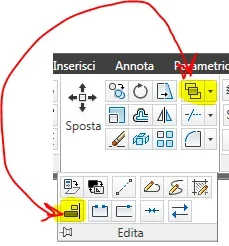
 

Attachments

  • sostituisci-edita.webp
    sostituisci-edita.webp
    10.4 KB · Views: 24
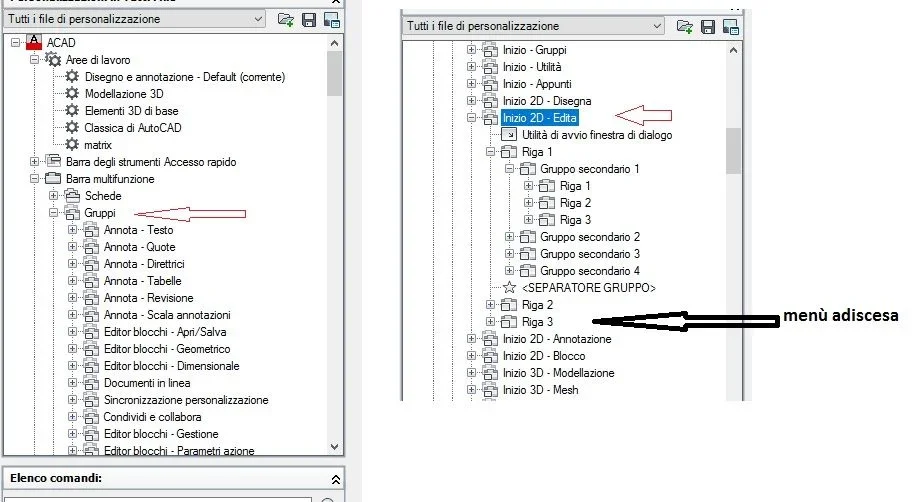
all autocad icons, classic or ribbons, are managed through the customization window of the commands to which.
then write in the command bar to which and look for the group card where you have those icons.
I'll give you a screenshot to direct you. before moving icons (just dragging from one group to another) check that the entries you read correspond to your layoutImmagine.webp
 

Forum statistics

Threads
44,997
Messages
339,767
Members
4
Latest member
ibt

Members online

No members online now.
Back
Top