
• This forum is the machine-generated translation of www.cad3d.it/forum1 - the Italian design community. Several terms are not translated correctly.

move / copy

  • Thread starter Thread starter braunfish
  • Start date Start date
vicular is fine, only that it is slower to put every time three constraints than to make a move/copy as in other software.
if I have to copy a piece 25 times by moving me we suppose only in x but always of different values (type 100, 120, 80, 75, 45, 120, ec...) and I have to reinvigorate, I have to put 25x3=75 constraints!
test so
new together
insert the particular
creates the series
select the elements and make them independent
eliminates the series
at this point dx key on the single item select iproperties
recurrence card
change the offset and fix
 
to help those who do not know how and where to copy:
- alt-f11 to access chermata vba (visual basic for application)
- as you will see at the top left there is a panel, expand project application (non document project) subfolder modules
- there should already be module1 (you can insert or import others as you see in the menu in the attached figure)
- double click on module1 and make a copy and paste of the macro mail. if everything goes well the code will be black and green comments, red rows have problems (type badly copied)
- customise user commands to have a button that activates the macro.

Hello, everyone!
as always!!,big catafract:36_1_11::4425:
 
to help those who do not know how and where to copy:
- alt-f11 to access chermata vba (visual basic for application)
- as you will see at the top left there is a panel, expand project application (non document project) subfolder modules
- there should already be module1 (you can insert or import others as you see in the menu in the attached figure)
- double click on module1 and make a copy and paste of the macro mail. if everything goes well the code will be black and green comments, red rows have problems (type badly copied)
- customise user commands to have a button that activates the macro.

Hello, everyone!
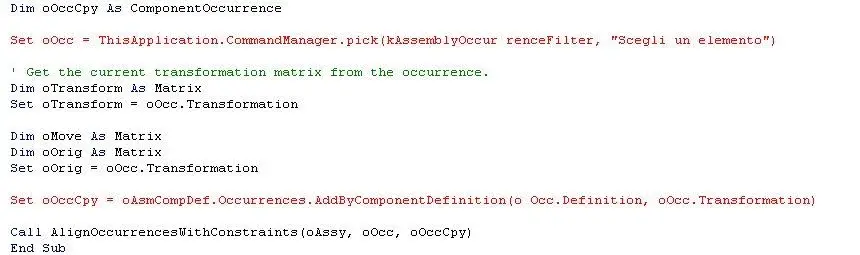
You give me these lines in error, what do you recommend?
 

Attachments

  • Cattura.webp
    Cattura.webp
    25.6 KB · Views: 7
You give me these lines in error, what do you recommend?
I see spaces in the red rows, definitely due to copy/paste: it should be enough to delete them. or:
... kassemblyoccur rencefilter.. .
... or occ.definition.. .

deleted space by changing row this should become black. Let me know. .
Bye!
 
Okay, the lines are now fine.
Now I get a "run-time error 91 - object variable or with block variable no set"
and shows in yellow this line "set oasmcompdef = oassy.componentdefinition"
Thank you.
 
Okay, the lines are now fine.
Now I get a "run-time error 91 - object variable or with block variable no set"
and shows in yellow this line "set oasmcompdef = oassy.componentdefinition"
Thank you.
to work there must be an open and active set (in the sense, the last window on which you clicked vba aside): Otherwise that error is generated. There may be other causes, but exclude me this first:smile:
 

Forum statistics

Threads
44,997
Messages
339,767
Members
4
Latest member
ibt

Members online

No members online now.
Back
Top