
• This forum is the machine-generated translation of www.cad3d.it/forum1 - the Italian design community. Several terms are not translated correctly.

move entire archive and program settings

  • Thread starter Thread starter Davimont
  • Start date Start date

Davimont

Guest
The new workstation is finally here.
First question.
I currently have my archive in
c:\work\ archive\

while on the new machine I wanted a second disk to keep the data divided from the os, so the path will be

d:\ archive

in redefine links should I set the fields like this?1710343515893.webp
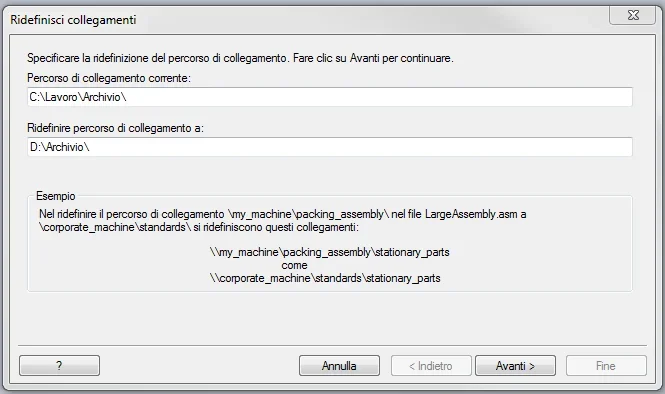
Do I have to make any arrangements?

according to question

I have in "c:\labor\se config" all my personalizations and templates (I copied the whole folder on external hardisk as backup) but I also used the function of if (now are on st10) assistant settings & preferences and I saved the sepref file.
on the new if it is still compatible the sepref file or in later versions has changed something?
Is it better to use this procedure or is it better to arrange things manually since I have the copy of everything?
 
The new workstation is finally here.
First question.
I currently have my archive in
c:\work\ archive\

while on the new machine I wanted a second disk to keep the data divided from the os, so the path will be

d:\ archive

in redefine links should I set the fields like this?View attachment 70683
Do I have to make any arrangements?
for the first question, if you're lucky you don't have to do anything. solid edge (depending on how the linkmgm.txt file is set) usually solves the "fall" links from the first directory and then going deep. If all your files are in "archive" doesn't matter the level of nesting of this, the important thing is that there are no other solid edge files scattered around out of this directory and kids.

I don't know why I never used this function. I usually carry and re amounts the registry key.
 
Last edited:
thanks hunter
so I can copy my archive and try to open some together, if everything row smooth then I don't touch anything.

the linkmgmt.txt file has inside this:
container
relative
absolute

begin search path

end search path
Can I leave him like this?

for the speech preferences does not convince me the copy of the right registry keys because maybe from win7 to win11 and from se10 to if current could have changed something that could cause some instability. but I would like to know which keys you refer to.

It is also true that I can ask for assistance how to import preferences, the first installation of if I have to do it with them because it has gone too long from the subscription, they told me that the installation was done within a month otherwise you would have to pass from siemens servers, more I do not know.
 
for discourse settings you cannot use the preferences of st10 for later versions. the command was created to copy settings on multiple workstations with the same version.

the compatibility of settings between different versions has been introduced with if 2024, so when it comes out if 2025 we can use the settings of if 2024
 
Well, then the .sepref file can also throw it.

but are the classic propseed.txt, gagetable.xls or materials.mtl compatible by copying them manually? It's not impossible to do it again, but it's a great job.

and for the macro speech has changed something in the later versions?
I have 4 or 5 macros I use habitually and using the .exe file trick renamed with the same file name. I hope they keep working. 🥲
 
Well, then the .sepref file can also throw it.

but are the classic propseed.txt, gagetable.xls or materials.mtl compatible by copying them manually? It's not impossible to do it again, but it's a great job.

and for the macro speech has changed something in the later versions?
I have 4 or 5 macros I use habitually and using the .exe file trick renamed with the same file name. I hope they keep working. 🥲
you can reuse everything
 

Forum statistics

Threads
44,997
Messages
339,767
Members
4
Latest member
ibt

Members online

No members online now.
Back
Top