
• This forum is the machine-generated translation of www.cad3d.it/forum1 - the Italian design community. Several terms are not translated correctly.

move views to the drawings above or under other views

  • Thread starter Thread starter malf
  • Start date Start date

malf

Guest
Hi, I've been trying to figure out how to solve this seemingly simple problem, looking with various English and Italian queries but I don't come up with it.
If I have a shaded view in a sheet of a drawing (sw 2020) and I want that visually overlap to another shaded view I can't change which should be above or below.
I try with the layers (livelli), it seems that the views cannot be assigned to the levels, at least not one by one (better?). I move one on one level, they go after all the others.
then there is the mysterious right-click "lock view in the foreground". if I open the solidworks guide and write the query "lock the foreground view" they also wonder what it is.
Sometimes the views even intersect (Annex), that, if you wanted to do it maybe I would not have found in a thousand years a software that would allow it.2020-09-11_122354.webp
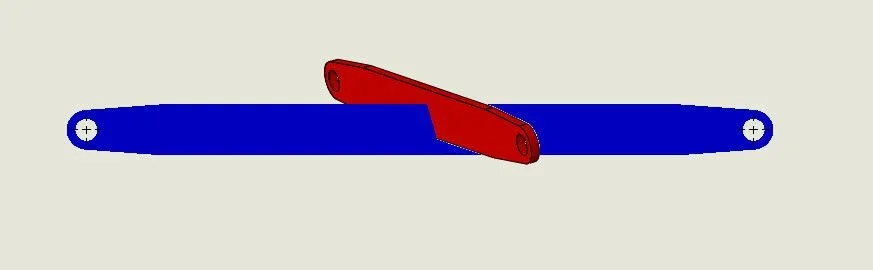
un suggerimento?
 
If I have a shaded view in a sheet of a drawing (sw 2020) and I want that visually overlap to another shaded view I can't change which should be above or below.
simply because it is not a graphic softwae and most likely no one has ever made such a request. you can still open a request because they implement this possibility.
then there is the mysterious right-click "lock view in the foreground".
you need to always have that active view when you insert annotations or sketches.
normally views are activated when you place above; If for example you want to insert an annotation the view where you pass the cursor is represented with marked corners. the mode locks in the foreground it activates that given view even if you place on another
Sometimes the views even intersect (Annex), that, if you wanted to do it maybe I would not have found in a thousand years a software that would allow it.
are those in the image 2 seen? attach the design thanks
 
I can't open this version of the files, but can you anticipate the sense of this magheggio instead of making an axieme or a multibody part?
and what would you do in the drawing that you attached? it seems correct
 
No, this was just a curiosity. the fact that two views can not only stand one above and one below, but also somehow intersect. we say that intersection is hardly a desired result. instead I would like a view to stand on another, and I would like to decide which view above and which below.
For example if I wanted the image below, which shows various configurations of the same part I would be forced to exit the design and build an assembly. and the thing is not always possible, if the views I want to order are, for example a detail that ends under another view... I think there must be a way to adjust the overlap of views.2020-09-11_135151.webp
 
I think there must be a way to adjust the overlap of views.
Why? I think it is a very special use of the design environment that is not structured for these needs. do not trait autocad 2d where you create axioms with two-dimensional figures.
If the first example I can understand, even if I would tell you to flank the views without surmounting them, the second in my opinion makes no sense because the detail positions where the bale does not break.
to do similar things, which seem suitable for manual, was created composer.

However I don't know how to help you because it doesn't prove possible to me and also looking in other forums I didn't find similar requests to yours, so how much I wrote is mere philosophy.

However, as mentioned, you can apply, if you are on subscription, to supplement this need in addition to contacting assistance.
 
Okay, thank you. Unfortunately I was on subscription until 2019 and I made time to update until service 0 of 2020
you're right about composer, I have to learn how to use it
 

Forum statistics

Threads
44,997
Messages
339,767
Members
4
Latest member
ibt

Members online

No members online now.
Back
Top