• This forum is the machine-generated translation of www.cad3d.it/forum1 - the Italian design community. Several terms are not translated correctly.

multisection operation (loft)

  • Thread starter Thread starter iceman_461
  • Start date Start date

iceman_461

Guest
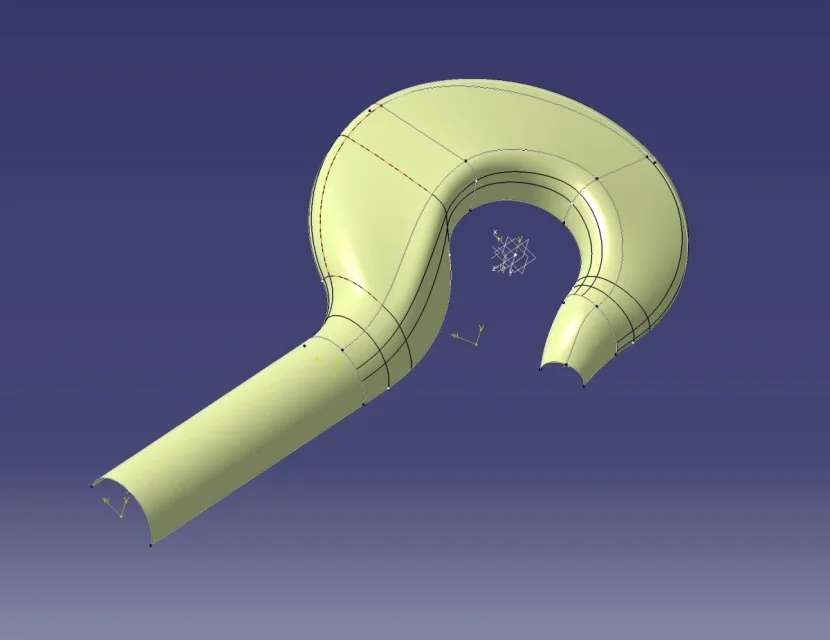
Hello to all I am experiencing problems with multisection extrusion, despite the analysis tell me that all the curves are closed I have the following error: "Impossible to homogenize sections before the calculation of loft" how can I continue?
Thank you very much to those who will help me.
 
you have to make sure that the closing points are on the same side (try with guide 1) to change it select it, then dx button replace. then do the same for the direction (the red arrow that originates from the point, the direction must be set from the same towards all the sections, otherwise the generated surface tries to pile up like the paper of a candy. to reverse the direction click on the brake. Let me know.
 
when you make a model with the multisection command, in addition to always set the closing point in the hypothetical starting point you have to check to have the same number of segments in the sketch.
 
you have to make sure that the closing points are on the same side (try with guide 1) to change it select it, then dx button replace. then do the same for the direction (the red arrow that originates from the point, the direction must be set from the same towards all the sections, otherwise the generated surface tries to pile up like the paper of a candy. to reverse the direction click on the brake. Let me know.
hi good morning, I tried to "order" the closing points and to correctly set the directions but that error in the photo always comes out.
 
ill problem creates me the stew_ext, I provote only with the stew_int me estrude correttamente.
You should check the ext guide if you have inconsistencies
you have to do more tests, for example, start with the first sections and see if it works and add away until you find out where "you plant"

can you post the file?
 
Let me know if the file reads. the problem gives me in proximity to the right section, i.e. sez_ass.
Thank you very much
 

Attachments

You have a student license and I can't open it. . .

as said bonzorosso, the number of segments in the sections is preferable to be equal.

If you do a test, in your case it should work if you only use the sez 1 and 2 or 3 and 4 or 5 and 6.

you could try setting the relationship mode in the mating tab
 
from your file the problem is that you have to do the 2 external lines you have taken all the contour that is closed both the transverses in correspondence of the sections
 
It would be done with support managers to move from a semicircle to the other section, then I wouldn't have closed the sections, but that could be fine................ I can't fix it on the flight. I don't have time.................... Maybe later
 
I did a quick thing.... not even done too well... .
I practically copied your sketches x "brogliare" the 2 outline and inside hook
I opened the sections so as not to have the part below
I have broken the 2 internal and external sketches on each section, to make the hook to pieces
I added at least 1 guideline to "forcing the round part in that straight

Try now to try to do the one written above, it is more difficult to explain that to do it............ .
But it takes a little time. ..... .
 

Attachments

  • Immagine 2023-06-14 154452.webp
    Immagine 2023-06-14 154452.webp
    34.4 KB · Views: 9
I still gave a quick eye...... the sections is better to keep them whole then mirror the sketches of the sections so as to have the whole sections ....... then it must be tried to make lofts, adding spline x to make go lofts in the desired direction, it must be copied and modified the master sketch 2 times to have only the 2 external and internal directions that stop on the last sections......... or better still make everything......... the sections must then have a sense even at the management level regarding the guidelines ................ then put back x see how you go on.........
 
thank you very much to all of you for the answers and for the ideas. If that's true, I did. later place the file.
 

Forum statistics

Threads
44,997
Messages
339,767
Members
4
Latest member
ibt

Members online

No members online now.
Back
Top