• This forum is the machine-generated translation of www.cad3d.it/forum1 - the Italian design community. Several terms are not translated correctly.

new functions sw 2011

  • Thread starter Thread starter PiegatoreSolidworks
  • Start date Start date

PiegatoreSolidworks

Guest
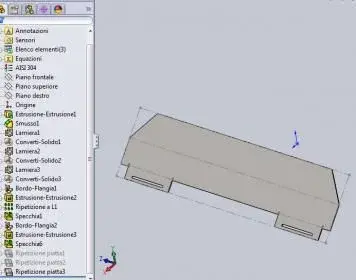
I tried 2011 and came across a "problem": I tried the new function of the plate flange mirror and it works but only if used once! if I apply it on the usual file on a second sheet visually works but in reality does not "explain" the result....
question: is it a bug or something normal?
 

Attachments

I tried 2011 and came across a "problem": I tried the new function of the plate flange mirror and it works but only if used once! if I apply it on the usual file on a second sheet visually works but in reality does not "explain" the result....
question: is it a bug or something normal?
as you may have noticed, the mirror function works, only that you can
apply to the same body and not to two separate bodies.
in the attached files you will find, one with your object modified by me (I deleted a body and mirrored the one on which the incriminated flanges lie), the other, instead, is how I would have built it.
known that you did the part to weld on long sides, it is not logical.
pieces like those, given also the contained height, are easily
made in one piece.
nb: in my version I did not respect your flange measurements, I am fancy.
:wink:
 

Attachments

as you may have noticed, the mirror function works, only that you can
apply to the same body and not to two separate bodies.
in the attached files you will find, one with your object modified by me (I deleted a body and mirrored the one on which the incriminated flanges lie), the other, instead, is how I would have built it.
known that you did the part to weld on long sides, it is not logical.
pieces like those, given also the contained height, are easily
made in one piece.
nb: in my version I did not respect your flange measurements, I am fancy.
:wink:
thanks for the mike answer, you are right the piece should not be executed so but it is only fancy to try the new features of 2011 including the "hold body" of the function "converted sheet" and then the mirroring of the "flange edge". in the file in 3 pieces the function "specchia6" doesn't even work to you, maybe you didn't notice it, while the "specchia7" where you mirrored all the side including the flanges is explained very well. the "specchia6" when using the "flattened" command remains however bent even if everything seems visually perfect!
 
thanks for the mike answer, you are right the piece should not be executed so but it is only fancy to try the new features of 2011 including the "hold body" of the function "converted sheet" and then the mirroring of the "flange edge". in the file in 3 pieces the function "specchia6" doesn't even work to you, maybe you didn't notice it, while the "specchia7" where you mirrored all the side including the flanges is explained very well. the "specchia6" when using the "flattened" command remains however bent even if everything seems visually perfect!
Yes, it does not develop.
thinks I did a linear repetition and mirroring operation
in a new file, and everything goes smoothly.
I'm afraid it's gonna take a couple of years before I have the multibody plates.
reliable.
I always work in the environment together, every lam. a separate file and row everything smoothly.
I use the multibody only for very simple objects, also why go to take
the bodies of an object with 20 positions (when they are few) become crazy. not to mention the weight of the file.
in the environment together, instead, it is all very manageable, starting with the names of the parts.
in fact in the multibody sheets lacks the ball and the possibility to have a unique name for each component.
if, then, malauguratedly, add or remove structural functions after putting at the table... begins to pray.
Try to believe.
I'll get you the test file.

hello and good year!
 

Attachments

for bending and mike1967:
the reason why it does not develop is because you use functions not of the sheet environment.
the sheet metal environment, as in other cads (if,nx,iv,catià,pro-e) is a separate environment, in the sense that there are controls so that the user can not create parts that do not comply with the requirements for the development of the part.
in your case, you used the fitting command that is not of the sheet environment.
if you replace your command with that of the toolbar and in this case you use it after mirroring, you will see that it develops.

all sw are better and every year prove it, but I think sw and in this case its sheet environment is to a more than discreet development state.
 
for bending and mike1967:
the reason why it does not develop is because you use functions not of the sheet environment.
the sheet metal environment, as in other cads (if,nx,iv,catià,pro-e) is a separate environment, in the sense that there are controls so that the user can not create parts that do not comply with the requirements for the development of the part.
in your case, you used the fitting command that is not of the sheet environment.
if you replace your command with that of the toolbar and in this case you use it after mirroring, you will see that it develops.

all sw are better and every year prove it, but I think sw and in this case its sheet environment is to a more than discreet development state.
and... yes!!! I would also like a platonic world:biggrin:. Try with this file that doesn't even have a connection.. .
with regard to the environment sheet metal... It is better, but I don't understand why they don't give us much care to this market branch.
 

Attachments

and... yes!!! I would also like a platonic world:biggrin:. Try with this file that doesn't even have a connection.. .
with regard to the environment sheet metal... It is better, but I don't understand why they don't give us much care to this market branch.
I have however solidworks 2012...:biggrin:
the options to activate in the commands must be known, you cannot activate to feeling.
 

Attachments

  • app.webp
    app.webp
    10.7 KB · Views: 27
I have however solidworks 2012...:biggrin:
the options to activate in the commands must be known, you cannot activate to feeling.
Well, now tell me what you did. :rolleyes:
this afternoon I designed a similar pz and it worked perfectly.
I tried and tried again, I will be prevented, but in that side file, unless you create an ad hoc configuration, you do not spy on me.
Maybe I miss something, but I don't explain these differences in pieces
almost identical.
I'll wait for you. :wink:
 
Well, now tell me what you did. :rolleyes:
this afternoon I designed a similar pz and it worked perfectly.
I tried and tried again, I will be prevented, but in that side file, unless you create an ad hoc configuration, you do not spy on me.
Maybe I miss something, but I don't explain these differences in pieces
almost identical.
I'll wait for you. :wink:
remove the 'normal cut' option.
that option should only be used in cases where you drill a cylindrical part.
read the help explaining the use of that option.
 
remove the 'normal cut' option.
that option should only be used when drilling a cylindrical part.
read the help explaining the use of that option.
I'm sorry, but I think that in almost 12 years of sw usage I've already understood
the use of the option... "normal," you think?
As you say, I don't want to make confusion with your statement:
normal cuts are used in those cases where there is the need for a net edge
and perpendicular to the surface of the surface that intersects.
see video 2.

in video 1, instead, you can check with your eyes that I can't get
the developed part, despite eliminating extruded fittings and cuts.
Good vision.

my system and win xp 32bit sp3 original, sw 2011sp1.
Now I connect to the ws in the office (teamviewer) and try with that, although
I know it's like this house.
But do you know how many times what happens on my car can't possibly be in the same ws as my partner??
explain.

No matter what, you know that I think you're competent, that's why I admire you. :finger:

In fact, if you'd like, I'll give you my teamviewer id, let me know I'll give you the pass.
 

Attachments

I attach your file, removing only the mentioned option and it works.
try to remove it yourself and make a ctrl+q.

regarding the use of that option you show in your videos, it is not the use it was thought for.
You want to run some dumps on a face that's not that of the sketch.
with that option, you get a normal cut, but it's a projection.
use is the one shown in the attached image.
Why is that option born?
to avoid a function, that of the 'distendi', repeated for all times you make a hole on cylindrical face.
then it is used even when the extruded cut is a little on the flat face and on the fold.
Clearly the sketch is on the flat face.
You have to enable that option, otherwise laser cutting makes a mess because on the flattened you will find two edges.

p.s:The forum reduces the size of the image and therefore it is useless to insert it, because you do not see the difference, but you can try it in person.
 

Attachments

I attach your file, removing only the mentioned option and it works.
try to remove it yourself and make a ctrl+q.

.
So, I'm telling you again: I've taken off the check, I've even erased the two extruded cuts, but there's no way.
Do you want to hear a good one?
downloaded your file... It works.but the glory lasted little: I erased the mirror and tried to remake it, result??

with my pc does not developaaaaaaaaaaaaaaaaaaaaaaaaaaaaaaaaaaa...!!!
Last chance... teamviewer.
I don't go any further with this discussion.

about the normal cut.... http://help.solidworks.com/2011/ita...egacyhelp/sldworks/sheet_metal/normal_cut.htmI don't see where it says it's only used on cylindrical parts.
i 1000/1500 drawings where it is present I went to cul@:biggrin:
 
You want to hear another beautiful one:I put the check mark on "normal cut" and on your file the piece develops
perfectly
, so there is something to consider different from mine.
But is it strange that you do not develop with the normal t activated?
how ever on my pc the file saved by you develops me, while instead
If I gate destroyed cuts and try to remake the mirror do not go??? ?

If some pious soul wants to make some evidence... I'd be delighted.
One thing is certain: with win xp32bit do not go... (provided at home and office)
 
in this video you can see what I described above.
if someone wants to try has the modus operandi.
Denghiu... :wink:
 

Attachments

So, I'm telling you again: I've taken off the check, I've even erased the two extruded cuts, but there's no way.
Do you want to hear a good one?
downloaded your file... It works.but the glory lasted little: I erased the mirror and tried to remake it, result??

with my pc does not developaaaaaaaaaaaaaaaaaaaaaaaaaaaaaaaaaaa...!!!
Last chance... teamviewer.
I don't go any further with this discussion.

about the normal cut.... http://help.solidworks.com/2011/ita...egacyhelp/sldworks/sheet_metal/normal_cut.htmI don't see where it says it's only used on cylindrical parts.
i 1000/1500 drawings where it is present I went to cul@:biggrin:
for the development problem. .. try to download... if you want it and time the sp2ev.
try to delete the first sheet metal creation function and then do undo.

regarding the option, not always the help is clear.
if you attach a file of the 1000/1500 drawings I tell you whether it was necessary or not that option.
the option projects the cut on the surface normal.
If the cut is already normal to the surface, what would it make use of?
If the cut is done on a cylindrical surface, then it makes sense.
or makes sense if the discharge takes both the flange and the fold radius.

in the examples you posted through video, I can't understand the use, as said, you would cut normal (correctly) only the projection of the sketch...so not of real size.

I see it like this, then with some targeted and correct example, maybe we can better understand the use.
 
for the development problem. .. try to download... if you want it and time the sp2ev.
try to delete the first sheet metal creation function and then do undo.

regarding the option, not always the help is clear.
if you attach a file of the 1000/1500 drawings I tell you whether it was necessary or not that option.
the option projects the cut on the surface normal.
If the cut is already normal to the surface, what would it make use of?
If the cut is done on a cylindrical surface, then it makes sense.
or makes sense if the discharge takes both the flange and the fold radius.

in the examples you posted through video, I can't understand the use, as said, you would cut normal (correctly) only the projection of the sketch...so not of real size.

I see it like this, then with some targeted and correct example, maybe we can better understand the use.
where can I download the sp2??
Isn't that the betatester version?
I have already logged in solidworks.com but it is only available
the sp1.
about normal cutting, don't worry, I'm clear about how and where to use it.
Anyway, I don't see why I shouldn't have done those cuts, if I have to pass a square tube or a round tube what I do, I promise the sylouette.. or what's his name?
That method is suitable for the use I have to do, in a single function.
 
where can I download the sp2??
Isn't that the betatester version?
I have already logged in solidworks.com but it is only available
the sp1.
about normal cutting, don't worry, I'm clear about how and where to use it.
Anyway, I don't see why I shouldn't have done those cuts, if I have to pass a square tube or a round tube what I do, I promise the sylouette.. or what's his name?
That method is suitable for the use I have to do, in a single function.
no is for beta testers, you just need to enable the option in your profile.
It's a preview of the S2.

If you have to pass a round or square tube, you must have some game, because if you put the 'normal cut' option, the tube would touch with the lowest edge.
In that case, I don't use that option and then straighten my face or I don't care if I hide the edge in the table so as not to create laser cut cases.
 
no is for beta testers, you just need to enable the option in your profile.
It's a preview of the S2.

If you have to pass a round or square tube, you must have some game, because if you put the 'normal cut' option, the tube would touch with the lowest edge.
In that case, I don't use that option and then straighten my face or I don't care if I hide the edge in the table so as not to create laser cut cases.
What are you saying?
You never used that option otherwise you wouldn't say that.
I link 2 items made to the flight with the enabled option.http://www.3dvia.com/models/70d45c66784a5c6e/esempio-taglio-normale#
http://www.3dvia.com/models/358c112b3d0f2133/the beauty of that option is precisely the fact that it keeps the measurements of the passage
Effective you must have.
do tests, especially with high sheet thicknesses (6-8 mm) so you will be more
evident what I support.
:wink:
 
Do you want to hear a good one?
downloaded your file... It works.but the glory lasted little: I erased the mirror and tried to remake it, result??
with my pc does not developaaaaaaaaaaaaaaaaaaaaaaaaaaaaaaaaaaa...!!!
English .
il troyan reggio.exe is spreading:biggrin:
much better the flu at the point. .

greetings and greetings to all
Marco:smile:

I don't know anything. are in vacation and swx is a week that I do not turn on:biggrin:
 

Forum statistics

Threads
44,997
Messages
339,767
Members
4
Latest member
ibt

Members online

No members online now.
Back
Top