• This forum is the machine-generated translation of www.cad3d.it/forum1 - the Italian design community. Several terms are not translated correctly.

nomenclature holes

  • Thread starter Thread starter rubincarter
  • Start date Start date

rubincarter

Guest
Good evening, boys!
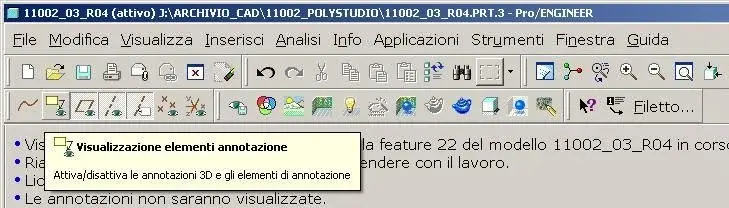
apologize if I still disturb another, simple (for those who know well proe) question. inside a part or a set how do I make the holes created during the modeling appear/discover from the base window?I refer to the words: m20x1 iso, etc

Thank you, as always!
 
Good evening, boys!
apologize if I still disturb another, simple (for those who know well proe) question. inside a part or a set how do I make the holes created during the modeling appear/discover from the base window?I refer to the words: m20x1 iso, etc

Thank you, as always!
there is the button:-), see attached image.
of course the holes you have to have them with the hole function, if you made them with an extrusion cut you do not see a blessed.... .
 

Attachments

  • Immagine2.webp
    Immagine2.webp
    36.6 KB · Views: 25
there is the button:-), see attached image.
of course the holes you have to have them with the hole function, if you made them with an extrusion cut you do not see a blessed.... .
I can't find the icon you described. in the bar above there is not and in the menus that allow to customize the bar even. I have seen in the menu customize to the item view.
possible? Proe version is 3.0

edit: there is the cloud icon with arrow, i.e. the feature anotation, but I do not find that newlet with arrow and eye symbolizing the display.
 
I think it's weird that it's not in the controls.
did you right click on the >comandi toolbar?
 
I think it's weird that it's not in the controls.
did you right click on the >comandi toolbar?
> displays and then I looked for the image icon you post. nothing, there is the display icon of plans, points, axes, but note nothing.
Boh. .

Thanks anyway for your availability! :finger:
 
> displays and then I looked for the image icon you post. nothing, there is the display icon of plans, points, axes, but note nothing.
Boh. .

Thanks anyway for your availability! :finger:
use layers, create a new level called notes, and there positions all the notes of the model.
once you do this, hide the level and save the display status.

Hi.
p-h
 
use layers, create a new level called notes, and there positions all the notes of the model.
once you do this, hide the level and save the display status.

Hi.
p-h
Bye to all,
Speaking of layers, when I am making a complex set and I need layers and axes to assimilate, it happens that I find myself a tide of axes, planes and points....I thought...it is possible to create a layer on which to move all the plans or axes that interest me for assembly, so that in the operating phase I hide all the layers except those in which the layers are present? ? ?

How do I create a new layer?

Thank you.
bb
 
Bye to all,
Speaking of layers, when I am making a complex set and I need layers and axes to assimilate, it happens that I find myself a tide of axes, planes and points....I thought...it is possible to create a layer on which to move all the plans or axes that interest me for assembly, so that in the operating phase I hide all the layers except those in which the layers are present? ? ?

How do I create a new layer?

Thank you.
bb
a little effort.
go to the model tree, show> tree levels> new level
or right button in the tree levels>new level.

for the operation you say I should do 2 tests but in principle it works on the contrary.
 
I would not use the levels for the notes of the holes captions, in the structure of the hole model tree you can simply turn them off, or set the key:
model_note_display on no, they only bothered me.
In the table you can still call back. :smile:
 
a little effort.
go to the model tree, show> tree levels> new level
or right button in the tree levels>new level.

for the operation you say I should do 2 tests but in principle it works on the contrary.
hi maxopus,
You're right... but at the end of the week I'm really fused and I wanted a tip because with layers I never worked and managed... .

I am trying to group the plans that interest me under a single layer for example 000l, but I am not at all sure that it works and if it is the correct procedure.....I also wanted to know how you manage big assemblies and plans............I miss:confused:

Thank you.
bb
 

Forum statistics

Threads
44,997
Messages
339,767
Members
4
Latest member
ibt

Staff online

Members online

Back
Top