• This forum is the machine-generated translation of www.cad3d.it/forum1 - the Italian design community. Several terms are not translated correctly.

notice overcoming value

  • Thread starter Thread starter stefra
  • Start date Start date

stefra

Guest
I wonder if there is a specific command or macro that warns me when in the sheet metal environment the extensions of the flat model exceed a certain value? for example when I exceed the width of the plan development of 1000 mm or 1250 or 1500 mm.
I tried to use automatic delimitation controls, but honestly I didn't understand much..:confused:
 
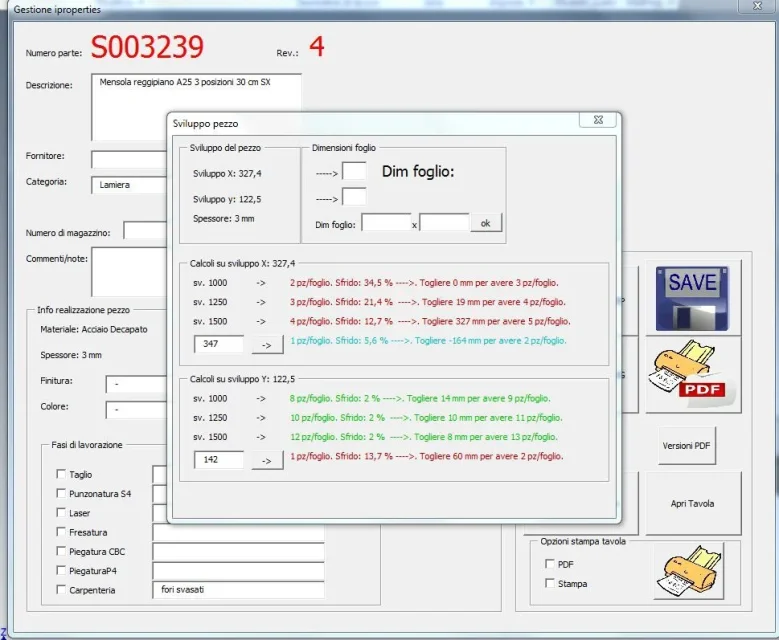
You could do something like this. a button that controls development and alerts you if it exceeds the development you want and maybe we also add that it "recommends" the development from coil with less skewer. :-)
after you have to adapt because everyone has a different need.Cattura.webpCattura.webp
 
"easy" is an ilogic rule, better if external, like this:
Code:
maxextentslenght = 3000
maxextentswidth = 1500

extents_length = sheetmetal.flatextentslength
extents_width = sheetmetal.flatextentswidth


if (extents_length < extents_width) then
	temp = extents_length
	extents_length = extents_width
	extents_width = temp
end if


if ((extents_length > maxextentslenght) or (extents_width > maxextentswidth)) then
	formtext = "le misure del modello piatto" & chr(13)
	formtext = formtext & "(" & round(extents_length, 0) & " x " & round(extents_width,0) & ")" & chr(13)
	formtext = formtext & "superano quelle impostate come massimo"
	messagebox.show(formtext, "superamento misure")
end if
connected for example to the trigger "change geometry of the part": in this way every time you change something is done control. if you connect the rule in the sheet model template the thing will be automatic, and being an external rule (in fact you fill the rule text in a .txt file) you can make easy refreshments. being all done in "economics" there are obviously limitations, namely:

1) as it is made, just set a sheet;
2) when active creates, if it does not already exist, a flat model: If you need to know precisely the "verse" of the sheet you need to check it by hand/turn it
3) If the flat model is diagonally placed sometimes it happens to me there may be warnings at home.

test if you can be useful
 
I connect to this discussion to ask what is the correct procedure to connect the rule to the trigger change geometry of the part as described by catafract whose comment is:
connected for example to the trigger "modifies part geometry"
 
I answer myself and take back for those interested:

activation of a rule based on an event

in the All-In-One bar, click the ilogic event trigger group management tab.

A dialog box shows a list of available events.
click on a list event.
click the rules or right-click and select rules from the context menu.
insert a check mark next to each rule to perform for this event. you can select document rules and external rules.
click ok after selecting all the rules for this event.
if necessary, drag the rules listed for an event up or down, to change the execution order.
click OK to close the event list.
 

Forum statistics

Threads
44,997
Messages
339,767
Members
4
Latest member
ibt

Members online

No members online now.
Back
Top