• This forum is the machine-generated translation of www.cad3d.it/forum1 - the Italian design community. Several terms are not translated correctly.

online guides catia v5

  • Thread starter Thread starter tullpat
  • Start date Start date
Hello ccz,

just to understand what you want to do:

1) Do you have a mold: solids or surfaces?
2) from the edge where the element ends, extract a curve
3) on that curve revenues a number of normal lines
4) Projects on the mold surface
5) pipe revenues: solids or surfaces?
6) will you remove all "arms" from the mold (top and bottom part? )
7) how does the "worm" have the head and the tail?
8) Don't you just use the projection by assigning the tool center to the 3d curve obtained?
9) Do you have to create grooves in the mold?

better if you place a clear example, than by itself it is already complicated, so to do and undo me on the street.

Hi.

years ago
 
for gianni, the mold is solid this customer requires deep 0.02mm "bets" with r0.75 to vent the air during filling. the projections of the curves serve for the tool center, in fact what we did is ok.
the grooves on the mold serve to make the 3d project real to the processing.
I attach example of a matrix that in this case is flat.
Hi.
 

Attachments

0.02 mm?? But it's a f*ca hair of a butterfly!

Perhaps you meant 0.2 mm, however whether the tool center is higher, in the case of flat matrix it is not even necessary to project, just work with offset.

better if you indicate a more complicated case, in order to understand how it enters and exits (it seems to me there is a perimeter channel. . .
 
in the design of plastic molds there are areas that allow the air to exit during the filling of the form but at the same time do not create "battles" or irregularities in the particular printed here are x which 0.02mm, there are specific programs to establish this( Moldovaflow)
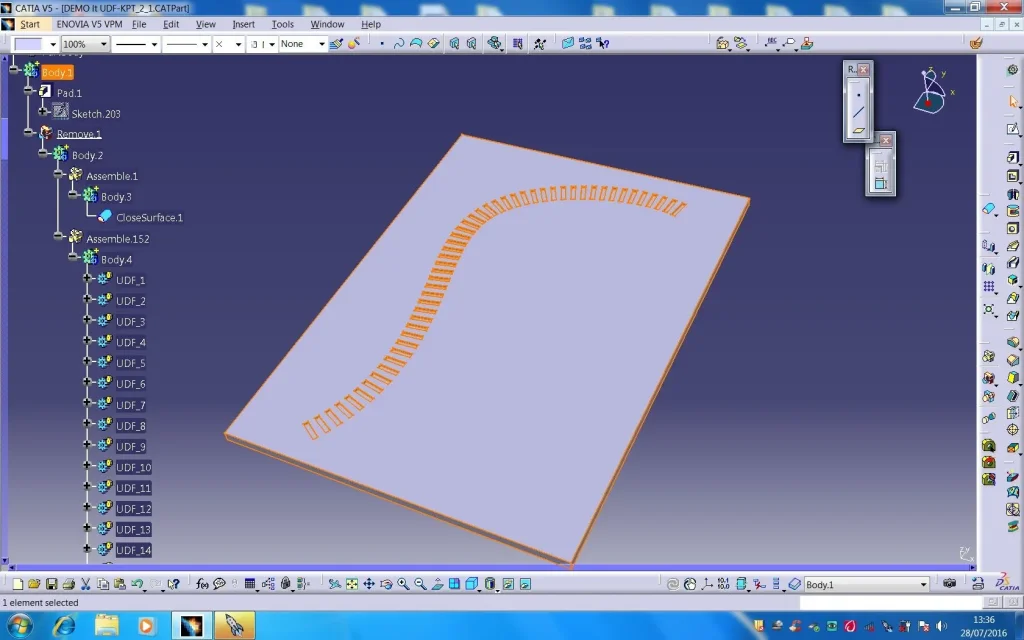
This client who uses pro-e, does not take the brigade and does the vermins along all the closing perimeter of the piece (there is the xché of the n° high) and provides me with the complete 3d project with the vermins. to perform these worms on the mold I can create a bisettrice for worm therefore extend it that is very laborious, or now I use the perpendicular fins mentioned above as much as possible similar to the shape and number of the 3d and with the cam I go to fresare on the surface \annulla relimitazine (without worms) with 0.02mm of offset
but if you want and will surely create my "bets on the 3d" using the lines as I can do?
if with obvious ease does it pro-and x why can't I do it too?
the perimeter channel only serves to bring out the air, perhaps you associated it with the two-component inine or gas .
thanks to the time you have dedicated me, if you have suggestions......
 
Hi.
It's not my industry, it was just curiosity for such a low value.
if you can send some images of unplanned areas, especially to see entrance and exit.
Hi.
 
C.C.
It will not be the "vermicelli" you want,
but the process to perform is well illustrated in the file
Annex
from the shape desired to your udf then proceed to instanziarla
Good job
to theLoop-1-1.webpLoop-2-1.webp
 

Attachments

Hello,

as always!

Just change the sketches to get worms or spaghetti on the guitar, depending on what you need.

this on flat matrices works very well.

Now I tried to apply the routine on a 3d curve, to follow the typical trend of a mold but I block on the orientation of the cylinder axis: Now this is given by the line.179, normal to the extrusion surface.1, while for the 3d curve should be of the angle/normal type to the curve, using as reference the extrapolated offset surface (in this way it is as if the axis is projected on the surface)

I tried to change the line.179 directly, but the routine returns me error and freezes.

I train the studio.

Hi.

years ago
 

Attachments

always for alpole,
I wanted to add that the routine gets stuck as I can't properly edit the script:

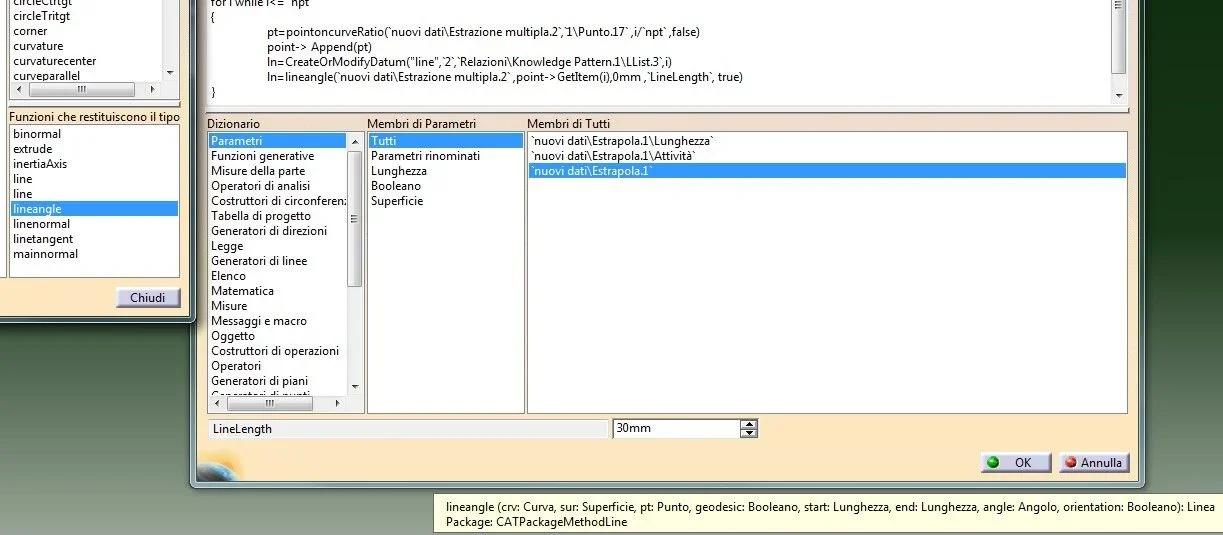
I replaced the linenormal line with the lineangle (presuming both the correct one), inserting the first arguments required (curve and surface) and leaving the arguments of your points.
the routine returns the following error: number of incorrect arguments in lineangle function: 5 instead of 8, the remaining 3 (relatives to the corner and all the rest requiring the suggestion) are above my (debula) forces, i.e. I have no idea of the syntax to use for the corner (the tips give points, angles, directions etc. but I did not find explanation of this syntax anywhere!)
Just a few English tutorials (I don't know, relying on automatic translations), I don't have any help.

I attach image.

as a humble and incapable disciple "I remove wax and put wax"

thanks for the attention

years ago
 

Attachments

  • lineangle.webp
    lineangle.webp
    55 KB · Views: 3
while for the 3d curve should be of the angle/normal type to the curve, using as reference the extrapolated offset surface (in this way it is as if the axis is projected on the surface)
before making alpole angry, he does and does a thousand times: I had written so, but It's wrong! I went too fast and didn't check well: the curve must be projected on the surface, otherwise it returns a footprint not parallel to the surface.

then the command is not lineangle, but (Immagine) project with the due arguments.

Hi.
 
I thank you for your concern. for routine I'm not in a hurry
the mold is already finished the snakes have been executed of milling
using the projected lines, the 3d agglomeration after the holidays.
I was thinking maybe in version 3d
it is better to keep 2 guidelines projected on the already offended surface
(binaries) create n° of equal points for each and therefore line
"point point"

good holidays
 

Forum statistics

Threads
44,997
Messages
339,767
Members
4
Latest member
ibt

Members online

No members online now.
Back
Top