• This forum is the machine-generated translation of www.cad3d.it/forum1 - the Italian design community. Several terms are not translated correctly.

orthogonal wall attack

  • Thread starter Thread starter pb__
  • Start date Start date

pb__

Guest
hello to all, I am new both of the forum and of revit. I have this problem with the attack of the masonry, despite studying the tutorials on attack priority and contour of the nucleus.
I send you the links with the images, you know how to explain why when it joins them changes the twist of the plaster and does not unite the 2 internal layers? ? Do you have any idea how to solve this? ?

http://img404.imageshack.us/img404/6141/uniti.jpghttp://img683.imageshack.us/img683/4183/disgiunti.jpgThank you all! !
 
... although I studied the tutorials on attack priorities and contour of the nucleus.
I send you links with pictures, ...
see the composition of the layers of the walls:
- layers of the same type of material
- layers placed inside/outside the core
 
Excuse me if I disturb you, I can ask you something else: can I change the layers of the masonry in a table form?
in the sense can I have in an abacus all walls and its layers?
Sorry about the requests but in the forum there seems to be nothing about it!

Thank you all!

paola
 
a possible solution (to be applied only to the section of variation) through the use of 3 types of wall
 

Attachments

  • MURO.webp
    MURO.webp
    81.9 KB · Views: 13
Excuse me if I disturb you, I can ask you something else: can I change the layers of the masonry in a table form?
in the sense can I have in an abacus all walls and its layers?
Sorry about the requests but in the forum there seems to be nothing about it!

Thank you all!

paola
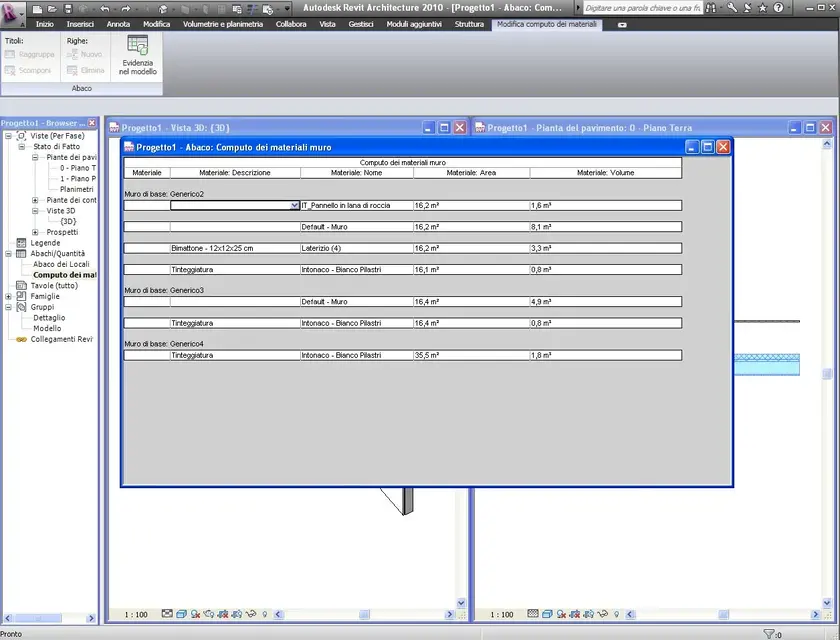
see the abacus of the compute of materials
 

Attachments

  • Strati.webp
    Strati.webp
    74.9 KB · Views: 4
thank you for the straight and for the speed!
As far as the wall is concerned, I think it is at this point the only solution (I have tried virtually all of them)...

for the second question I meant that the component layers could be displayed so that they could change the priority in a table and not have to enter the properties of the type of wall used. I tried from the abacus of the compute of the wall materials but I do not find the possibility to insert the column "function".

hello and thanks again
 
you can prepare various types of wall (already composed with its layers) and the abacus use in the "type" field to select the change of type.
 
you can prepare various types of wall (already composed with its layers) and the abacus use in the "type" field to select the change of type.
I already have various types of wall, but I would like to be able to change these types in a table way (for example if I wanted to give function 1 to all layers of insulation).
instead of how I understood from what you told me I can associate to a generic wall a default stratigraphy in the project phase. Am I wrong to understand?
Thank you.
 
It's correct. .
the ver. 2011 revit introduces the automatic opening of the "change card" to the selection of each object. . .
 
Last edited:

Forum statistics

Threads
44,997
Messages
339,767
Members
4
Latest member
ibt

Members online

No members online now.
Back
Top