• This forum is the machine-generated translation of www.cad3d.it/forum1 - the Italian design community. Several terms are not translated correctly.

parameterize a bow...

  • Thread starter Thread starter ocraM999
  • Start date Start date

ocraM999

Guest
... I try to explain myself better.
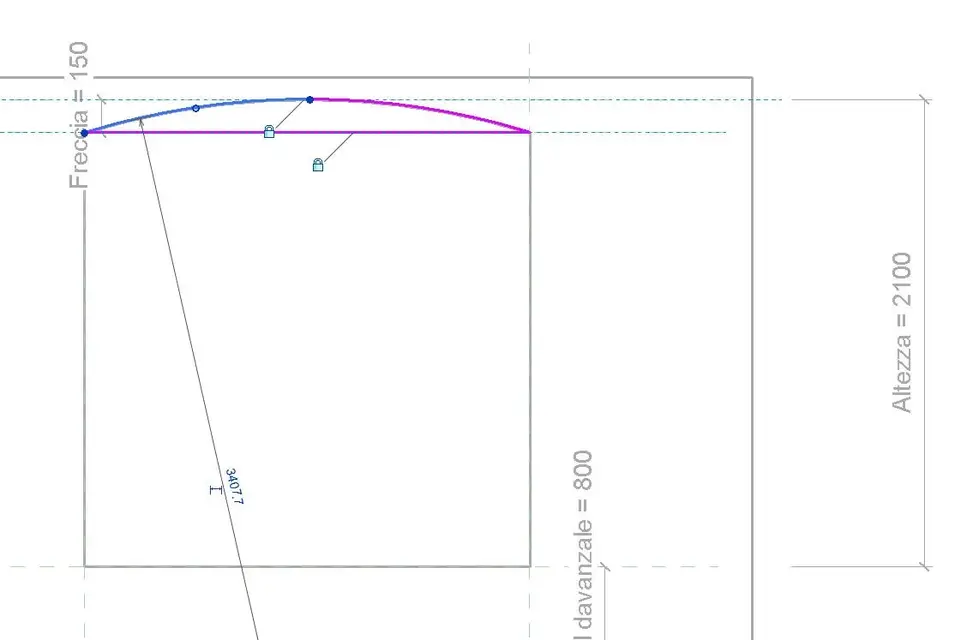
I am trying to make a window family that has an arched architrave whose arrow is always 10 cm. other measures change.
I noticed that revit 'blocks' the radius measure, so when I change the family the arrow always changes.
I can't find how to set the bow....
Mar
 

Attachments

  • arco.webp
    arco.webp
    11.4 KB · Views: 12
Maybe I'll say a beastly thing, never having seen in revit action, but I try to say my...

The arrow varies with the radius, right?

If you want to keep it fixed at 10 cm., you should look in revit the way to bind the length h=10 from the dial above the rope: that is constant, and the rest parameterized.

asking forgiveness for the unworthy invasion of camp, I return to my maps.. .

:
 
Maybe I'll say a beastly thing, never having seen in revit action, but I try to say my...

The arrow varies with the radius, right?

If you want to keep it fixed at 10 cm., you should look in revit the way to bind the length h=10 from the dial above the rope: that is constant, and the rest parameterized.

asking forgiveness for the unworthy invasion of camp, I return to my maps.. .

:
.... but how could you bind the arrow?
..or parameterize the radius depending on the arrow (cm 10 fixed) and rope (i.e. the width of the window)....
But how?
Mar
 
parameterize the radius according to the Arrow (cm 10 thread) e of the rope
I don't think you can do that for a geometric reason.

If you block the arrow (distance between summits of the arch and rope), the light of the arc changes to the radius, or the length of the rope.

As for the feasibility in revit, wait for the experts of matter.. .

:
 
creates two families of gaps one by the arch and one by the side below.
then parameterize... .
when drawing the arc break it in 2 or drawings a first arc (passing for three points) then select one end and reduce it to the half-point of the arc in this way you can bind it to the reference plane repeats on the other side without closing any lock. then close the contour with a bound line to the reference plane that identifies the base of the arrow.
draws a second vacuum for the rectangular part.... then join the geometry and use the command size geometry to drill the wall.

I hope I have understood the problem well and I have been clear
 

Attachments

  • Arco 1.webp
    Arco 1.webp
    16.1 KB · Views: 25
1) blocks the central point of the arc at the tangent point on the reference plane (high) with a zero and blocked value.
2) blocks the passing plane for the outer points of the arc with the one above, using a blocked quota = 10 cm
3) creates a series of connecting quotas of the plans regarding the base plan (which is a reference plan (it does not move)
see the example (open the vacuum in "change" to see the blocked odds)

... opps, second...
 

Attachments

in both ways you get the result even if maybe the one proposed by gfrank is more linear. . .
two details:
1-when I wrote 2 families I meant two geometries of voids and not two families to nest. . Sorry.
2-I the arrow of the arch, I'd need you from 10 cm tomorrow. .

Hi.
 
in both ways you get the result even if maybe the one proposed by gfrank is more linear. . .
two details:
1-when I wrote 2 families I meant two geometries of voids and not two families to nest. . Sorry.
2-I the arrow of the arch, I'd need you from 10 cm tomorrow. .

Hi.
...enmbe sono valide.. .

2 - ... argument ...:finger:
 
in both ways you get the result even if maybe the one proposed by gfrank is more linear. . .
two details:
1-when I wrote 2 families I meant two geometries of voids and not two families to nest. . Sorry.

I had guessed

2-I the arrow of the arch, I'd need you from 10 cm tomorrow. .

I was thinking
Thank you
 
1) blocks the central point of the arc at the tangent point on the reference plane (high) with a zero and blocked value.
2) blocks the passing plane for the outer points of the arc with the one above, using a blocked quota = 10 cm
3) creates a series of connecting quotas of the plans regarding the base plan (which is a reference plan (it does not move)
see the example (open the vacuum in "change" to see the blocked odds)

... opps, second...
............., I didn't think you could use the zero value.
It works very well.
the system suggested by lances as well but I do not understand the logic.
Thank you
 
the one suggested by lance is a method to use a familgia of already preset "windows" (with parametric voids), to which "only" the void of the face is engulfed.
in this case, with the insertion of a vacuum by means of a "complete" arc, it is not possible to hook the median point (thick at the top floor), but it is necessary to "strain" the arc in two parts that converge in the same median point (for the locking)
is also an effective method to set the window height parameter equal to the height to the face (high point).
in my case the total height (including face) of the window must be controlled by a "fittice" parameter that is given by h window+h turn
 
Last edited:

Forum statistics

Threads
44,997
Messages
339,767
Members
4
Latest member
ibt

Members online

No members online now.
Back
Top