• This forum is the machine-generated translation of www.cad3d.it/forum1 - the Italian design community. Several terms are not translated correctly.

part changing other part? ?

  • Thread starter Thread starter m_arquati
  • Start date Start date

m_arquati

Guest
Riciao.. .

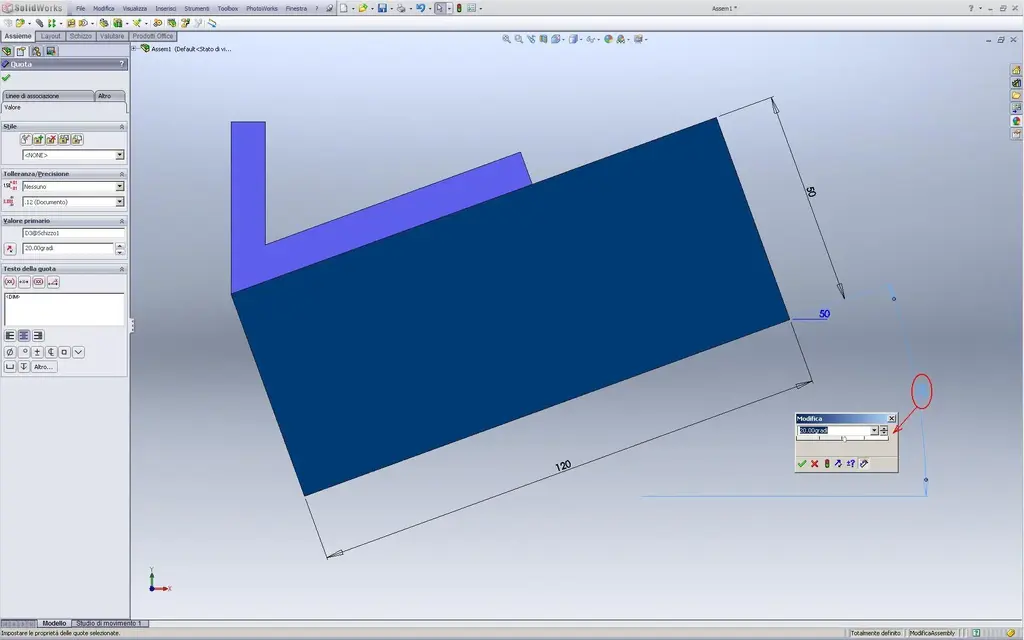
we say that I have a part that changes inclination through an angle.
to the face of this part there is a "l" (I call it so to understand) coupled as a coincidence, whose angle at 90° between the "|" and the "_" (vertical and horizontal listarella of l) I would like to change the angle of the first part (always keeping the vertical part true).
as I do now, of course, at the change of the corner changes all the orientation of the "l" and does not "deform" the angle between vert. and horizontal...

I explained... I didn't understand much!!!!:angry:
Well, if you need an image, I'll do it!

Thank you very much
Mar
 
Here's the picture!

to change the angle of part 1, even the angle of part 2 must change in the same way but keeping the vertical part always vertical!

Thank you so much!
Mar
 

Attachments

  • alfa.webp
    alfa.webp
    12.2 KB · Views: 13
Here's the picture!

to change the angle of part 1, even the angle of part 2 must change in the same way but keeping the vertical part always vertical!

Thank you so much!
Mar
you can do so by inserting an eqution with equality between the odds that interest you, or together, depending on how it is built, you can work on the constraints of the sketch that generates the "l".
depends on how you shaped it and assembled it, but the ways can be different
 
Riciao.. .

we say that I have a part that changes inclination through an angle.
to the face of this part there is a "l" (I call it so to understand) coupled as a coincidence, whose angle at 90° between the "|" and the "_" (vertical and horizontal listarella of l) I would like to change the angle of the first part (always keeping the vertical part true).
as I do now, of course, at the change of the corner changes all the orientation of the "l" and does not "deform" the angle between vert. and horizontal...

I explained... I didn't understand much!!!!:angry:
but ways can be different
look if one of the ways can be this.. and especially if I understood what you ask:ANGOLO 1.webpANGOLO 2.webpView attachment PROVE ANGOLI.zipgreetings
Mar

p.s. but I see you have sw2003 (??) you can't open my file.
 
perfect sampom!

As soon as I can unload!
I hope I can see it in some way!!!


Thank you very much
Mar
 
Sampom,

I can access a 2006, 2007 or 2008.
You used 2009, didn't you?

I can't actually open the file!

practically in a few words, how did you do that?


Thank you.
Mar
 
Then,

if in a set with part 1, I create a new part (directly in the axieme with "insert new part"), I can very well.
If I create the two separate parts and then I assemble them in the axieme, instead I can't!! !
of the two parts, ignite the faces as you did in the pictures but at the varying of the inclination, tilts all part 2 and does not change the angle as I would like.. .
I obviously mistake something in the couple, since with the coupling on the spot, instead it works!! !

What are you talking about?
Thank you.
Mar
 
Then,

if in a set with part 1, I create a new part (directly in the axieme with "insert new part"), I can very well.
If I create the two separate parts and then I assemble them in the axieme, instead I can't!! !
of the two parts, ignite the faces as you did in the pictures but at the varying of the inclination, tilts all part 2 and does not change the angle as I would like.. .
I obviously mistake something in the couple, since with the coupling on the spot, instead it works!! !

What are you talking about?
Thank you.
Mar
the coupling "on the place" centers little or nothing, the difference does it as drawings the sketch of the l.
If in the axieme you go in contextual modification of the part whose face must remain vertical and on that side of the sketch a parallelism to a vertical plane will solve the problem equally. the difference between the two systems is that in one case you know what you do, you manage the couplings, etc..., in the other you rely more on swx, which decides where to put the origin, etc...
keep in mind that such an approciation is disastrous because faces are quite unstable in case of change.
 
thanks re_solidworks.. .

I think I understand!

I try so I give you feedback!!! !


Thank you again!
Mar
 
That's right!
just set the sketch of part 2 so that it is tied correctly to the important edges of part 1...

I noticed however that with angle=0.001 (so 0) behavior changes!

Is there a reason?

Thank you!:finger:
Mar
 
I noticed however that with angle=0.001 (so 0) behavior changes!
Is there a reason?
I don't know what behavior you refer to but the reason is that 0.001 is not 0
if you see 0 in the quota is because you set the display accuracy with less than three decimals, but for swx that anx is not 0 and if you click on the quota, in change you will see that you appear again 0.001
 
Bye!

No, not for precision, but part 2 becomes fixed... I mean, it doesn't change the angle, but it rotates the whole part... as if what was said before was no longer valid!

I'll have something wrong.
I do better and see!

Thank you.
Mar
 
Bye!

No, not for precision, but part 2 becomes fixed... I mean, it doesn't change the angle, but it rotates the whole part... as if what was said before was no longer valid!

I'll have something wrong.
I do better and see!

Thank you.
Mar
try posting your file, let's see what's wrong.

greetings
Mar
 
Thank you!

I'll make it better, and if it's a problem, you give me an eye!


Thank you very much
Mar
 

Forum statistics

Threads
44,997
Messages
339,767
Members
4
Latest member
ibt

Members online

No members online now.
ciao
Back
Top