• This forum is the machine-generated translation of www.cad3d.it/forum1 - the Italian design community. Several terms are not translated correctly.

part scaling.

  • Thread starter Thread starter leggera
  • Start date Start date
for the single part, for completeness, you could also use the "direct" command (checking the solid, not the individual faces); I don't know any alternatives for the axieme to pass through a derivative assembly as said by stefanobruno.
Note that if you edit the direct editing command you cannot change the value already entered, but if you have defined a parameter (e.g. "scale") and you use it in the command then the problem is around: i.e. changing the scale value you update the part. the specific because I noticed only after many uses, it doesn't seem intuitive at all. . . < read message clarification # 5 > >
 
Last edited by a moderator:
As usual, he's right.
In this way everything remains parametric.
is an option that I use little, but that allows to switch from the needle to the missile in a moment.
provided the missile has the needle shape.
 
to note that if you edit the direct editing command you cannot change the value already inserted,
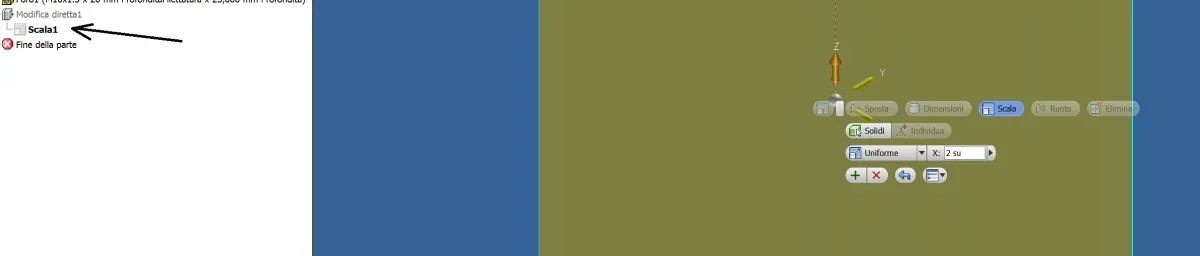
doing double clik on direct editing work opens a "under menu" scale and then again double clik on scale and you can edit the scale value.
At least with 2019 version I can do this.
then everything is correct what you say on a scale parameter
Immagine.png
 
Now that you show me... I see! Better so, I thought it was a little too Byzantine.
Unfortunately I can no longer correct my previous post, we hope that future users read to the bottom.
 

Forum statistics

Threads
44,997
Messages
339,767
Members
4
Latest member
ibt

Members online

No members online now.
Back
Top
