• This forum is the machine-generated translation of www.cad3d.it/forum1 - the Italian design community. Several terms are not translated correctly.

pc performance to exploit revit

  • Thread starter Thread starter warburg
  • Start date Start date

warburg

Guest
Currently, and still for a while, I would use revit on a notebook of the precision m6300, with xp pro sp3, intel core2 extr x7900 2.80ghz, 4gb ram, graphics card nvidia picture fx 3600m.
Would I go discreetly or should I even think about updating "the machines"? :-)
from the little tests done so far I do not realize, I have not manipulated heavy files or launched honest applications. . .
Hi.
C
 
depends on the type of project.
for a single villa is excellent
for a building of 5 floors is good
for a lottization of 10 5 floor buildings is just enough
this reported not so much to the phase of "drawing", as to that of rendering.
Moreover, you must consider that the "in place" design weighs heavily on the files, compared to the use of families.
Moreover, the ram used by xp is at most 3 gb
also...
 
humm, okay, then I can go on for a little bit again:-) I expected to update not before a year or so.
Hi.
C
 
I almost decided to purchase a new precision ws. using revit 2010 and cs4 an adroce doubt: view to 32 or 64 bit? I don't want to mess up my life before I begin, that you know then there are conflicts with other programs or all smooth lines? thanks for any answers/recommendations.
 
you are right but given the promotion of the nn know exactly what to do, the same of the announces to provide then win7 as upg, knowing then how the versions of win nn I would like to wait to find myself with the solid bin.
hi ale
 
In fact... But consider that of promotions it always does, I when I took the m6300 looked gold, then after a few months was retired in favor of the new m6400 :-))))))))) and of course Mr. of not warned me.
then for windows... What to say, worse than sight is impossible (perhaps win), if you make it wait for win7, it speaks well.
 
I almost decided to purchase a new precision ws. using revit 2010 and cs4 an adroce doubt: view to 32 or 64 bit? I don't want to mess up my life before I begin, that you know then there are conflicts with other programs or all smooth lines? thanks for any answers/recommendations.
Well, I'd say 64 bits.
see in other discussion the considerations of making 54 on the type of machine and program.
among other things, view allows to increase the ram, that for revit is not indifferent
 
:cool:Intrigued about real performance diversity I propose a fairly reliable test that we have studied on two different machines.

the test we conceived this way:

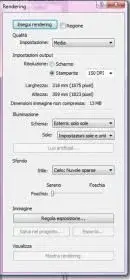
we open revit10 pack2 and load the file "progetto4" attached, let's go (without touching anything!) on view 3d and open it, then command render and the setting must be like the attachment "sets render", let's start, the result must be as "3d" attached.
we read the time in the render progress window (drawing the graph on "close window").

:tongue: I hope you can serve as a comparison... .

as first given you notice the gap almost 300% of the calculation times!
the cost diversity among the machines is less than a thousand euros but the performance is totally different... .

:finger: in total it is worthwhile, percui council= view 64, corel4, potency card (there is better), revit 64


My times (on two different machines) are:

comparative speed tests
test file:progetto4
broser: 3d view
command: render
settings make: see png "sets render"
speed:

m32 = tempo minute 3,21
m64 = tempo minute 1,16

machine 32------------------
system information
------------------

operating system: windows xp professional (5.1, build 2600) service pack 3 (2600.xpsp_sp3_gdr.080814-1236)
language: italian (regional setting: italian)
system manufacturer: intelr
system model: awrdacpi
bios: phoenix - awardbios v6.00pg
processor: intel(r) core(tm)2 cpu 6600 @ 2.40ghz (2 cpus)
memory: 2046mb ram
page file: 715mb used, 3223mb available
windows dir: c:\windows
directx version: directx 9.0c (4.09.0000.0904)
dx setup parameters: not found
dxdiag version: 5.03.2600.5512 32bit unicode

----
---------------
display devices
---------------
card name: radeon x1600 series
manufacturer: ati technologies inc.
chip type: radeon x1600 series (0x71c2)

current mode: 1920 x 1200 (32 bit) (60hz)
monitor: monitor plug and play
monitor max res: 1600,1200


machine 64-----------------
system information
------------------
operating system: windows vista™ business (6.0, build 6001) service pack 1 (6001.vistasp1_gdr.090302-1506)
language: italian (regional setting: italian)
system manufacturer: .
system model: .
bios: phoenix - awardbios v6.00pg
processor: intel(r) core(tm)2 quad cpu q9550 @ 2.83ghz (4 cpus), ~2.8ghz
memory: 8190mb ram
page file: 1578mb used, 15033mb available
windows dir: c:\windows
directx version: directx 10
dx setup parameters: not found
dxdiag version: 6.00.6001.18000 32bit unicode


---------------
display devices
---------------
card name: ati radeon hd 4800 series
manufacturer: ati technologies inc.
chip type: ati radeon graphics processor (0x9440)
dac type: internal dac(400mhz)
device key: enum\pci\ven_1002&dev_9440&subsys_05021002&rev_00
display memory: 4083 mb
dedicated memory: 1015 mb
shared memory: 3067 mb
current mode: 1920 x 1200 (32 bit) (60hz)


...buona gara.....chi tiene i risultati?:cool:


ps.tralaltro il file allegato è un buon defoult d'inizio in italiano...
 

Attachments

  • Impostazione Render.webp
    Impostazione Render.webp
    5.9 KB · Views: 40
  • {3D}.webp
    {3D}.webp
    134.9 KB · Views: 32
  • Progetto4.zip
    Progetto4.zip
    4.5 MB · Views: 55
Last edited by a moderator:
Hi.
I tried with my 64-bit pc
view 64 bit
and revit 2010 64 bit
I have inside 2 xeon e5410 2.33 ghz
but revit sees only 1
8 gb ram etc ddr2 667 mhz

time spent 1' 22"
6" due to different cpu ghz
Not bad

Things change if I carry out fbx in
Max who sees both cpus

 
hi I tried also I and I (ha:-) made 1 minute and 27"

the software is revit 2010 x 64bit, the build is the 20090612_2115(x64), but I don't know what sp ho?!? ! ?

the computer is this:

of the precision t7400 - intel xeon e5420 (2.50ghz,1333fsb,2x6mb,quad core)
4gb ddr2 667 quad channel fbd memory (4x1gb)

320gb (7200rpm) sata ii hard drive 1 s

512mb pcie x16 nvidia picture fx 1700

Hi.

Towards
 
Ww64!
:cool:the diversity between us (tobiab) is in the video card....more or less costs double... to earn 11". ..maybe it is worth....(it is a seventh faster...).
affixed to 87" goes to 76"....
 
the 64 bit you see it when as in my case I have to render a large row of revit
where in phase of rendering I go to use all 8 giga of ram
with a 32 bit that then uses it you and no 3 because one eats it seen
You can't do anything
on the 32 bit when I sent to make the same file nailed immediately
even if he managed to manage it both in the plant and in the prospects and in the 3d views
 
Currently, and still for a while, I would use revit on a notebook of the precision m6300, with xp pro sp3, intel core2 extr x7900 2.80ghz, 4gb ram, graphics card nvidia picture fx 3600m.
Would I go discreetly or should I even think about updating "the machines"? :-)
from the little tests done so far I do not realize, I have not manipulated heavy files or launched honest applications. . .
Hi.
C
you may have some smallm slowness problem using multiple applications together
then you should possibly replace one of the ram counters with one more capacious so you can bring total capacity to e.g.
that will certainly be good
 
I have to choose between two notebooks to start using revit models are these:

acer aspire 7738g microsoft windows view premium edition intel core 2 duo t6400 from 2ghz, 4gb memory ram ddr3 and a graphic compartment nvidia geforce gt 130m, 1024mb dedicated

hp pavilion dv7-2215 windows® 7 home premium authentic 64-bit processor intel® coreTM2 duo p8700 2.53 ghz, 3 mb cache l2 memory 4096 mb (2 x 2048 mb) supports up to 8 gb memory ddr3 graphics card ati radeonTM hd 4650 up to 2815 mb total graphic memory with 1 gb ddr3 dedicated
 
Hi.
according to my personal experience with 64-bit revit 2010 hp is to be preferred for window 7 because with 64-bit you can increase the ram up to 8 gb and making the renders more you have better is
 
Hi.
according to my personal experience with 64-bit revit 2010 hp is to be preferred for window 7 because with 64-bit you can increase the ram up to 8 gb and making the renders more you have better is
So you would recommend the hp pc, my use will not be continuous I don't even know how to use it but I want to start taking our hand.
Thank you.
 
between the two
if it were even qcore would be better

my experience of this period led me to fully appreciate the 64 bit
is making revits of a large residential complex and in some renders
use of the ram I keep monitored with the management of windows/performance activities
I get over 15 gb (I have installed 16 gb) not know what would happen if I had only 4 or 8
on the contrary it is, with the qcore previous to 32 bits with 4 gb of ram the render did not even leave
but I think it's a limit case because I have 64 single villas+40 terraced villas
with roofs with 3d tiles and 3d hedges
 
I did the test myself.

view 64 bit
revit 2010 64 bit sp2
of the precision m4400 - t9600 (notebook)
4 gb of ram
picture fx 770m

time spent 2' 34" (tested 4 times)

I thought worse by reference you have vs. "mostri" :biggrin:. greetings
 
I also tried the test :d

it seems to affect a lot the cpu
56' with:

7 ultimate x64
revit 2011 x64
i7 920 @ 3.5ghz
6gb ram ddr3 @ 1667mhz 7-7-20 1t
gtx 275 @ 650-mem. default

I have just started using it and I am finding myself very well:)
 

Forum statistics

Threads
44,997
Messages
339,767
Members
4
Latest member
ibt

Members online

No members online now.
ciao
Back
Top