ale82ale82
Guest
Good morning to all,
I am a designer at a small growing company, and I would like to propose a new site with the display of renders.
I started yesterday to cuff with photoview 360 and I didn't have big problems, but this morning at the opening of the file for a new render I find this problem that I can't fix.
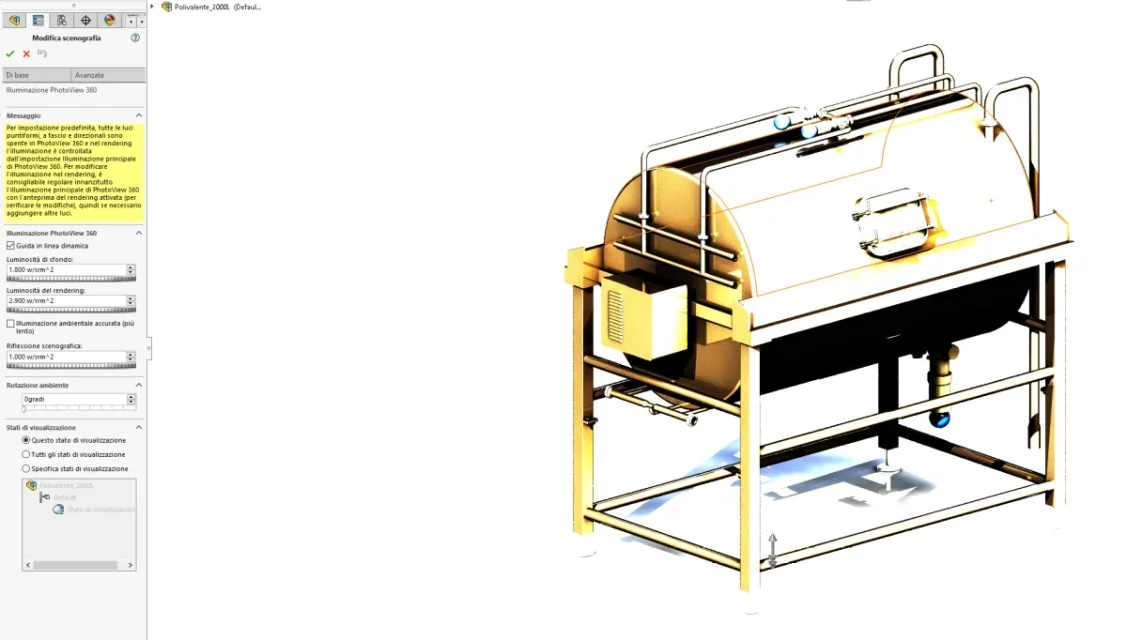
from the image you can see that the steel finish of the machine is not correct, I increased the brightness both of the background and of the render because the base was all black.
I hope I have been quite clear in exposing the problem, in case I remain available for any clarification.
I am a designer at a small growing company, and I would like to propose a new site with the display of renders.
I started yesterday to cuff with photoview 360 and I didn't have big problems, but this morning at the opening of the file for a new render I find this problem that I can't fix.
from the image you can see that the steel finish of the machine is not correct, I increased the brightness both of the background and of the render because the base was all black.
I hope I have been quite clear in exposing the problem, in case I remain available for any clarification.