
• This forum is the machine-generated translation of www.cad3d.it/forum1 - the Italian design community. Several terms are not translated correctly.

planivolumetrico

  • Thread starter Thread starter piero del bianco
  • Start date Start date

piero del bianco

Guest
Good evening.
lately I need to create a planivolumetric (with shadows) of a portion of territory.
I thought I'd act in this system:
1. import from dwg of a portion of the regional technical paper (ctr) suitably made in 2d.
2. creation of a plan (by extrusion of a line) of useful dimensions to display.
3. apply to that plan the newly imported ctr so that you can view it in 3d. a sort of "bearing".
4. make the necessary changes to the ctr drawing various shapes above the "basic plan".
Now: I would like to know how to perform on the practical side (to use tools etc...). for example how I can essentially draw a line over a plane so that this wheel to rotate the first: what the line is somehow "applied" on the floor?
Have any of you ever done such things?
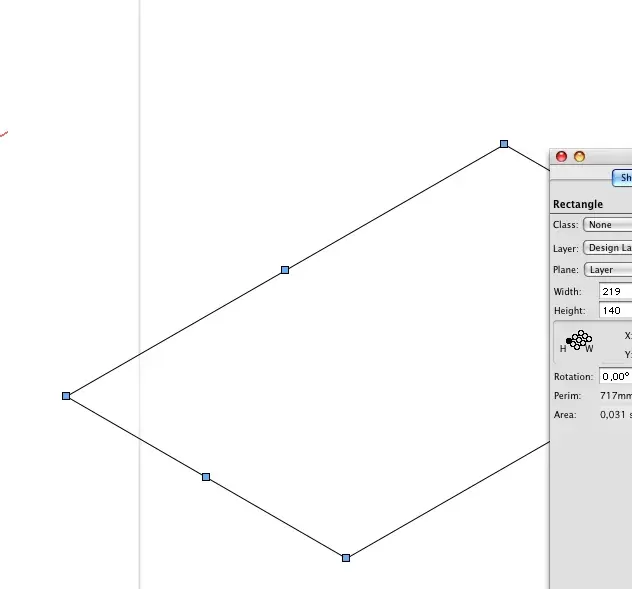
 
to create the plan I recommend using an extruded rectangle at 0 (not a line).
Keep in mind that what you want to do is done automatically since 2011, since 2d objects are actually 3d and rotate freely compared to the screen.
 
ciao,
1. import from dwg of a portion of the regional technical paper (ctr) suitably made in 2d.
2. creation of a plan (by extrusion of a line) of useful dimensions to display.
What version do you use of vw?
from 2010 it is possible to display two-dimensional geometric entities, such as lines, rectangles, polygons, etc. in 3d views, as planar objects.
anyway I would avoid extruding lines to get plans. there are rectangles, just convert them to 3d polygons or extrude them.
3. apply to that plan the newly imported ctr so that you can view it in 3d. a sort of "bearing".
to "apply" the ctr you should import it as a texture, then rasterized previously, if I understood well what you want to do.. .

4. make the necessary changes to the ctr drawing various shapes above the "basic plan".
now: I would like to know how to play on the practical side
Have any of you ever done such things?[/QUOTE]In general it is used to "relucidate" imports, especially because dwg are always rich in lines, lines, nets, etc., which weigh and only annoy.
then:
1) cleaning work after importation.
2) creating a new layer/gloss where redesigning the information that interest, recalculating the underlying ctr, perhaps using 3d polygons or 2d to extrude in a second time.
I do.
 

Attachments

  • oggetti_planari.webp
    oggetti_planari.webp
    9.2 KB · Views: 8
Hi.
What version do you use of vw?
from 2010 it is possible to display two-dimensional geometric entities, such as lines, rectangles, polygons, etc. in 3d views, as planar objects.
anyway I would avoid extruding lines to get plans. there are rectangles, just convert them to 3d polygons or extrude them.
la 2008.
to "apply" the ctr you should import it as a texture, then rasterized previously, if I understood well what you want to do.. .
in this way, but I can't change it in a second time: I see it as an image. I meant instead importing it as a sum of smaller entities such as lines and/or polygons that can freely rotate being applied to a plan. How did she explain first?
In general it is used to "relucidate" imports, especially because dwg are always rich in lines, lines, nets, etc., which weigh and only annoy.
then:
1) cleaning work after importation.
2) creating a new layer/gloss where redesigning the information that interest, recalculating the underlying ctr, perhaps using 3d polygons or 2d to extrude in a second time.
so should I import the ctr as element 2d (which does not rotate) and then recalculate it with elements 3d to make it rotate?
 
so should I import the ctr as element 2d (which does not rotate) and then recalculate it with elements 3d to make it rotate?
with vw2008 you have this option along with that to import it directly into 3d, because all two-dimensional entities remain such in any view.
I do.
 
with vw2008 you have this option along with that to import it directly into 3d, because all two-dimensional entities remain such in any view.
I do.
If I imported in 3d the ctr, would there be a chance to flatten it on a 3d plan? a kind of "flatten" for the autocadists. . .
 
usually those imported files are all composed of 3d polygons, hardly any extruded stuff. Try it. import everything in 3d and immediately see what it is about moving into an assonometric view.
I do.
 
usually those imported files are all composed of 3d polygons, hardly any extruded stuff. Try it. import everything in 3d and immediately see what it is about moving into an assonometric view.
I do.
Yes, exactly. These are 3d polygons that take different height according to the category of membership (buildings, shoe etc...). Now I wanted to know if there is a way to flatten them all on the height level 0. as in autocad by cleaning the command "flatten". a kind of projection on the horizontal plane. . .
I just tried to select them all and set their z to 0 but, of course, so it does not work.
 
try this way, select them all in front view and with the command line distribute/align distribute 3d portals all at the same altitude.
I do.
 
try this way, select them all in front view and with the command line distribute/align distribute 3d portals all at the same altitude.
I do.
Thank you! I solved.

Now I have another problem (which then so much is not...).
all design (formed by 3d polygons) is on one layer and one category. I have to distribute it in different categories (e.g. buildings, trees etc...). to do this (working in a barbaric way) I should move every single polygon into the category of belonging. I know that instead, in vectorworks there is a "custom selection" tool that allows to select objects having the same characteristics. Does anyone know exactly how it works? because I have looked at the guide but it is not sufficiently exhaustive. for example if I had to select all the polygons of the design that have a number of vertices equal to 256 how should I do?
 
Strange that it's all about one category. They are usually divided dwg by layer, with viability, buildings, level curves, etc.
However, the custom selection works by asking him to select the type of object (selezonami all polylinee or all rectangles or all 3d polygons, etc); on characteristics (color, line thickness, filling, etc); and other criteria such as name, layer or class membership, etc.
does not work on the number of vertices (it would not even make much sense eh...!)

I do.
 

Forum statistics

Threads
44,997
Messages
339,767
Members
4
Latest member
ibt

Members online

No members online now.
Back
Top