
• This forum is the machine-generated translation of www.cad3d.it/forum1 - the Italian design community. Several terms are not translated correctly.

positioning odds changed after reinstallation

INVENTORMUSTDIE

Guest
Good morning workers, today I reinstalled inventor 2014 on windows 10. I have a problem with positioning quotas, see photo attached.Immagine.webpbefore the light green selection ball was on the end of the quota. Now it is. also quota between line and line, but between edge and edge no...
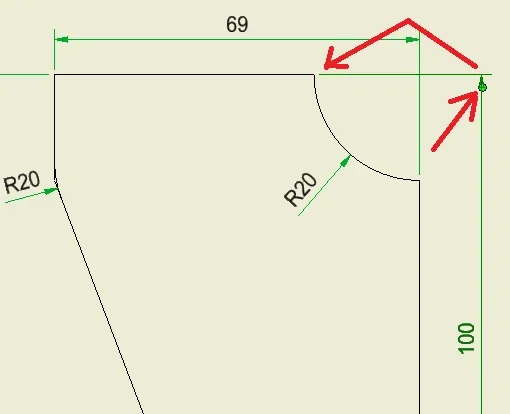
What do I do?

thanks to the attention
 
Did you export the settings and then reload them?
reinstalling has remitted all default settings
 
Did you export the settings and then reload them?
reinstalling has remitted all default settings
I don't know how to do this. In case I could take personalizations from another pc, if you have the chance to tell me how to do it.
but there is no option somewhere to change the position of that light green ball?
 
Thanks technomodel, unfortunately I don't think it depends on that. I have now noticed that on other sheets of the same idw uses the right quotas, as once (the quota rules are the same). the components where I make this mistake are simple teams.
If you have any other suggestions, they are well accepted.
thanks again for the speed of response!
 
I think it's okay, but maybe I don't know what the problem is.
It makes me the odds well both from the edge and from the intersection point, the green pole to me does not appear.
 
the clear green ball is what appears when you select a quota, and use it to move the odds after you put them on the table. I'm trying to attach a last picture to you.Immagine2.webpbo will be a bug of the 2014 version.

thanks the same, hi good work.
 
I'd say it's a problem with the.ipt.
I tried to put it on the table with my template and the same problems.
looking quickly I don't see obvious defects, but now I don't have much time to devote.
 

Forum statistics

Threads
44,997
Messages
339,767
Members
4
Latest member
ibt

Members online

No members online now.
Back
Top