
• This forum is the machine-generated translation of www.cad3d.it/forum1 - the Italian design community. Several terms are not translated correctly.

precision assembly

  • Thread starter Thread starter gabrielev
  • Start date Start date

gabrielev

Guest
Good morning.

I have problems with the assembly of various pieces, as although having built them with the same outer diameter when I assemble everything I remain of the parts that emerge from the main surface.
the body is built vertical punches (green), helix coast (red and blue) and horizontal ring (white).
as can be seen from the photo always results of the material that comes out at every intersection between the various parts and most likely this will give me problems in the analysis fem.
How can you do it to adjust the piece, possible that the casket lacks precision? forum 2.webp
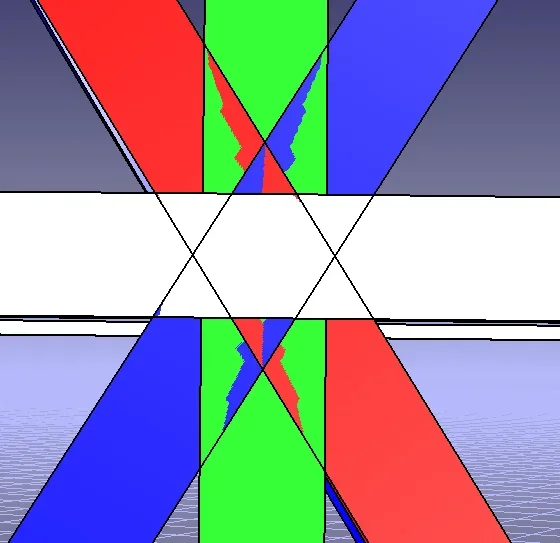
 
difficult to respond by looking at the image (for me not understandable). It is not lacking in precision, but of course it is necessary that the geometries of the parts be consistent with what one wants to achieve and that the geometries are well bound. Moreover it is necessary to adjust the accuracy level of the curves, to avoid false views.

If you have the r19 and you can send me the product, I can analyze it better to see what the problem is.

Hi.

years ago
 
actually concerning the image you do not understand much. However I have increased the accuracy level of 3d and 2d to 0.01 and the design is more precise but for obvious geometric problems, such as the intersection of a vertical square-based punch created with tangency on the ring circumferences will lead to the creation of a step.
it is possible to eliminate these steps that and make the whole structure continue so as not to have problems in the fem analysis.
I can't send you the file right now because it's on another pc.
and thank you for the answer.
 
actually concerning the image you do not understand much. However I have increased the accuracy level of 3d and 2d to 0.01 and the design is more precise but for obvious geometric problems, such as the intersection of a vertical square-based punch created with tangency on the ring circumferences will lead to the creation of a step.
it is possible to eliminate these steps that and make the whole structure continue so as not to have problems in the fem analysis.
I can't send you the file right now because it's on another pc.
and thank you for the answer.
I think it's just a video display problem, i.e. the so-called "cutting": circles and cylinders are actually often approximated to polygons or prisms in the display on the monitor, but then actually the cad knows very well what a circle is and what a polygon.

relative to the fem, if you have to make contacts you just need to worry about making a mesh thick enough so as to avoid pronounced steps, possibly making bevels on 3d geometry at points where there might be marked edges.
 
Thank you for your answers.
bringing precision of 3d and 2d to 0.01 drawing is much more accurate, the steps that are displayed are only those related to geometries.
Now I would like to know how to make the structure a unique body in the sense of not having the overlap of material in the intersections between the various parts.
 
I don't know the fem, so I don't know the required input characteristics to get the analysis.
normally you have to trim (cut) the various parts where they intersect.
to make it a unique body you must then assemble them, if they are more parts in an assembly you must make an allcatpart.
if you can send the file it is easier to help you.

Hi.
 
Unfortunately, I can't send you the file, but I'll get you a better picture.
the structure presents many crosses as in the photo forum3.webpHow do you do an allcatpart? from tools generate catpart from product?
 
How do you do an allcatpart? from tools generate catpart from product?
Yes.

If you have shaped different catparts in a product, and if you have used solids, you will find yourself with a single catpart that contains different body, these leotards will then have to assemble them with boolean operations.

if you have shaped different catparts in a product, and if you have used the surfaces, you will find yourself with a single catpart that contains different geometric groups with the surfaces that you will then trim and merge (very work)

if you have shaped different catparts in a product, and if you have used both surfaces and solids, you find yourself with a single catpart that contains a soup on which to work (good luck)
 
Thank you for the answer.
Fortunately I'm in the first case because I used solids, now I just need to find the right boolean operations to join the parts.
 
according to me and according to my experiences there are actually collisions between solid valleys.

If you do a "clash" collision analysis what turns out?
 
It is a combination of the various solids, it is the interconnection that I want to avoid.
I want everything to be displayed continuously in the intersection and not as a computation.
I tried with Boolean operations but I broke the intersection in multiple parts and sometimes I get out this message "Boolean volume operations are not supported with the available licenses" I don't understand why sometimes it does me perform the operation and sometimes not.
 
I tried with Boolean operations but I broke the intersection in several parts
but which boolean do you use? Are you using relic union or intersection?
in your case you have to use add (also assemble should work, so much you do not use pockets)
"Boolean volume operations are not supported with the available licenses" I don't understand why sometimes it does me perform the operation and sometimes not.
Sometimes operations fail because of the complexity of the geometries used, where in complexity they mean various inaccuracies. if in the solid there are (e.g.) cracks, strawberries etc. apply rays becomes problematic, if there are close geometries but not properly in contact, sometimes it is necessary to apply a thickness even only of 0.01 to one of the parts to be able to assemble together more body.

you have a mp

Hi.

years ago
 
I joined allcatpart and then I used Boolean operations.
but the problems of tiny steps remain.
as you said before gianni55
Sometimes it is necessary to apply a thickness even only of 0.01 to one of the parts to be able to assemble together more body.
but how do I add a surface or material to make the union of the bodies a uniform surface.
 
for negative steps, extract the affected edge, create a surface with filling and then use the seam features with which fill the hole
for the positive ones, extract the adjacent surfaces to the steps, create a surface with the filling and use to cut the steps of the solid (in this case it is possible that the cut does not succeed for the reasons I told you and you must then move/offset the surface or join the adjacent ones)

If you can't put a limited picture of the problem.

Hi.
 
forum 4.webpas you can see from the enlargement there are small steps.
the problem is that if I rise a surface I add a step but you create another step from another side.
does not exist a method to combine all adjacent solid surfaces that have a small error?
 
the problem is that if I rise a surface I add a step but you create another step from another side.
Tell me about "superior", but I hope you refer to the "face" of the solid, that is, you are working with the solids (although from the image it seems to me to be surfaces)

However, in this image I also see different colors, so either you did not join the boolean, or send me old pictures (and this does not help me understand the problem).

apart from the steps that you highlighted with the lens, I see other triangular faces that must be eliminated and if the white face is a plan leans on that to make a sketch that encloses the triangles and then make a pocket, while the highlighted step should be eliminated better aligning the geometries.
does not exist a method to combine all adjacent solid surfaces that have a small error?
the system generates the solid leaving all the big and small faces you created, how can you guess which ones you don't care?
to avoid the problem you have to improve the design method, e.g. by better aligning the geometries, or by cutting the solid before intersections and creating a more "clean" union, or by eliminating the steps with minimal rays.
 
Tell me about "superior", but I hope you refer to the "face" of the solid, that is, you are working with the solids (although from the image it seems to me to be surfaces)
As a surface I refer to the faces of solids.
However, in this image I also see different colors, so either you did not join the boolean, or send me old pictures (and this does not help me understand the problem).
I carried out the boolean assembly operation, but not matching the solids remained of different colors and created the 2 blue and red triangles below.

the problem for me is geometric because the red and blue solids are coasts created with a square surface and a propeller. However, being the square surface created on a tilted plane of tot degrees compared to the xy plane, the coast will never be precisely combined on the edges of the vertical rod.

Perhaps I was wrong to create the coasts starting from a surface that rests on a sloped plane perpendicular to the line of the propeller, but this seems to me the only way to maintain the perpendicular thickness to the propeller of the constant coast and equal to the value of the starting section, otherwise increasing the inclination of the propeller always reduces the section if I do not maintain the perpendicular construction plan to the propeller.
 
I understand...

can you increase (of very little) the main geometries, so that it contains all the others that intersect, and then radiate them?

but this object, has no symmetry plans, or axes of revolution etc. In short, something that allows you to simplify everything only in one part and then applying circular matrices or mirrors rebuilding the whole?

I'll throw it there.

- Rebuild the white ring
- lean on the flat surface of the ring and create a sketch with inner diameter and outer diameter and width you need the green vertical and extrude it
- with a circular matrix create all green vertical parts
-generate the propeller by interrupting it just before it intersects with white and vertical ring green and on a floor lying at the end of the propeller build the square section of the coast (and extrude)
-build the terminal connection between blue, green and white
- with a mirror you get the symmetric part
- with a circular matrix you get how many coasts you need

same thing for the top part, then half ring mirror and finish

You know what you can deform and how...

Let me know.

Hi.
 

Forum statistics

Threads
44,997
Messages
339,767
Members
4
Latest member
ibt

Members online

No members online now.
Back
Top