• This forum is the machine-generated translation of www.cad3d.it/forum1 - the Italian design community. Several terms are not translated correctly.

precisione in soliworks

  • Thread starter Thread starter diegotrab
  • Start date Start date

diegotrab

Guest
Hello, everyone. I have been a pro/e user for almost 10 years, but because of the ever closer collaboration with a firm I am also using solidworks, version 2009 (on a notebook lent by the firm...a scanso di equivoci).
I find it really effective in many features and I'm seriously evaluating the purchase of this software.
But I found a flaw: in comparing a sweep, I realize that solidworks "deforms" the surface, compared to what should be the correct result. I am talking about a 0.029mm error, but that in my case is not tolerable.
I found these "deviations" in other parts.

Now my niubbo question is: is there a way to set the accuracy in soloworks ? similar to how it is done in pro/e or in other cad.

I would like to set: absolute precision 0.001mm

In fact, being my parts quite large, 3 meters x 1.5 meters, I would not like there to be some relative precision setting that introduces errors. These are moulds, therefore need very high precision.


What?
 
But I found a flaw: in comparing a sweep, I realize that solidworks "deforms" the surface, compared to what should be the correct result. I am talking about a 0.029mm error, but that in my case is not tolerable.
posteriest an example file (if not the original that maybe is "secret", at least one similar) where you see the error and how is the sweep done?

greetings and welcome
Mar
 
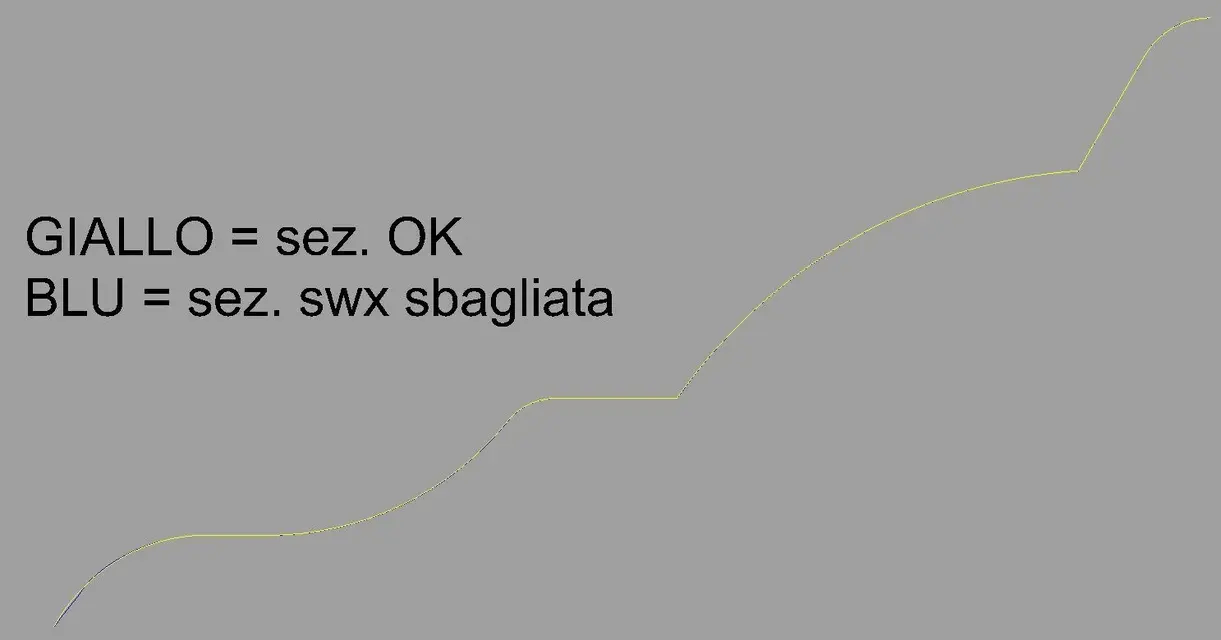
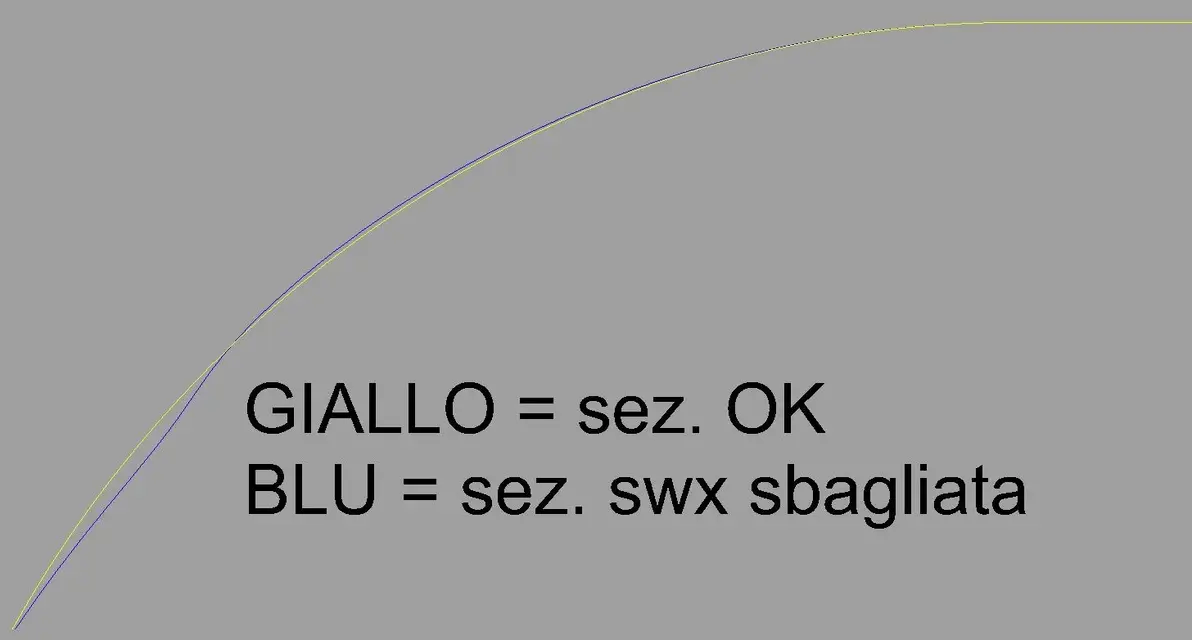
Obviously starting from the same curves (section and trajectory), here is the comparison between pro/e and swx. I am not explaining everything to you because and how, but the result of pro/e I am sure.
iho there is some tolerance to be set in sxw, also because the offset of certain problem surfaces in swx is run smoothly, while in pro/e fails....and then work by decreasing precision.....
I, in swx, do not find the possibility to set a precision to my liking....but I am swx niubbo... :rolleyes:
 

Attachments

  • confronto_sez.webp
    confronto_sez.webp
    20.3 KB · Views: 35
  • confronto_sez_dettaglio.webp
    confronto_sez_dettaglio.webp
    26.7 KB · Views: 28
Obviously starting from the same curves (section and trajectory), here is the comparison between pro/e and swx. I am not explaining everything to you because and how, but the result of pro/e I am sure.
iho there is some tolerance to be set in sxw, also because the offset of certain problem surfaces in swx is run smoothly, while in pro/e fails....and then work by decreasing precision.....
I, in swx, do not find the possibility to set a precision to my liking....but I am swx niubbo... :rolleyes:
Okay.
but I meant a native swx file, not an image.
to control the procedure and understand the error.

greetings
Marco:smile:
 
Okay.
but I meant a native swx file, not an image.
to control the procedure and understand the error.

greetings
Marco:smile:
I don't think it's a mistake, probably the speech is this: when the cad counts, it makes approximations up to a certain decimal number.

from what I also understood by giving a quick last to the American forum, on pro/e you can set the number of decimals to consider, instead in swx (and if the same) is not possible. for example try drawing a 0.0001 mm long segment and tell me if you can or go wrong, and then try to do the same with a 0.00001 mm long segment.
 
on pro/e you can set the number of decimals to consider, instead in swx (and if the same) is not possible. for example try drawing a 0.0001 mm long segment and tell me if you can or go wrong, and then try to do the same with a 0.00001 mm long segment.
utente proe and swx confermo!
 
I don't think it's a mistake, probably the speech is this: when the cad counts, it makes approximations up to a certain decimal number. .
I agree. But what I mean is that if in pro/e imposed an absolute 0.001mm tolerance, it means that if I design a 150 meter cruise ship, the maximum error in the definition of geometry will be 0.001mm, independent that it is a 50mm long piece or a 50 meter long loft flank.
if instead imposed the relative, then the admitted error is in percentage terms. If I discard the same ship, it may be that it has millimeter errors, while if I draw a wristwatch, then I am in the thousandths of a millimeter.

I can't find the same set in swx, if it's there.

> from what I also understood by giving a quick last to the American forum, on pro/e you can set the number of decimals to be considered, instead in swx (and if the same) is not possible. .
It's not like that. or rather it is. In the sense that it is another of the 1000 configurations (mille is not a random number unfortunately) of pro/e. But that's not what I'm looking for.

> For example try drawing a 0.0001 mm long segment and tell me if you can or go wrong, and then try to do the same with a 0.00001 mm long segment.
done. with the first, ok. with 0.00001 swx I go wrong.

I mean, I'd like to leave pro/e because it broke me... it doesn't progress and it has defects that I just can't stand anymore. But I "sweppo" all the time. It's the basis of my molds and unfortunately I find these discrepancies in swx... and I hope it's just a matter of settings.
unfortunately no one has been able to answer me, not even of other advanced users of swx that I know... .
I trust you!
 
It is true that in sw it is not possible to draw a segment of length less than 1e-4mm if the unit of measurement is the millimeters, otherwise it must pass to the unit of measurement of the microns.
However perhaps your problem may depend on import tolerance, when importing a curve in iges solidworks format asks you, by clicking in the options box, to set the import tolerance of the curve. Perhaps by lowering this tolerance the problem is resolved.
I don't think there is a tolerance system like you say, sw always considers 8 decimals after the comma (although in the units are set 2 decimals only) and accepts a model with a maximum size of 1e6mm (1 km).

if for example draws a segment along 1.12345678mm and binds it to a segment of equal length, measuring the total length sw from the measure of 2.24691356mm with a precision of 8 decimals.
I can't tell you if it keeps this accuracy even in the most complex operations but I don't see why it shouldn't.

Hi.
wave


wave
 
@

Thank you very much for the explanation.
Well, I also thought about importing, but I didn't actually try to look for settings for that.

the proof that I want to do is draw these curves natively in swx and see what happens.
Actually, I'm afraid that the result is the same, as the straight section of the sweep is "less wrong" than that dissected in a corner....and so it seems that there is an adaptation of the superifice.
and in any case, the curves I use, being usually very "arzigogolate" drawing in rhinoceros and then the amount in proe, always without problems.
then draw them directly is swx would be a problem and I would be point and end.


As for the micron setting, this also makes me more and more think that swx accuracy is not settable by the user and is relative. medium size objects? then use millimeters. Big objects, use the centimeters. small objects? use microns.... In short, one should understand the logic of the great and the small in swx.
 
Surely there may be a precision problem in import, while I think there is no intrinsic accuracy problem of software, working this with 8 decimals on a basic unit of the millimeter.
I think rather that the sweep function may vary between the two programs giving different results.
the sweep function has several possibilities, perhaps it needs other driving curves or other sections to maintain a more accurate control.
I would not blame the precision of the program that I think is sufficient.
I am not an expert in the use of the sweep function and the times I used it I have struggled a lot to get the desired result, I recommend you to do more tests maybe starting from simple sections and away going to the section of your interest.
 
...also because the offset of certain problem surfaces in swx is run smoothly, while in pro/e fails....and then function by decreasing accuracy. . .
I'd say you have the proof that pro/e is a bowl and that svix succeeds where others fail.

the world is divided into two, on the one hand those who go to the "less six", rognosis and incapable, on the other those who go to the "less four" that can what others dream about!

p.s.: the trick is there, but you can't see!
 
unfortunately no one has been able to answer me, not even of other advanced users of swx that I know... .
Sorry I'm late but I didn't forget about you (I have little time and strange times..).
and I am not an advanced user, but simply "a surplus" (what I don't know..):biggrin::biggrin:.

no, in swx that I know there is no possibility of adjusting the "tolerance" (at least it is not in some recounted sect that I do not know). the program always uses the "maximum of precision" allowed by those 8 decimals they were talking about (but if you give a round-digit quota that remains).

I asked you the file because it didn't convince me, I never happened to find discrepancies in the "development" of a sweep (or any extrusion).. provided you give commands on correct/coerent sketches. I noticed that while not being particularly specialized (or perhaps just for this) in the surfaces, swx in treating them is very "short and dot". . It makes you do more or less of everything, but it wants extreme precision.

I had doubt that the problem resided in the path of the sweep.. and in fact it is so; that spline, I do not know why, for him it is not correct/regular (from where and how did you import that closed curve?). and you did not mention it, but if you look well your model you see that in the inner corners where the profile "turn" the surface is "crowded" badly and all the corners are different. and this would be much more serious than a mistake of a few cents (which as you see below is resolved).

then I made a sketch of the route "ricalcando" approximately your imported curve, using only lines and arches (with the splines I did not try). I placed on the trajectory your profile curve (converted in sketch as you had already done) and started with the sweep.
the result was the usual I expected, perfect! including the sharp corners that are now beautiful smooth and connected. dimensionally starts to zero and ends to zero, without tolerance. check:
View attachment curva sweep e sezione.rarNow you will tell me < but why does it?> > , I don't know, maybe because it is more "specialized" you eat and correct everything. swx I told you, on that side it makes much more valuable.

certainly is an import problem, I had already heard it with the rhino files in swx (personally never tried). I'm convinced that if I built the curves/shocks directly in swx you solve everything.. also because it is absurd to use 2 programs (at least 3 you are using them) that work in a completely different way, clear that imports are messed up.
and then take your hand, because in swx do all the arzigoli you want.. perhaps even better with constraints and parameters (the sketches are very simple to use and complete).
try to remake that path directly in the program (I don't know if mine can suit you), work well with the plans and keep the straight lines, horizontal and vertical (those that have to be), assign the quotas the right tangences etc. etc. so that the sketch "do not move anymore", you will see that everything will work.

greetings
Marco:smile:
 
Sorry I'm late but I didn't forget about you (I have little time and strange times..).
:
What a delay!
you were of extreme kindness and utility. Thanks again.
So, in the meantime, I sent the same curves and sections to a friend of mine who works with catia (ex proe also he) and the result was perfect.
sections perfectly combined with those extracted from the proe sup. and no curling.
As my works, as you can imagine, are far more complicated than this portion of sweep, it is essential for me to import curves from other cads (even because sometimes curves are designed by other people). At this point I will redesign the curves natively in solidworks and control the result (which at this point should be perfect). Then I will focus on the import parameters for curves, maybe importing them to dxf or .vda instead of iges.
in fact the spline, in fact it was composed natively by arches and circles.

@ er President
without unleashing flames or polemics or the trite and ritrito clash between cad, before saying that proe is a bowl, even with all the limits that it has and that make me fun, I would go slowly...:smile:
I have already made thousands of molds with proes and I assure you that its accuracy is out of discussion. the fingertips and the eye measure the cent.....when a surface is canned, on the fried the "read" very well.
and the offset speech that doesn't come I think you haven't read it carefully: also proe offset the same problem sup., but decreasing accuracy a little. which does not mean that the new precision is lasca, but simply that I work still in absolute but maybe instead of 0.001, I move to 0.03. As no one seems to know if swx works in relative....you can't understand if so I'm bringing the two cads to work with the same precision. I hope I explained. . .
In short, I am in this forum because I am looking for a valid alternative to proe. and swx seems to me on the good road.
but you want for lack of time, you want for my limits in product knowledge....before drawing conclusions I would like to understand us well.
I was already screwed once in the frantic purchase of a very expensive cam and I no longer want to repeat the mistake.
Thank you all, so...
 
@ er President
without unleashing flames or polemics or the trite and ritrito clash between cad, before saying that proe is a bowl, even with all the limits that it has and that make me fun, I would go slowly...:smile:
I have already made thousands of molds with proes and I assure you that its accuracy is out of discussion. the fingertips and the eye measure the cent.....when a surface is canned, on the fried the "read" very well.

with the greatest respect to the president, but here guys, I approve too. I have been a td user for many years, and I am a moldist, I must say that the precision of "system" high is not at all a limit in doing things, indeed then you find them when you go to make the cam. I explain better, e.g. with a tolerance of 0.03 mm, the surfaces of the model could have "fessure" at max of 0.03 mm, with a tolerance smaller to e.g. 0.001, the " now we make a connection in both models, my question is which of the two fittings is better (in which case the program calculates well without problems)?? ? also passing the model to the cam, when the tool arrives over one of these "fessures" how does it behave??? You will say, go over without any problem... and if that's not??? ? Anyway, I've been sw user for nine months, and this tolerance thing I've been asking for right these days, but it seems to me to understand that the tolerance in sw is not controllable or taxable, if so is it for me is a point less for sw, and surely this thing will not like (you can say?????) even the mold friends. hello to all:biggrin::biggrin:
 
I have the impression that you haven't read my post well!
:smile:
I didn't mean to offend anyone!
I recommend, no controversy... it was just that maybe then you need to better explain the meaning of your message.
I interpret it that you say that proe is a bowl and that solidworks is fine.
for charity, I repeat, proe is full of limits and above all it is still 10 years ago, while solidworks that I follow "for sympathy" with friends for years, continues to progress. I just don't think proe is a real bowl. I assure you that he took me out of trouble on so many occasions and that the molds are good. fried with other cams, because the proe cam is simply indecent.
 
with the greatest respect to the president, but here guys, I approve too. I have been a td user for many years, and I am a moldist, I must say that the precision of "system" high is not at all a limit in doing things, indeed then you find them when you go to make the cam. I explain better, e.g. with a tolerance of 0.03 mm, the surfaces of the model could have "fessure" at max of 0.03 mm, with a tolerance smaller to e.g. 0.001, the " now we make a connection in both models, my question is which of the two fittings is better (in which case the program calculates well without problems)?? ? also passing the model to the cam, when the tool arrives over one of these "fessures" how does it behave??? You will say, go over without any problem... and if that's not??? ? Anyway, I've been sw user for nine months, and this tolerance thing I've been asking for right these days, but it seems to me to understand that the tolerance in sw is not controllable or taxable, if so is it for me is a point less for sw, and surely this thing will not like (you can say?????) even the mold friends. hello to all:biggrin::biggrin:
I didn't mean to offend anyone!
I recommend, no controversy... it was just that maybe then you need to better explain the meaning of your message.
I interpret it that you say that proe is a bowl and that solidworks is fine.
for charity, I repeat, proe is full of limits and above all it is still 10 years ago, while solidworks that I follow "for sympathy" with friends for years, continues to progress. I just don't think proe is a real bowl. I assure you that he took me out of trouble on so many occasions and that the molds are good. fried with other cams, because the proe cam is simply indecent.
cases are two:
or you have not read/followed me for a long time, or you have eyes lined with ham!

I insist (and if I insist, please "accondiscendere"! :smile: ) to suggest that you carefully read my post.

a greeting

p.s.: I do not argue. to polemize you should be at least two and I still have to find what " stands at my sight"!
:biggrin:
 

Forum statistics

Threads
44,997
Messages
339,767
Members
4
Latest member
ibt

Members online

No members online now.
Back
Top