• This forum is the machine-generated translation of www.cad3d.it/forum1 - the Italian design community. Several terms are not translated correctly.

problem coincidenza facce partbody e body e tra body e body... .

  • Thread starter Thread starter Staedtlerp
  • Start date Start date

Staedtlerp

Guest
hello to all
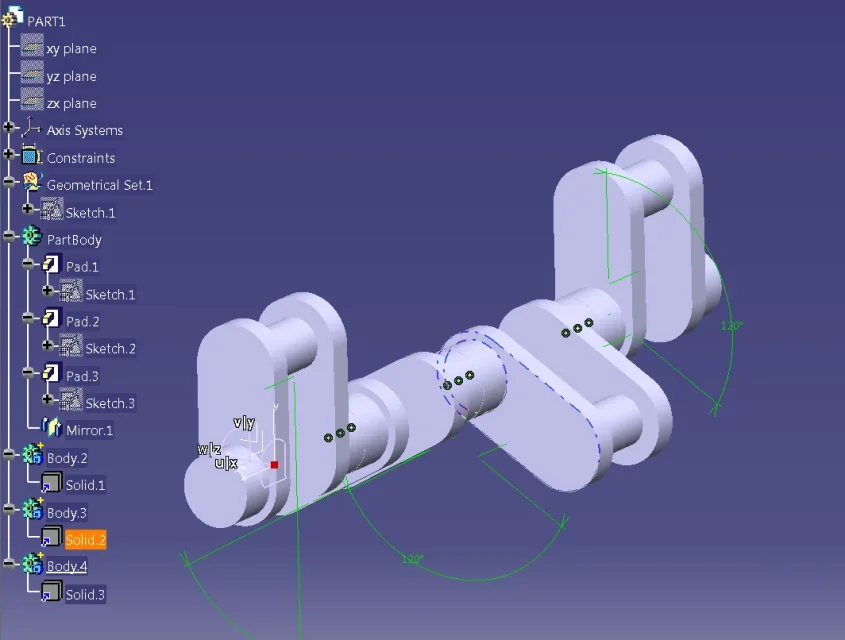
I haven't been able to deal with a problem for a few days. I am making with catia v5 an entire motor tree; I first created a single elbow (see photo) and then, to create the other elbows, I simply copied the single elbow 5 times through the copy paste command. In this way I found 1 partbody and 5 body (see photo). to be able to assemble the tree, I must combine the successive faces of the individual elbows and I was going to do so with the command of the defined constraints, in particular by selecting the two faces and applying the coincidence bond. Had it, this operation I can do it between partbody and body2 (or any other body), but not between body and body. selecting the two faces of the body and pressing the defined bond command is not possible to select the coincidence item. How can I solve the problem? Where am I wrong? Is there another way to assemble the tree? Thank you very much....:finger:
 

Attachments

  • gomito singolo.webp
    gomito singolo.webp
    34.3 KB · Views: 14
  • Vari gomiti.webp
    Vari gomiti.webp
    104.7 KB · Views: 22
I tried to do this too but when I go to change the distance it doesn't make me vary......:-(
 
ok...I tried to clean the file with catdua and it detected me 1 error....I tried again to make the faces coincide but nothing...:frown:....the thing is very strange: in solidworks, once created any volume through any combination of feature, there is the possibility to copy the genre translating it and the game is made!! ? . ..cmq I can't charge it xkè when I try to charge it tells me:" invalid file". . .
 
ok..I created a .rar file archive with the catpart file and I managed to upload it... thank you very much....:finger::finger:
 

Attachments

probably replicated geometry with file structure reconstruction.

if you run the paste copy with links you can tanquillously replicate the parts and use the 3d constraints for their positioning.

if you prefer the replica of the feature structure you need:
1 or I use power copy to replicate individual sectors
2 or I have used isolated axes tarts between them with constraints and replicate the geomatria.

Hi.
 

Attachments

  • albero a gomiti.webp
    albero a gomiti.webp
    49.6 KB · Views: 12
already done...this morning I ran the copy of the partbody copying it and using special paste. did this I chose the option "as result with connection" and I got a body.2 composed simply by solid.1. after I moved the body.2 with the translation option from the transformation feature panel and I appeared the warning:
"Instead of turning an import directly, it is advisable to apply the context command add position to the solid. then apply the required gsd transformation to the axle system of the group of positions.
you want to continue with the transformation (click on you) or exit the command and make the suggestion (click on no)? "
I didn't understand what the warning meant, I clicked no and I just moved the body.2. I did this again try to apply the coincidence between the faces using the 3d constraints but nothing... does not want to know!!!!:frown:

Tell me one thing: but in the photo you posted a geometric group appears before the partbody... but what's it for? ? ?
 

Attachments

  • Cattura5.webp
    Cattura5.webp
    76.3 KB · Views: 7
the problem is the transformation you applied.
if you apply the tasformation feature the model keeps in memory the spsosamente for which, or do it the appropriate step.
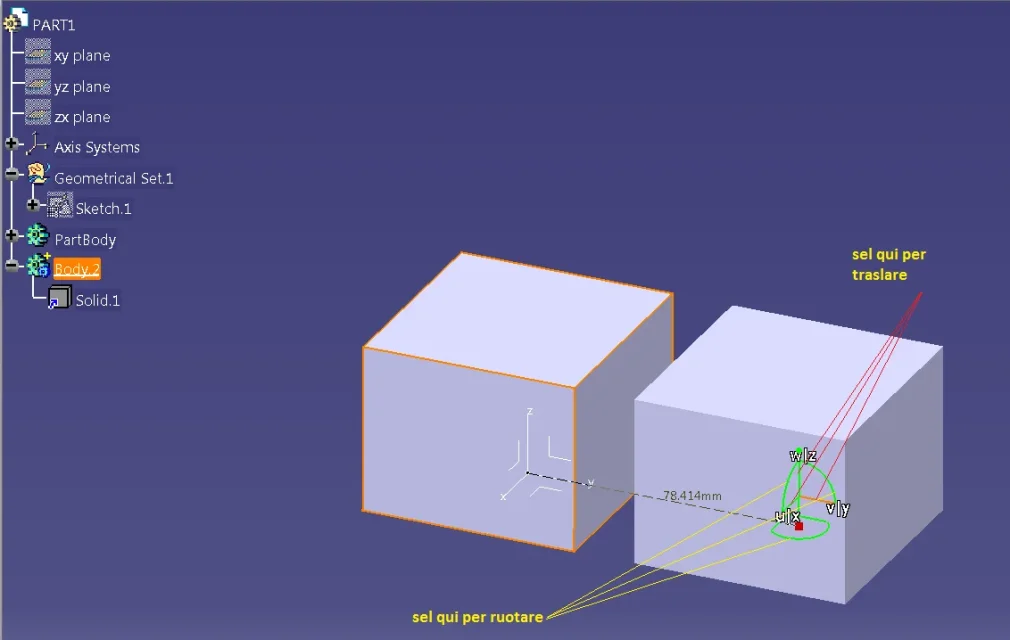
or transfer the volume using the compact, see photo.
drag the compass through the red point (1) on the element to be translated, when it becomes green (in case they were superimposed, once it has changed color select on the tree the body to be translated), you can translating the objects through the directions x or y or z see photo 2.
After the translation you can detach the compass by dragging it from the red point on the axle in the lower right (make sure that it is corrected as the orientation of the terna).
at this point you can use the 3d constraints.

the geometric group that you see is due to the "non-hybrid" casket configuration, you probably have the opposite "hybrid" setting, which is not the native casket.

Hi.
 

Attachments

  • Cattura5.webp
    Cattura5.webp
    79.2 KB · Views: 13
  • foto cubo.webp
    foto cubo.webp
    34.5 KB · Views: 11
Wow it works...!!!!:finger:...so recapitulando: the problem was that to move the single elbow I didn't use the manipulator simply but did I get the transformation through a move feature? ....but is it possible that adding a move feature causes such a big problem?? in the end I just moved the piece, I didn't change it or rotated... thank you very much, you were very helpful and very patient...:finger:. . .
a last thing: but what does it mean, when I try to rotate the piece by means of rotation feature, the message:
"Instead of turning an import directly, it is advisable to apply the context command add position to the solid. then apply the required gsd transformation to the axle system of the group of positions.
you want to continue with the transformation (click on you) or exit the command and make the suggestion (click on no)? "
Should I turn the individual elbow always by manipulator?? Thank you very much:smile:
 
"Instead of turning an import directly, it is advisable to apply the context command add position to the solid. then apply the required gsd transformation to the axle system of the group of positions.
you want to continue with the transformation (click on you) or exit the command and make the suggestion (click on no)? "
the system is recommending you to apply the transformation (or rotation) features instead of using the manipulator.
but is it possible that adding a move feature causes such a big problem? ?
being a feature behaves like a prisma feature, that is, it keeps memory of all the parameters that define it.
so if you do an additional command that goes into conflict with the precedent, go to the father/son loop.
the manipulator applies explicit transformations, and you will count that you can apply it to volumes, but not to body with feature sequences.

for your model perhaps the logical sequence is to create volumes and to move and rotate the volume with the appropriate feature, giving the correct linear and ancularian steps.

Hi.
 
and here I am again here...:biggrin:...I made the elbows, I moved them, I bound them and I also rotated them. later, as I wanted to create a single piece (one body), I used the command assembled from the Boolean operations menu and began to assemble the various elbows. all right until I arrived to assemble the piece composed of the 5 elbows assembled (which for the assembly sequence I used is the body.2) with the partbody. here again problems in fact appeared to me the following message:
"features involved in an update cycle."...:confused: but what does that mean?
 
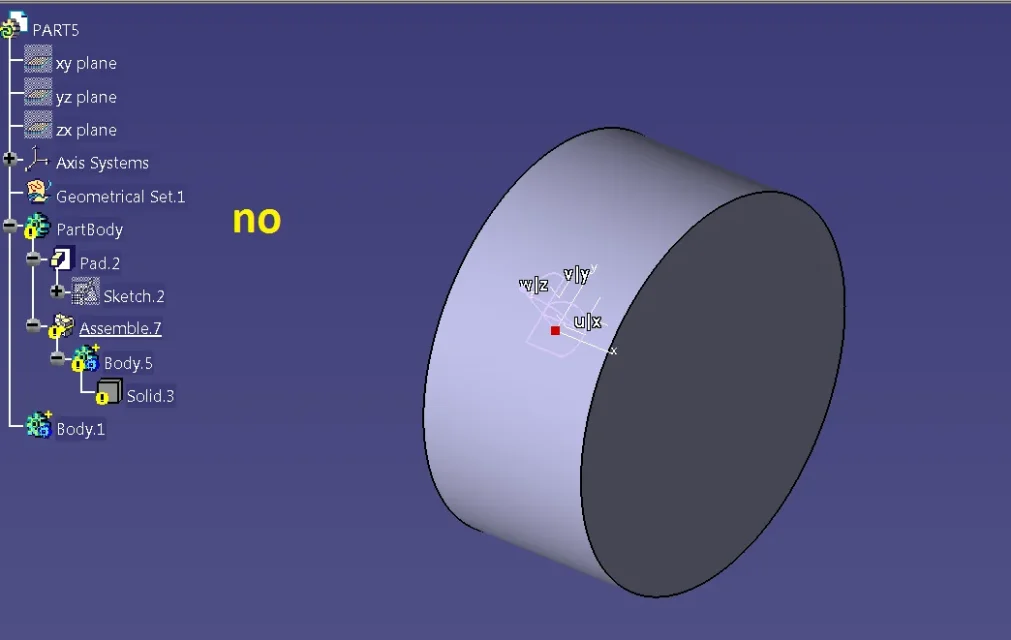
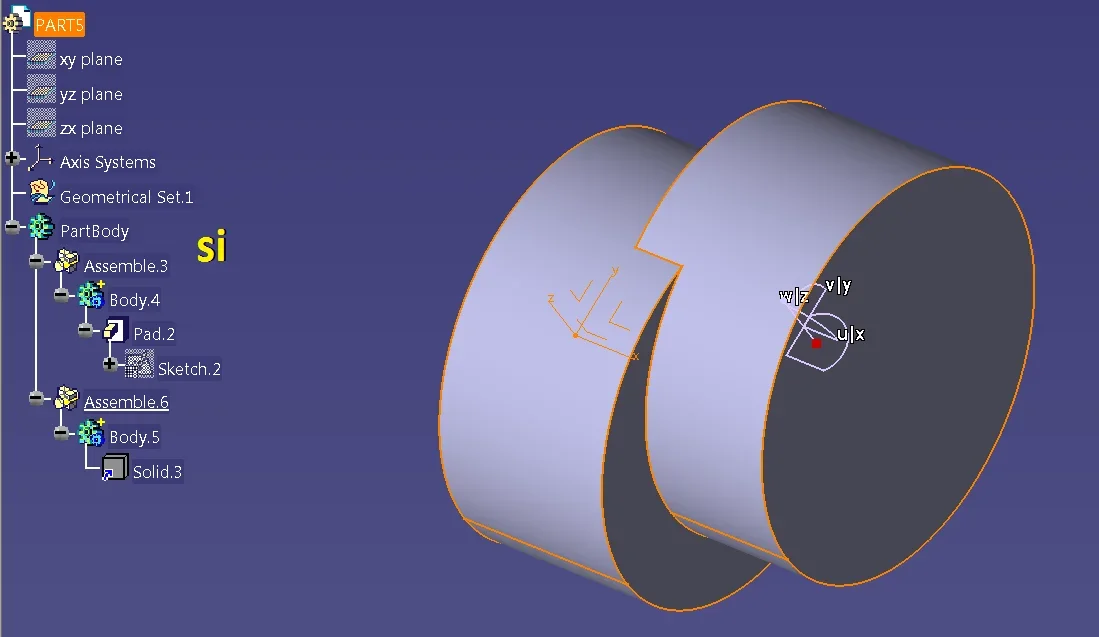
you are waxing to assemble a copy at a lower level than the copied object

see photos

in the curtain menu "insert" selection "aggingi un leotard" vacuum
buttondx on this, and in the curtain menu in the field "body object", select edit in "partbody".
At this point you can assemble all the body.

Hi.
 

Attachments

  • fotoaa.webp
    fotoaa.webp
    25.9 KB · Views: 4
  • fotoa.webp
    fotoa.webp
    36.1 KB · Views: 5
Last edited by a moderator:
So I should copy the individual body....I did so: since between the single body and the part body there is a connection, I simply disabled this link....I clicked with the right button on the solid and in the last solid object voice I clicked on disable....so doing I managed to assemble everything...is it right or could I have combined something catastrophic? ? :smile:
 
ok I did as you recommended me and it actually works great....I don't know how to thank you.. .:finger:
 

Forum statistics

Threads
44,997
Messages
339,767
Members
4
Latest member
ibt

Members online

No members online now.
Back
Top