
• This forum is the machine-generated translation of www.cad3d.it/forum1 - the Italian design community. Several terms are not translated correctly.

problem display rhino

Archideuf

Guest
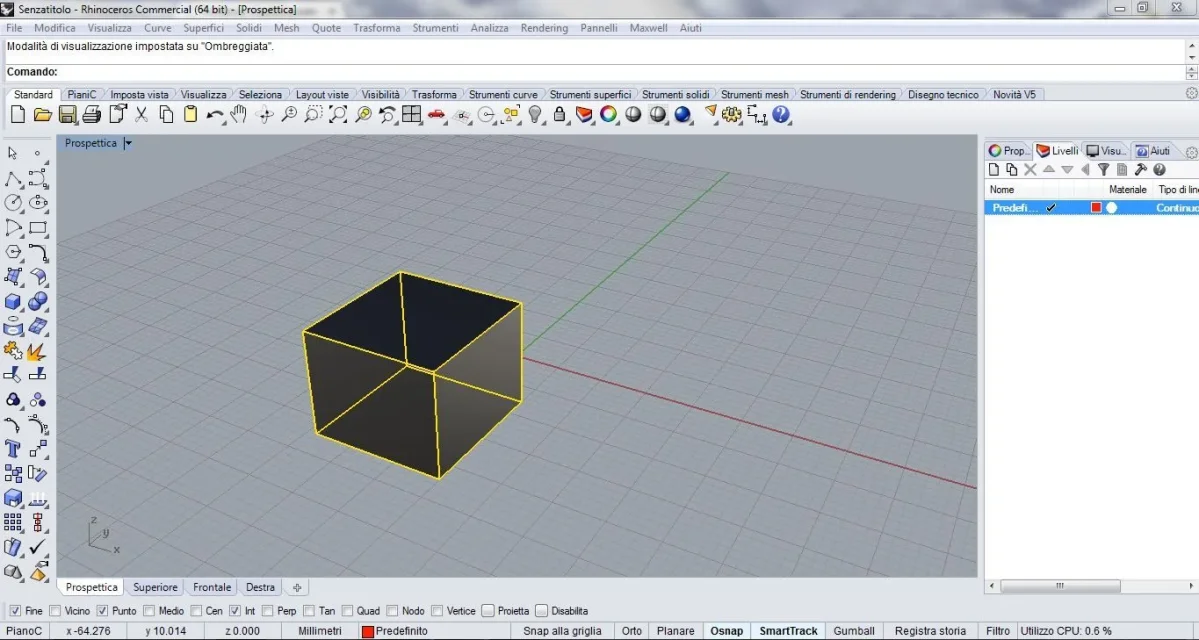
Ombreggiata.webpHello, everyone! I just joined the forum, I hope to be in the right place and you can help me. I just started using rhino 5 and I have a problem in some visualization. to make you understand, if I build a simple cube in 3d on a level to which I attribute the red color, I can see it of the correct color in the visualization "semitrasparente, but in the shaded view the solid still remains of a dark gray color, and the same thing happens in the visualization "rendered" even if I attribute a material. Can someone explain why and how to solve it? Thank you very much
 

Attachments

  • Semitrasparente.webp
    Semitrasparente.webp
    132.4 KB · Views: 7
Hi.
I did a lot of tests by activating the "visual" label and I have the same results as yours. Indeed, by activating randomly some of these voices, at some point objects, on the rendered view disappeared completely, while in others it was all normal. I can't explain why. I noticed, instead, in your images, that in the side window, under "livelli", while the square is red, the circle is still white: click it, attribute the color you want and thus will appear in the rendered view.
I hope you're useful.
 
Hi.
I did a lot of tests by activating the "visual" label and I have the same results as yours. Indeed, by activating randomly some of these voices, at some point objects, on the rendered view disappeared completely, while in others it was all normal. I can't explain why. I noticed, instead, in your images, that in the side window, under "livelli", while the square is red, the circle is still white: click it, attribute the color you want and thus will appear in the rendered view.
I hope you're useful.
Good morning, man.
the problem is solved by enabling in tools/options/options rhino/view/opengl "using hardware graphics acceleration modes".
This function enables the use of gpu hardware accelerator.
the object will be displayed as de be.

Good job
 

Attachments

  • Opzioni RHino.webp
    Opzioni RHino.webp
    45.9 KB · Views: 40
Hey, maybe I can help you.
go to the property of the object.f3 or menu-modification-ownership object. a side window should appear.
select the object.
in the side window select "material" in the drop-down menu, then select "base" and choose the color that will be displayed in your rendering. different from what you choose in different working levels.
I hope I understand the request.
Hi.
 

Forum statistics

Threads
44,997
Messages
339,767
Members
4
Latest member
ibt

Members online

No members online now.
Back
Top