• This forum is the machine-generated translation of www.cad3d.it/forum1 - the Italian design community. Several terms are not translated correctly.

problem in the assignment of coincidence bond between cylindrical faces in a set

  • Thread starter Thread starter lolloroma114
  • Start date Start date

lolloroma114

Guest
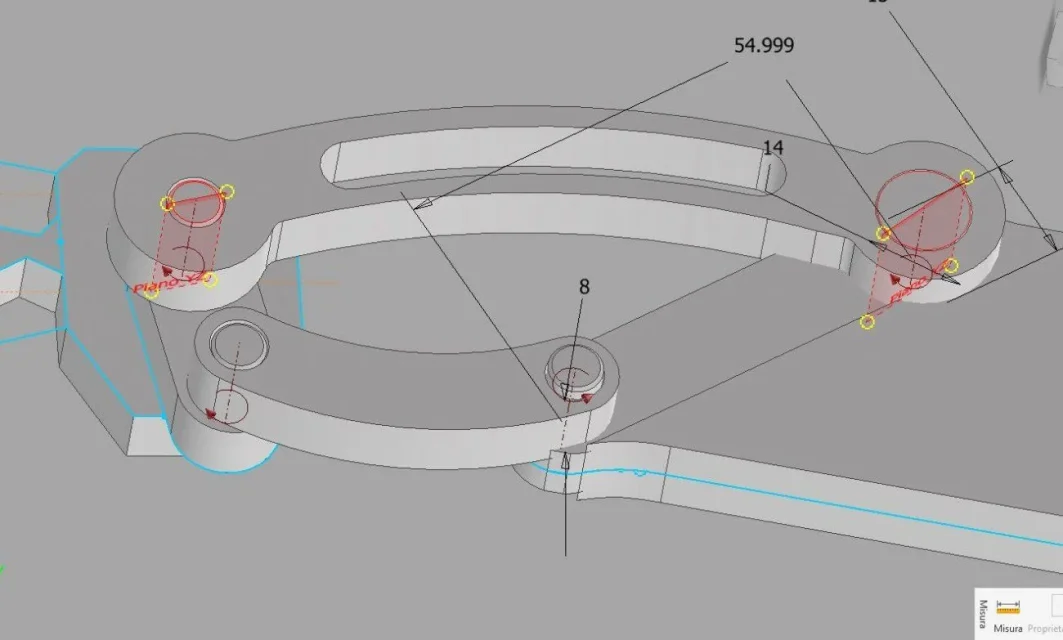
Hello everyone, they're at the first weapons with the software inventor, and I'm stuck at one point. I made a twin with two holes at the ends, and consequently two pins that must be placed in the holes. I first set the coincidence between the axes of cylindrical pins and cylindrical holes respectively. I then set the coincidence between the faces of the two components choosing the normal option agrees. while for the first hole I had no problems of any kind, for the second I can only set the coincidence between the axes, while when I try to set the coincidence between the faces I get a mistake: "the new relationship is in conflict with the existing relationships of the whole." Does anyone know what's going on? Thank you in advance! lolloroma114.webp
 
the answer could be: "There is something wrong ".
I'm sure you've already noticed.
without opening the original file it is impossible to give a sensible answer, we could start shooting guesses, we would lose time all without constructing any.
so, if you can, attach the file.
 
Hello everyone, they're at the first weapons with the software inventor, and I'm stuck at one point. I made a twin with two holes at the ends, and consequently two pins that must be placed in the holes. I first set the coincidence between the axes of cylindrical pins and cylindrical holes respectively. I then set the coincidence between the faces of the two components choosing the normal option agrees. while for the first hole I had no problems of any kind, for the second I can only set the coincidence between the axes, while when I try to set the coincidence between the faces I get a mistake: "the new relationship is in conflict with the existing relationships of the whole." Does anyone know what's going on? Thank you in advance!View attachment 60365
the answer could be: "There is something wrong ".
I'm sure you've already noticed.
without opening the original file it is impossible to give a sensible answer, we could start shooting guesses, we would lose time all without constructing any.
so, if you can, attach the file.
Okay, I didn't know you could attach the file. Can you tell me how to do it? because when I go to attachments it doesn't make me select .iam or .ipt files:unsure:
 
I practically have these .iam and .ipt files saved in a folder, if I click on "allegates" and open that folder, it doesn't display them simply. What is a rel? Sorry I am new both to this forum and to model cad
 
Okay I solved, sorry for the discomfort. the problem is on the point of contact between lower body and 2, I can't connect them because of the problem reported before. Thank you!
 

Attachments

select the folder and add to archive ( zip / rar etc)
Rel. = inventor release, 2019 / 2020 / 2021 ?
 
but this folder documents.zip to you allows you to view the files I shared? Anyway, my rel is 2021.
 
I don't understand what you think you do, the thicknesses aren't consistent, the contiguous faces can't match.Vincoli.webp
 
I know that the thicknesses are not consistent, that I will change later, what I wanted to do at the moment was simply to bind all four components. You say I can't do this until I make all the thickness match?
 
You say I can't do this until I make all the thickness match?
Of course, however the system is already fully bound, apart from the pins that are free to rotate.Vincoli2.webpremember that it is always better not to leave labile constraints, those pins better to block them.
This is a very simple set, when it becomes more complicated, uncertain constraints will become a source of difficulty in movements.
This is your situation:Vincoli3.webpshould be soVincoli4.webpsee that the rotation arrows on the two pins have disappearedVincoli5.webpno one does it, because it seems a waste of time, but it is the basis for having smooth and safe movements.
 
Thank you so much! However, I have now understood what you meant before about the thicknesses, it could not match :roflmao:. I didn't think about this thing about the pins, thanks to the tip! Good evening.
 

Forum statistics

Threads
44,997
Messages
339,767
Members
4
Latest member
ibt

Members online

No members online now.
Back
Top