
• This forum is the machine-generated translation of www.cad3d.it/forum1 - the Italian design community. Several terms are not translated correctly.

problem with control measures distance between the outside of two rounded superfis.

  • Thread starter Thread starter MORENO100
  • Start date Start date

MORENO100

Guest
Bye to all,
I would like to ask you for help, I would like to ask you that I am a self-taught, I have been working with proes for 12 years and I have never been able to use the "measure > distance" command to detect the external measurement between two rounded surfaces.
I make an example to explain better: I would like to measure external length of a very normal socket with the completely rounded ends.
I measure > distance > i select the two surfaces of the asola > the program detects the size between center and center, if I remove the spun from "use a half board" I get the same measure.

I trust that you may be of help, hoping that the problem should be resolved by my incompetence and not by the program, it would be a disappointment.
Thank you.
 
Hello Moorish!! :smile:
I think the software goes to detect the minimum distance between the two surfaces, so in this case it coincides with the intersection!
I believe that to measure the distance you need to use additional elements (type points or plans).
for a couple of years I used solidedge v18 and there for example, in the measurement phase you can activate the "key points", which are nothing but snap: in that case you will be able to get your measure.

In the end I think it's just a matter of habit, but it's not excluded that there is another way, that I don't know!!
 
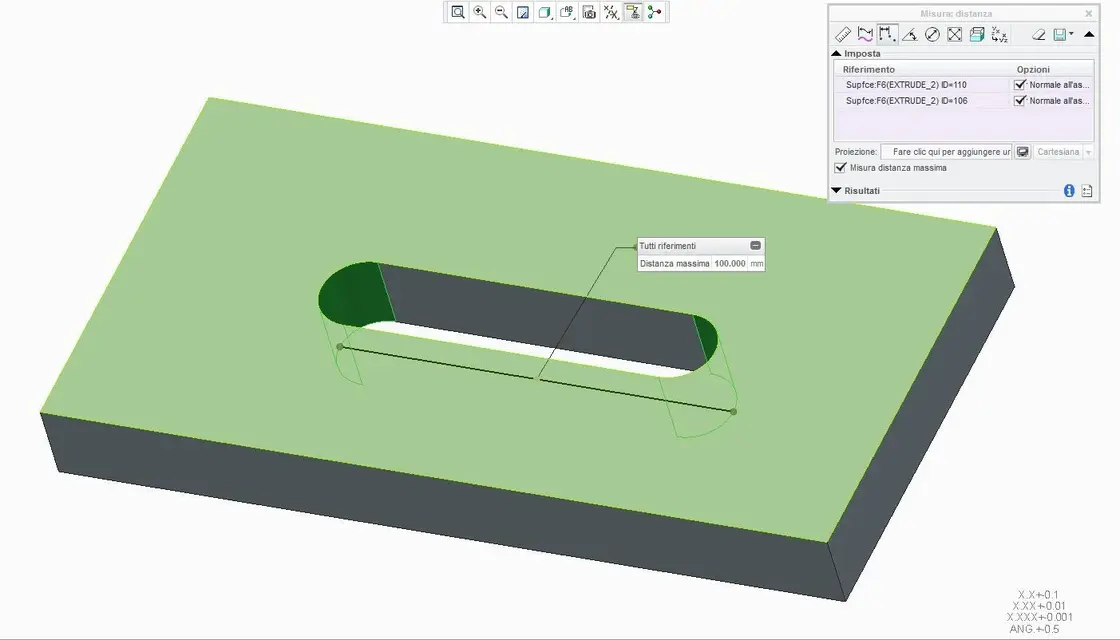
not unfortunately in the version you use was not present the distance "maximum", so you can not get it in the simple distance, a smallness that in I create have added as you will see from the image.
distanza.webpHowever, you can overcome this "mancancy" if you have built the mathematics by inserting in the asola a reference share for the maximum distance, or if it is a mathematics imported from the outside a curve where you went to measure the length.

greetings
 
Thank you so much for the answers, I was just a scruple that I wanted to take out for a long time. already know that they have added it in creo is encouraging.
Good work for everyone.
 
of nothing, you are also quiet, in creo they have greatly enhanced all the measurement part and above all improved the management of the same, if you see in the image they have consolidated all the commands in a single toolbar,many fewer clicks... :rolleyes:
greetings
 
Thank you so much for the answers, I was just a scruple that I wanted to take out for a long time. already know that they have added it in creo is encouraging.
Good work for everyone.
make a table and then put a quota! :biggrin:
 
Hello, everyone.
Since we're on the subject, I'd have a small request.
I use creo2 recently, but when it comes to measuring a distance I can not impose on it to use plans or axes.
I'll explain.
active the command measures, but when approaching the area begins to pre-select all edges. instead I would like it to select the surfaces (flats) without having to zoom every time to approach me.
Is there any option I miss?
Thank you.
 
make a table and then put a quota! :biggrin:
No need... Just as said add a share in the sketch, when you do dx change key automatically appears, without needing to measure anything.:smile:
Hello, everyone.
Since we're on the subject, I'd have a small request.
I use creo2 recently, but when it comes to measuring a distance I can not impose on it to use plans or axes.
I'll explain.
active the command measures, but when approaching the area begins to pre-select all edges. instead I would like it to select the surfaces (flats) without having to zoom every time to approach me.
Is there any option I miss?
Thank you.
use filters, find them on the bottom right, activate only the surfaces or references (the planes, axes, points, Ix,) are references.

greetings
 
thanks for the info.
the thing a little uncomfortable is that I have to check which filters to activate.
Maybe I try with a macro.
 
thanks for the info.
the thing a little uncomfortable is that I have to check which filters to activate.
Maybe I try with a macro.
Well, they're filters, otherwise you leave it smart, I don't understand what's so uncomfortable. .
However I do not recommend you to make a macro, because filters are contextual to the environment, so they change if you are on the table, together or in sheet metal.
 

Forum statistics

Threads
44,997
Messages
339,767
Members
4
Latest member
ibt

Members online

No members online now.
Back
Top