
Crikka
Guest
Hello everyone!
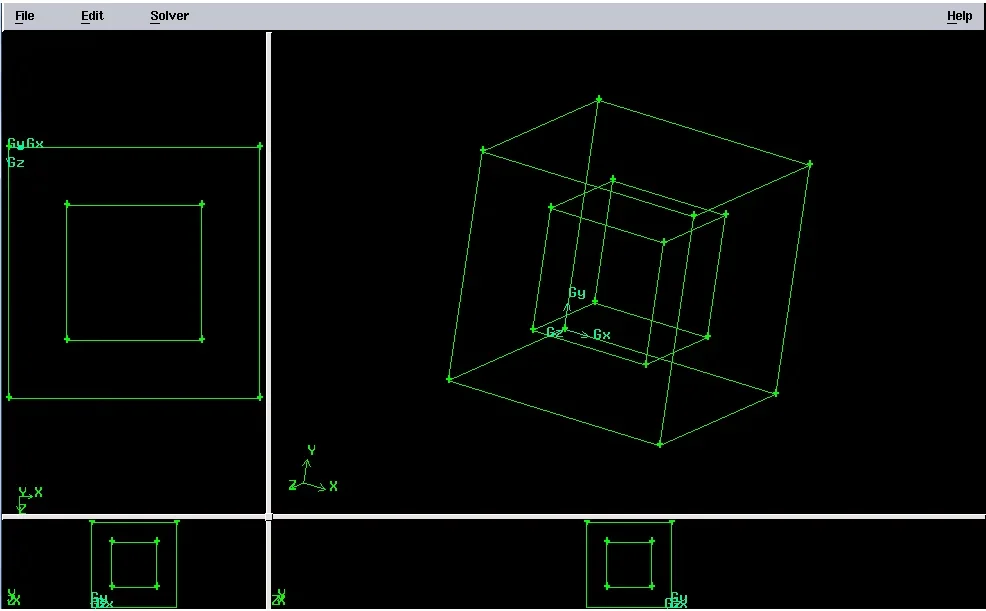
I'm doing a job for the thesis where I have to use gambit and fluent. I started creating the geometry of my model directly on gambit. I practically had to make a cube with a vacuum inside, made with a smaller cube. (this is an experimental block without openings).
The problem arises when I go to mesh. My professor wants me to make a mix using the cubes, so that the mesh is on a scale of 100000 cubes. I just think the professor missed some passage in the explanation. He told me to start meditating from the edges, then the surface and finally the volume. However, when I go to make the mesh of the volume using hex, the only type of mesh I can select is the stairstep, with others I can't because it tells me that I have a vacuum inside. the problem of this mesh is that I can't control, despite various size of the range, the number of items I get... I get or about 26000 cubes or 200000.
reading something here in the forum I thought maybe I jumped a few steps, for example the first mesh button is that related to the "boundary layer" that the professor didn't exactly explain to me, maybe I should start at first?
The thing I don't understand is this: he wants a homogeneous mix, and he wants me to create it from the edges. I have to tell you the truth... This is not very clear to me (and I apologize, and I am ashamed, because the minimum is very trivial...): What do you mean exactly when they say they're messing from edges? In the sense, does the edges mess have to affect the volume messuring at the end?
because, for example, I decide to split one side in 10 cm intervals, on the surface I go to create a mesh that resumes these intervals and then I go to create a reticle with squares of side 10cm. However, when I pass to the volume, it is put independently from the surface (at least, this happens to me with the type of hex--->stairstep mixing). How exactly does it work?
Since when I select the volume, automatically, as a type of mixing for this figure, gambit suggests to use tet/hybrid, then I tried to make mesh with the hex core type and already here I can better control the number of elements. The only thing is that I don't have a very homogeneous distribution near the void.
You know, I thought, as it's a cube, with another cube inside, the story was pretty simple... Instead, bo, I'm afraid I've missed some important steps and I can't figure out what's the best way to mesh in my case. as this program is really new to me and I'm learning to use it myself by seeing some tutorials, I can't understand if I just jumped some steps or made a mistake somewhere. and I definitely still have to understand this program well and how it works. . .
What do you suggest I do? what steps should I follow for a good mesh of my case?
I thank you very much and apologize in advance for my ignorance in this field (and for any trivial questions...).
below I posted the image of my model
I'm doing a job for the thesis where I have to use gambit and fluent. I started creating the geometry of my model directly on gambit. I practically had to make a cube with a vacuum inside, made with a smaller cube. (this is an experimental block without openings).
The problem arises when I go to mesh. My professor wants me to make a mix using the cubes, so that the mesh is on a scale of 100000 cubes. I just think the professor missed some passage in the explanation. He told me to start meditating from the edges, then the surface and finally the volume. However, when I go to make the mesh of the volume using hex, the only type of mesh I can select is the stairstep, with others I can't because it tells me that I have a vacuum inside. the problem of this mesh is that I can't control, despite various size of the range, the number of items I get... I get or about 26000 cubes or 200000.
reading something here in the forum I thought maybe I jumped a few steps, for example the first mesh button is that related to the "boundary layer" that the professor didn't exactly explain to me, maybe I should start at first?
The thing I don't understand is this: he wants a homogeneous mix, and he wants me to create it from the edges. I have to tell you the truth... This is not very clear to me (and I apologize, and I am ashamed, because the minimum is very trivial...): What do you mean exactly when they say they're messing from edges? In the sense, does the edges mess have to affect the volume messuring at the end?
because, for example, I decide to split one side in 10 cm intervals, on the surface I go to create a mesh that resumes these intervals and then I go to create a reticle with squares of side 10cm. However, when I pass to the volume, it is put independently from the surface (at least, this happens to me with the type of hex--->stairstep mixing). How exactly does it work?
Since when I select the volume, automatically, as a type of mixing for this figure, gambit suggests to use tet/hybrid, then I tried to make mesh with the hex core type and already here I can better control the number of elements. The only thing is that I don't have a very homogeneous distribution near the void.
You know, I thought, as it's a cube, with another cube inside, the story was pretty simple... Instead, bo, I'm afraid I've missed some important steps and I can't figure out what's the best way to mesh in my case. as this program is really new to me and I'm learning to use it myself by seeing some tutorials, I can't understand if I just jumped some steps or made a mistake somewhere. and I definitely still have to understand this program well and how it works. . .
What do you suggest I do? what steps should I follow for a good mesh of my case?
I thank you very much and apologize in advance for my ignorance in this field (and for any trivial questions...).
below I posted the image of my model