-Mc-
Guest
Hello, everyone!
solid works 2008 sp 3
I created a frame with structural member function; is a very articulated tube frame and now I brought the drawing to the table;
to identify the cutting length of the various tubes I want to use the automatic bubble method so those who read the drawing from the piece number can easily trace to the cutting size;
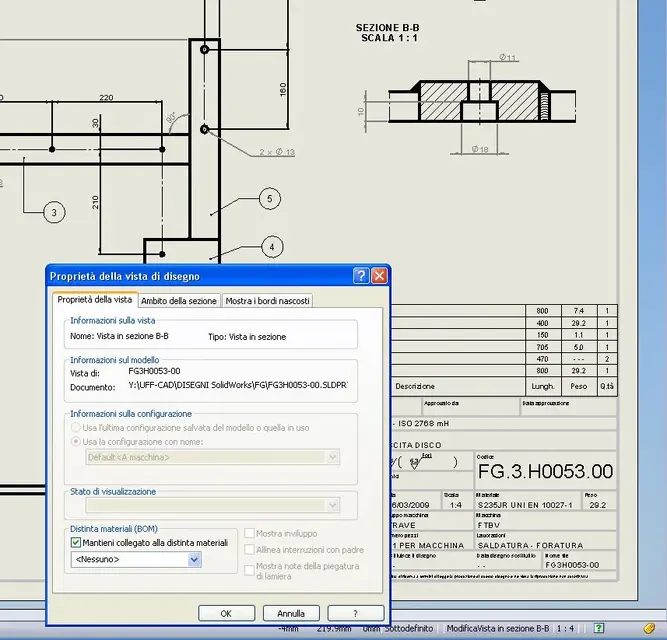
here arises the problem: I noticed that in the section views, going to manually bubble the tubes for clarity of the design and easy readability, solid works does not recognize the position of the various elements; continues to identify members with the number of bubble 1;
in the sections probably loses links to the tabellina of the various elements.
Is there a tick between the various options I haven't selected or is it just a sw kiss?
Thank you.
p.s. I searched in the forum but did not find answers.:frown:
solid works 2008 sp 3
I created a frame with structural member function; is a very articulated tube frame and now I brought the drawing to the table;
to identify the cutting length of the various tubes I want to use the automatic bubble method so those who read the drawing from the piece number can easily trace to the cutting size;
here arises the problem: I noticed that in the section views, going to manually bubble the tubes for clarity of the design and easy readability, solid works does not recognize the position of the various elements; continues to identify members with the number of bubble 1;
in the sections probably loses links to the tabellina of the various elements.
Is there a tick between the various options I haven't selected or is it just a sw kiss?
Thank you.
p.s. I searched in the forum but did not find answers.:frown: