• This forum is the machine-generated translation of www.cad3d.it/forum1 - the Italian design community. Several terms are not translated correctly.

problem with year

  • Thread starter Thread starter Lorenzo_t80
  • Start date Start date

Lorenzo_t80

Guest
Good evening.
In the office we are 3 people. we often work on multiple orders and at the beginning and end of day we synchronize the main folder through goodsync. often and willingly when we open axioms with screws, or in any case with other commercial pieces taken from the library, there are problems of connection and does not find commercial pieces, creating conflicts and unresolved references.
our engineer advised us to move the used library, in the main directory of our files so as to sync them too. Who can tell me how to do it? I know I have to change the settings of the project file by changing the folder, but I would like to have a confirmation and maybe clarification from someone. and another question is: changing the folder to all three computers, all files created before changing the folder, will they give me problems when opening?
thanks and good day to all.
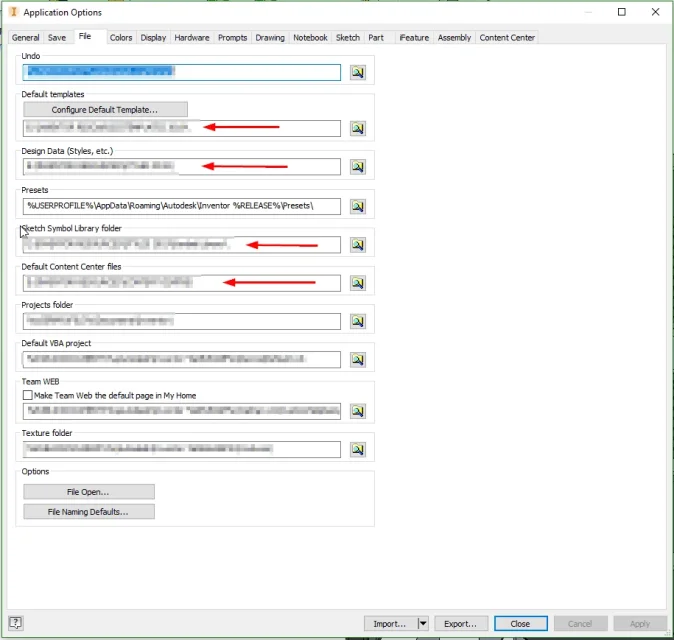
 
take a look at the screenshot:2019-06-27 09_58_50-Autodesk Inventor Professional 2019.webpthe red arrow indicates common folders on the server.

from this moment all files created by everyone will be accessible to everyone.

for old files:

find existing folders in all local pcs (I don't rich the path will be something like %userprofile%\documents\inventor\content center files )

select everything (for all pcs) and copy to the new folder on the server.
 
I have all the drawings in a x folder of the computer with many other folders inside. when synchronizing, we only synchronize the x folder. You tell me the red arrow indicates the common folders on the server. What do you mean?

You can politely explain to me how to change.
Image.webp
 
If I understand well you work locally. .
I don't understand much about corporate networks (other people here are more accurate) but I tell you what I know:
in all companies that I have worked files (your x folder) is leaned in a separate pc - server accessible by everyone. I believe that even one of your 3 pcs can act as a server if set correctly.
inside this folder x we created an inventor resources folder with sub-folders templates, styles and contentcentre.
 
If I understand well you work locally. .
I don't understand much about corporate networks (other people here are more accurate) but I tell you what I know:
in all companies that I have worked files (your x folder) is leaned in a separate pc - server accessible by everyone. I believe that even one of your 3 pcs can act as a server if set correctly.
inside this folder x we created an inventor resources folder with sub-folders templates, styles and contentcentre.
Sorry you don't have a server?
 
we have 3 pcs. we say one does as a server but it is not. pc1 synchronizes with pc2, pc1 synchronizes with pc3 and then again pc1 with pc2. I just want to know how to put all the screws, maybe in a folder of the main directory; then using the same folder within each pc and that at each change it is then synced.
 
we have 3 pcs. we say one does as a server but it is not. pc1 synchronizes with pc2, pc1 synchronizes with pc3 and then again pc1 with pc2. I just want to know how to put all the screws, maybe in a folder of the main directory; then using the same folder within each pc and that at each change it is then synced.
you have to create a shared folder in the "server" pc so that everyone goes to read files only from them and not that there are files on all pcs.
you have to make sure that pc1 is like a server for pc2 and pc3 where to fish cad files so that you do not need to synchronize.
other thing that will surely have happened to you will be to have overwritten a file that maybe was using another right?
 
if you have a server where you synchronize all the work because you do not use vault.
I think the basic version is free and even if a little limited.
 
you have to create a shared folder in the "server" pc so that everyone goes to read files only from them and not that there are files on all pcs.
you have to make sure that the pc1 is like a server for the pc2 and pc3 where to fish cad files so that it does not need to do any synchronization.
other thing that will surely have happened to you will be to have overwritten a file that maybe was using another right?
We prefer to have files on all pcs also for a matter of security and error margins in design. However, it does not happen to overwrite files because we work most of the time on different projects and jobs.
 
cito the promo post: "We often work on multiple orders and at the beginning and end of the day we synchronize the main folder through goodsync."
I quote the last post: "We work most of the time on different projects and jobs"
according to which of the two statements is the correct one can find the correct solution.
1) have a common folder for the whole field
2) copy (synchronize) library folder on 3 pcs each evening
3) if I open a file of a colleague and inventor I report that there are one or more standard components, I replace them from my pc and in this way I am also grabbing my library consistently with that of the colleague.
 

Forum statistics

Threads
44,997
Messages
339,767
Members
4
Latest member
ibt

Members online

No members online now.
Back
Top