• This forum is the machine-generated translation of www.cad3d.it/forum1 - the Italian design community. Several terms are not translated correctly.

problema con formato solid works.

  • Thread starter Thread starter Furnu87
  • Start date Start date

Furnu87

Guest
Good day to all.

I've been working on a set these days. so until yesterday no problem. this morning the surprise: I click on the file but this does not open to me. I know that in the "open" window does not give me preview. I try to open the drawing, it seems that I leave but then the following message comes out: "\name format of the directory and file.sldasm invalid. "

What can that be? but above all, how do I recover my work?
 
Isn't that you renamed the file and/or "hand" directories? You know it's not allowed if you want references to remain.
other hypothesis that always rename or move you have a file path so nested to exceed 255 characters.
try to put together and details perhaps in a catrella c:\temp or similar and verify that it opens.

then, whenever you want to rename and/or move a set (fonics, you do not learn the tricks to do it "hand", that decoy) uses taxally solidworks explorer or use the context menu (dx key) added to windows.

last (and more chilling) hypothesis, try to move/copy the file manually. if you still say "no valid name" or bad errors, maybe even other files that do not open that not soono of swx, last hope. rename the directories so that the name is as short as possible and if it still gives errors, it is dying the hdd.
 
I know I have to use solidworks explore and, except by mistake and without realizing it, I didn't rename the file. what I don't understand is because on the axieme file, in the properties you recognize it as a solidworks axieme file. but I don't read the preview.. .

I try to see how you say if putting them in another folder open but it seems strange anyway because until yesterday it opened me and anyway other files are also put in the same folder and having codename, they all have the same length.

for now I thank you oldwarper... Now I try to see.
 
I moved with explorer the two files (assieme and drawing) on the desktop. but still does not open them to me.
I've moved him handily, but nothing.

I'll have to do it again. . .
 
I moved with explorer the two files (assieme and drawing) on the desktop. but still does not open them to me.
I've moved him handily, but nothing.

I'll have to do it again. . .
desktop is the worst place to put it.
use a folder like c:\try or something like that.

test with solidworks explorer to select the design that gives problems and look if the properties' (species in the reference tab) are correct or there's something wrong. try to replace the reference to the axieme with another (maybe to another set) or the same together. Sometimes he might have corrupted himself.

do the same with the axieme and verify that the references to the drawing are correct. in case there are absurd characters in some field, unfortunately it is corrupt and unusable files.

p.s.: I see you use the terms "two files" for drawing and together... look that in addition to the axieme you have to move/copy all the components, otherwise it will be empty!
try to open, in the same session, first all the components, finally the assieme and at the end of all the design. In this way swx gives precedence to the already uploaded files instead of those in the path of references.
 
I moved with explorer the two files (assieme and drawing) on the desktop. but still does not open them to me.
I've moved him handily, but nothing.

I'll have to do it again. . .
If you only moved the set and the design by leaving the parts... It's normal.
 
I see now that it does not give me references. trying to make the pack and go has no detail that composes it. while I do it with another set, I create the list of details that make it.
 
Sorry, mike, I see your answer now.
as already written above, making pack and go does not make me move the parts. It's empty.
 
I see now that it does not give me references. trying to make the pack and go has no detail that composes it. while I do it with another set, I create the list of details that make it.
If you try to go to the directory where you saved the set and the components, what do you find?
1)only the .sldasm file
2) both the .sldasm file that .slddrw
3)only .sldprt files
4)only the .slddrw file
5)no file
 
I see both the file of the axieme (the icon displays it to me and in the properties tells me that it is a joint sw file) and the drawing.
the parts are in another folder because we split the parts from the assist. but I don't think that's because otherwise you wouldn't open any files.
 
try to start slwks, from file/open, try to open the set, but first
below go to references and see if you can give him the
the addresses of missing components... I'm so sure you've made a pastry...:biggrin:

Help yourself in searching for components, maybe looking for them by date of creation and modification, at least you will have an almost reliable list of the pieces you are looking for.
I hope it's a set with "little" pieces... :smile:
 
I did not understand on bass where but... I opted for the easy way.
Fortunately I had already created the table dxf and I am using that as a reference and reminder to remake the whole set.

Thank you very much for the time and answers you have dedicated to me.

Thank you, I wish you a good afternoon.

enrico
 
I did not understand on bass where but... I opted for the easy way.
Fortunately I had already created the table dxf and I am using that as a reference and reminder to remake the whole set.

Thank you very much for the time and answers you have dedicated to me.

Thank you, I wish you a good afternoon.

enrico
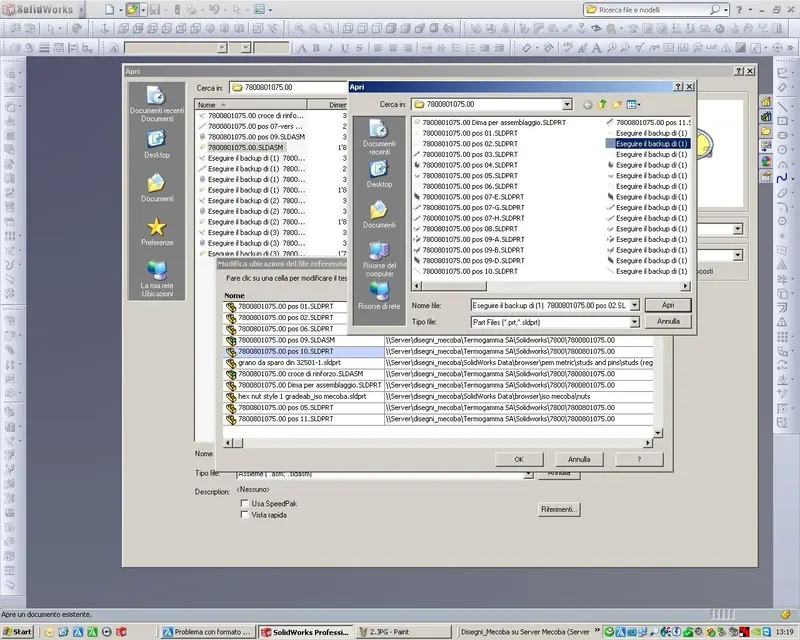
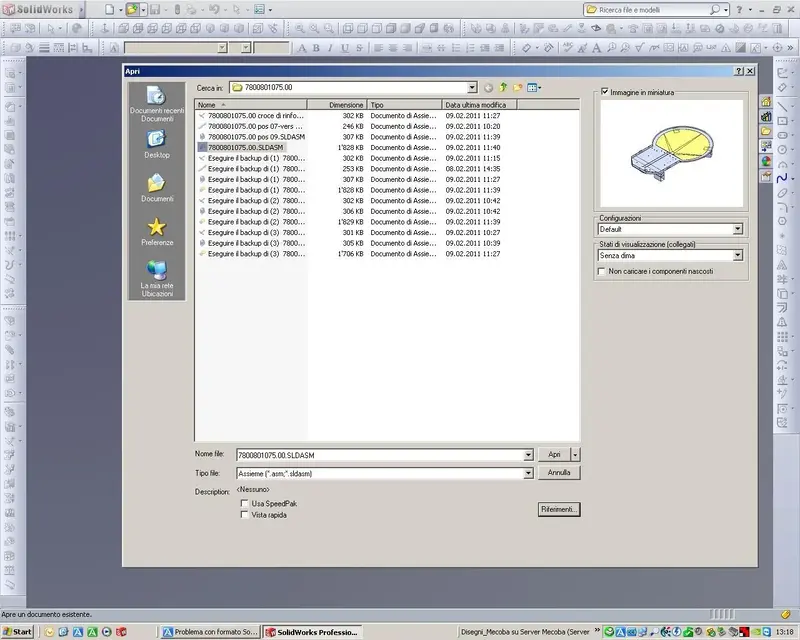
if I can give you advice, enable backup copies (see image), I keep
3 copies of all files saved during the day, then, in the evening, copies are deleted from a batch file so as not to weigh the database.
below also the steps for opening with references.
 

Attachments

  • 1.webp
    1.webp
    115.7 KB · Views: 10
  • 2.webp
    2.webp
    179.1 KB · Views: 9
  • 3.webp
    3.webp
    183.7 KB · Views: 6
  • 4.webp
    4.webp
    86.6 KB · Views: 8
thank you mike1967: now I can't look at it because I have to deliver the job as soon as possible. However I will give us an eye.

Thanks again
 

Forum statistics

Threads
44,997
Messages
339,767
Members
4
Latest member
ibt

Members online

No members online now.
Back
Top