Baso95
Guest
Hello, everyone. This is my first discussion on the forum.
I am an aerospace engineering student and in this semester I am carrying out my three-year thesis on the buckling of cylinders in composite material with the use of fem analysis (patran and nastran). I chose to do this kind of thesis especially to learn how to use a software on structural analysis with 'help of my professor if it wasn't that he didn't give me much of his time and so I had to satisfy the various problems that came to me alone.
the purpose of the thesis is precisely to verify the shock of the real data from the ideal ones in calculating the buckling factor. real data were taken with a wrinkle meter in the lab and then put into excel format.
I am using the student edition 2014 of patran but at the end of the accounts when I send buckling analysis does not work. .I don't want it to be my mistake so I quickly list the following steps in modeling:
data:
cylinder h=80 mm average=126.4 t=1,2 mm
material t800 (orthrope) and11=164 gpa e22=6.81 gpa g12=4.37 gpa poisson=0.33
layers of ply to put: 0.12
Constraints: Test 1) Incaster
test 2) support
to reproduce a compression force distributed on the cylinder use an mpc function with rbe2, the function requires an independent node (not belonging to the mesh) and other dependent nodes lying on the cylinder (imposing all dof's).
solution type: buckling with a self-value
proceeding on patran:
geometry: create-->curve-->lynebyxyz--> vector <0 0 80> origin [63.2 0 0] *This to make the line that will then be revolutionized on the z axis
create-->surface-- >revolve-- > put 360 degrees
property: created--> orthotropic 2d--> the name of impt properties material--> imitation data as 164e9 6.81e9 4.37e9 0.33
create-->composite--> * opens composite laminated-- as in figure and save as composite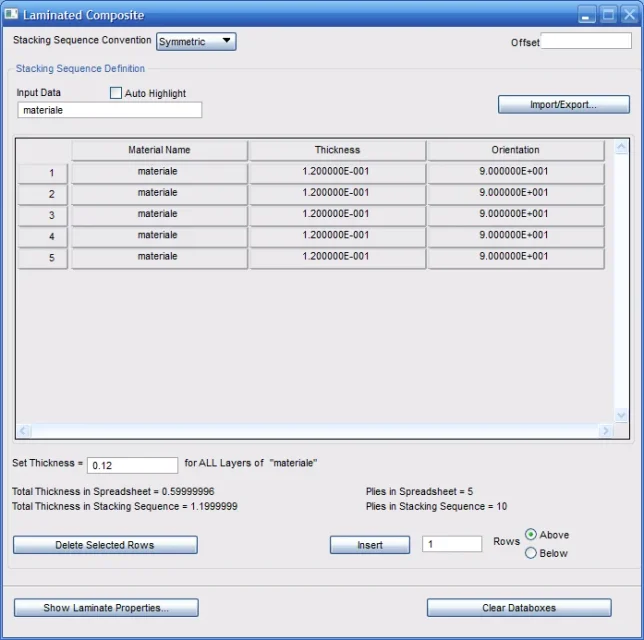 element properties-->create-->2d-->shell-->I call it mat_prop and insert properties as in figure
  Now doubt: I don't know if to insert the mesh first and put the constraints on it or do it on geometry.
mesh: create-->object:mesh--> select surface-->*mi automatically calculates a global edge lenght 26 but I change it in 4
equivalence--> *to elect 21 knots on the curve created with lynebyxyz
loads: displacement-->input data--> everywhere <0 0> select application region--> fem *selections the nodes, add and apply
mesh: mpc-->*creo independent node at coordinates 0 0 80 with arccenter
create--> mpc-->rbe2--> take n employees and the only independent node
force: I create the coordinate force 0 -1 to be applied in the node first created
should be finished
now I begin the analysis
analysis--e.g. model-->full run-->solution type--> buckling--> apply
a message: but it does not create any .xdb files
I am not practical of the software and it is very likely that the process is wrong.
So I ask you two things:
1) is the procedure correct? if you can improve it?
2) in the real study instead how can I import the profile function and then make a mesh?
Thank you very much and good Sunday:
I am an aerospace engineering student and in this semester I am carrying out my three-year thesis on the buckling of cylinders in composite material with the use of fem analysis (patran and nastran). I chose to do this kind of thesis especially to learn how to use a software on structural analysis with 'help of my professor if it wasn't that he didn't give me much of his time and so I had to satisfy the various problems that came to me alone.
the purpose of the thesis is precisely to verify the shock of the real data from the ideal ones in calculating the buckling factor. real data were taken with a wrinkle meter in the lab and then put into excel format.
I am using the student edition 2014 of patran but at the end of the accounts when I send buckling analysis does not work. .I don't want it to be my mistake so I quickly list the following steps in modeling:
data:
cylinder h=80 mm average=126.4 t=1,2 mm
material t800 (orthrope) and11=164 gpa e22=6.81 gpa g12=4.37 gpa poisson=0.33
layers of ply to put: 0.12
Constraints: Test 1) Incaster
test 2) support
to reproduce a compression force distributed on the cylinder use an mpc function with rbe2, the function requires an independent node (not belonging to the mesh) and other dependent nodes lying on the cylinder (imposing all dof's).
solution type: buckling with a self-value
proceeding on patran:
geometry: create-->curve-->lynebyxyz--> vector <0 0 80> origin [63.2 0 0] *This to make the line that will then be revolutionized on the z axis
create-->surface-- >revolve-- > put 360 degrees
property: created--> orthotropic 2d--> the name of impt properties material--> imitation data as 164e9 6.81e9 4.37e9 0.33
create-->composite--> * opens composite laminated-- as in figure and save as composite
element properties-->create-->2d-->shell-->I call it mat_prop and insert properties as in figure Now doubt: I don't know if to insert the mesh first and put the constraints on it or do it on geometry.mesh: create-->object:mesh--> select surface-->*mi automatically calculates a global edge lenght 26 but I change it in 4
equivalence--> *to elect 21 knots on the curve created with lynebyxyz
loads: displacement-->input data--> everywhere <0 0> select application region--> fem *selections the nodes, add and apply
mesh: mpc-->*creo independent node at coordinates 0 0 80 with arccenter
create--> mpc-->rbe2--> take n employees and the only independent node
force: I create the coordinate force 0 -1 to be applied in the node first created
should be finished
now I begin the analysis
analysis--e.g. model-->full run-->solution type--> buckling--> apply
a message:
but it does not create any .xdb filesI am not practical of the software and it is very likely that the process is wrong.
So I ask you two things:
1) is the procedure correct? if you can improve it?
2) in the real study instead how can I import the profile function and then make a mesh?
Thank you very much and good Sunday: